← Reports

Ransomware · Ransomworm · Worm

WannaCry - invoice_greenanimals.pdf.exe

Author
Moise Medici
Updated
15 Feb 2026 · Completed
Difficulty
Medium
Platform
Windows
Family
WannaCryptor
Languages
C++
MITRE
T1047 (Windows Management Instrumentation) T1059.003 (Command and Scripting Interpreter: Windows Command Shell) T1059.005 (Command and Scripting Interpreter: Visual Basic) T1569.002 (System Services: Service Execution) T1543.003 (Create or Modify System Process: Windows Service) T1547.001 (Boot or Logon Autostart Execution: Registry Run Keys / Startup Folder) T1027.007 (Obfuscated Files or Information: Dynamic API Resolution) T1027.009 (Obfuscated Files or Information: Embedded Payloads) T1027.013 (Obfuscated Files or Information: Encrypted/Encoded File) T1036.004 (Masquerading: Masquerade Task or Service) T1036.005 (Masquerading: Match Legitimate Resource Name or Location) T1036.007 (Masquerading: Double File Extension) T1070.004 (Indicator Removal: File Deletion) T1140 (Deobfuscate/Decode Files or Information) T1480 (Execution Guardrails) T1564.001 (Hide Artifacts: Hidden Files and Directories) T1620 (Reflective Code Loading) T1222.001 (File and Directory Permissions Modification: Windows Permissions) T1016 (System Network Configuration Discovery) T1033 (System Owner/User Discovery) T1046 (Network Service Discovery) T1083 (File and Directory Discovery) T1680 (Local Storage Discovery) T1210 (Exploitation of Remote Services) T1570 (Lateral Tool Transfer) T1486 (Data Encrypted for Impact) T1490 (Inhibit System Recovery) T1491.001 (Defacement: Internal Defacement)

Question 5

Starting from the service: in Windows, services are just registry keys, so their details appear clearly in Regshot:

HKLM\SYSTEM\ControlSet001\Services\mssecsvc2.0\Type: 0x00000010
HKLM\SYSTEM\ControlSet001\Services\mssecsvc2.0\Start: 0x00000002
HKLM\SYSTEM\ControlSet001\Services\mssecsvc2.0\ErrorControl: 0x00000001
HKLM\SYSTEM\ControlSet001\Services\mssecsvc2.0\ImagePath: "C:\Users\REM\Desktop\invoice_greenanimals.pdf.exe -m security"
HKLM\SYSTEM\ControlSet001\Services\mssecsvc2.0\DisplayName: "Microsoft Security Center (2.0) Service"
HKLM\SYSTEM\ControlSet001\Services\mssecsvc2.0\WOW64: 0x0000014C
HKLM\SYSTEM\ControlSet001\Services\mssecsvc2.0\ObjectName: "LocalSystem"
HKLM\SYSTEM\ControlSet001\Services\mssecsvc2.0\FailureActions: 00 00 00 00 01 00 00 00 01 00 00 00 01 00 00 00 14 00 00 00 01 00 00 00 60 EA 00 00
HKLM\SYSTEM\ControlSet001\Services\pafhcsxxsfdrw600\Type: 0x00000010
HKLM\SYSTEM\ControlSet001\Services\pafhcsxxsfdrw600\Start: 0x00000002
HKLM\SYSTEM\ControlSet001\Services\pafhcsxxsfdrw600\ErrorControl: 0x00000001
HKLM\SYSTEM\ControlSet001\Services\pafhcsxxsfdrw600\ImagePath: "cmd.exe /c "C:\ProgramData\pafhcsxxsfdrw600\tasksche.exe""
HKLM\SYSTEM\ControlSet001\Services\pafhcsxxsfdrw600\DisplayName: "pafhcsxxsfdrw600"
HKLM\SYSTEM\ControlSet001\Services\pafhcsxxsfdrw600\WOW64: 0x0000014C
HKLM\SYSTEM\ControlSet001\Services\pafhcsxxsfdrw600\ObjectName: "LocalSystem"

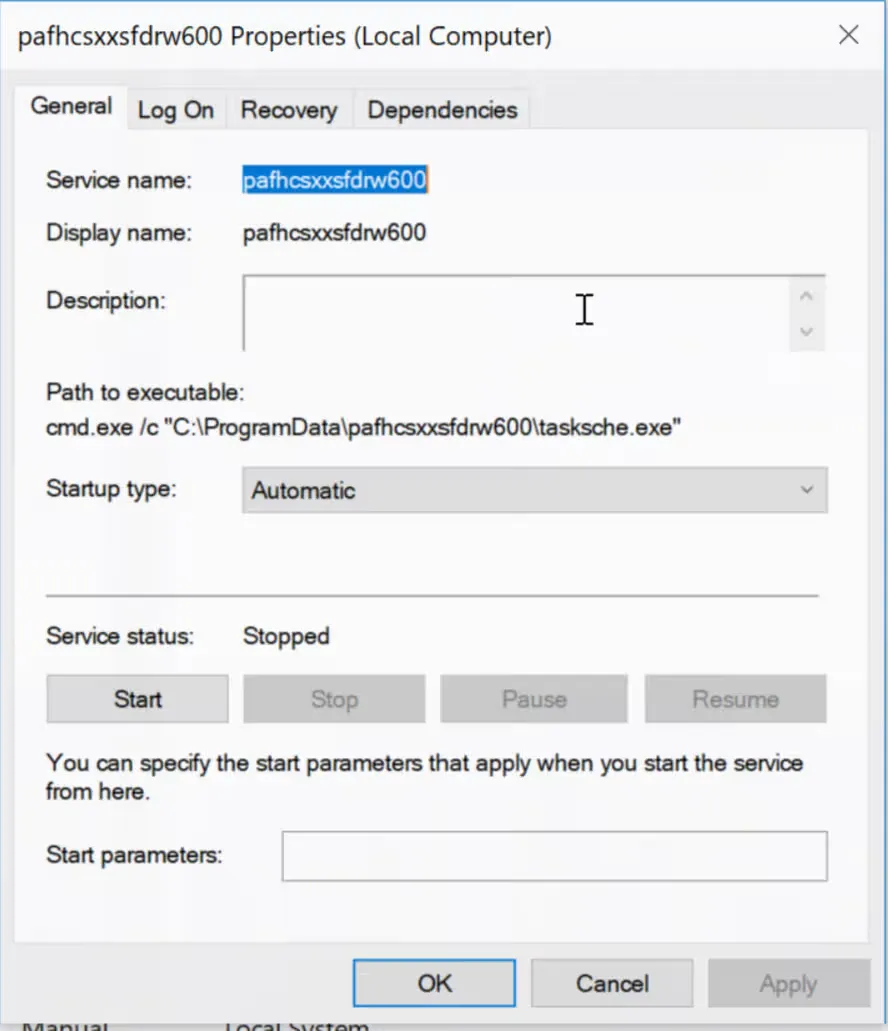
The services Microsoft Security Center (2.0) Service and pafhcsxxsfdrw600 are created, respectively executing the sample with parameter -m security and a new file C:\ProgramData\pafhcsxxsfdrw600\tasksche.exe.
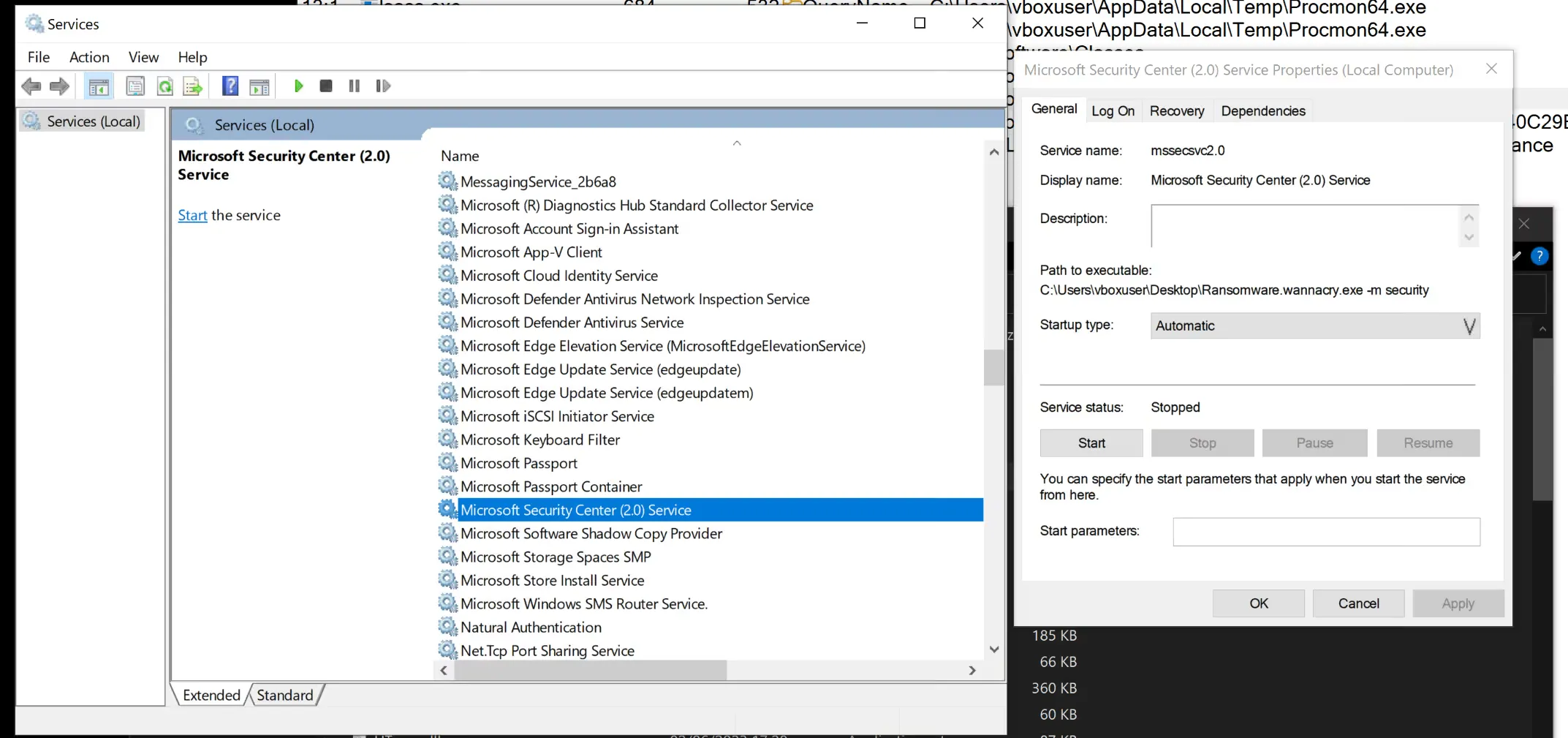
The Microsoft Security Center (2.0) Service, service name mssecsvc2.0, whose executable is the sample run with -m security.
Fig. 8: The Microsoft Security Center (2.0) Service, service name mssecsvc2.0, whose executable is the sample run with -m security.
The pafhcsxxsfdrw600 service, which runs cmd.exe /c C:\ProgramData\pafhcsxxsfdrw600\tasksche.exe automatically at startup.
Fig. 9: The pafhcsxxsfdrw600 service, which runs cmd.exe /c C:\ProgramData\pafhcsxxsfdrw600\tasksche.exe automatically at startup.