Ransomware · Ransomworm · Worm
WannaCry - invoice_greenanimals.pdf.exe
- Author
- Moise Medici
- Updated
- 15 Feb 2026 · Completed
- Difficulty
- Medium
- Platform
- Family
- Languages
- MITRE
SMB Network Analysis
The purpose of the website is to not use the internet to find answers for the analysis, and just go with the knowledge that can be understood from the malware. However, since the sample used an unpatched version of SMB that was fixed in Windows 7, which triggers one aspect of the sample that was of particular interest, a Windows 7 VM was installed, file sharing and network discovery (SMB) were enabled and the Windows 10 machine in the same network of the Windows 7 machine was infected, just to take a look at the SMB traffic. The PCAP can be downloaded from the “Sample Download” zip linked at the top of the page.
In the capture, the network is:
192.168.56.1is the default gateway and DNS;192.168.56.2is the Windows 10 host, from where the infection starts;192.168.56.4is the REMnux machine, it is present in the capture, but has no role here;192.168.56.5is the Windows 7 host.
The way the exploit used by WannaCry, Eternalblue, works is explained very well in 43:
Primarily, SMB (Server Message Block) is a protocol used to request file and print services from server systems over a network. Among the protocol’s specifications are structures that allow the protocol to communicate information about a file’s extended attributes, essentially metadata about the file’s properties on the file system.
Eternalblue takes advantage of three different bugs. The first is a mathematical error when the protocol tries to cast an OS/2 FileExtended Attribute (FEA) list structure to an NT FEA structure in order to determine how much memory to allocate. A miscalculation creates an integer overflow that causes less memory to be allocated than expected, which in turns leads to a buffer overflow. With more data than expected being written, the extra data can overflow into adjacent memory space.
Triggering the buffer overflow is achieved thanks to the second bug, which results from a difference in the SMB protocol’s definition of two related sub commands: SMB_COM_TRANSACTION2 and SMB_COM_NT_TRANSACT. Both have a _SECONDARY command that is used when there is too much data to include in a single packet. The crucial difference between TRANSACTION2 and NT_TRANSACT is that the latter calls for a data packet twice the size of the former. This is significant because an error in validation occurs if the client sends a crafted message using the NT_TRANSACT sub-command immediately before the TRANSACTION2 one. While the protocol recognizes that two separate sub-commands have been received, it assigns the type and size of both packets (and allocates memory accordingly) based only on the type of the last one received. Since the last one is smaller, the first packet will occupy more space than it is allocated.
From this it can be understood that the two commands SMB_COM_TRANSACTION2 and SMB_COM_NT_TRANSACT can be searched for in the capture. Looking at the Microsoft documentation 44 the codes for the commands are: 0x32 and 0xA1 respectively. Also the _SECONDARY opcodes are +1 of the base command. A filter can then be applied in Wireshark:
smb.cmd == 0x32 || smb.cmd == 0x33 || smb.cmd == 0xA0 || smb.cmd == 0xA1to see if any traffic has been registered to perform those commands. There are a lot of occurrences, and to distinguish them easily the first one is opened; in the packet viewer at the bottom SMB → SMB Header is expanded and, with a right click on SMB Command, “Apply as Column” is selected. This way there is an extra column that shows the SMB commands executed, as shown in the screenshot:
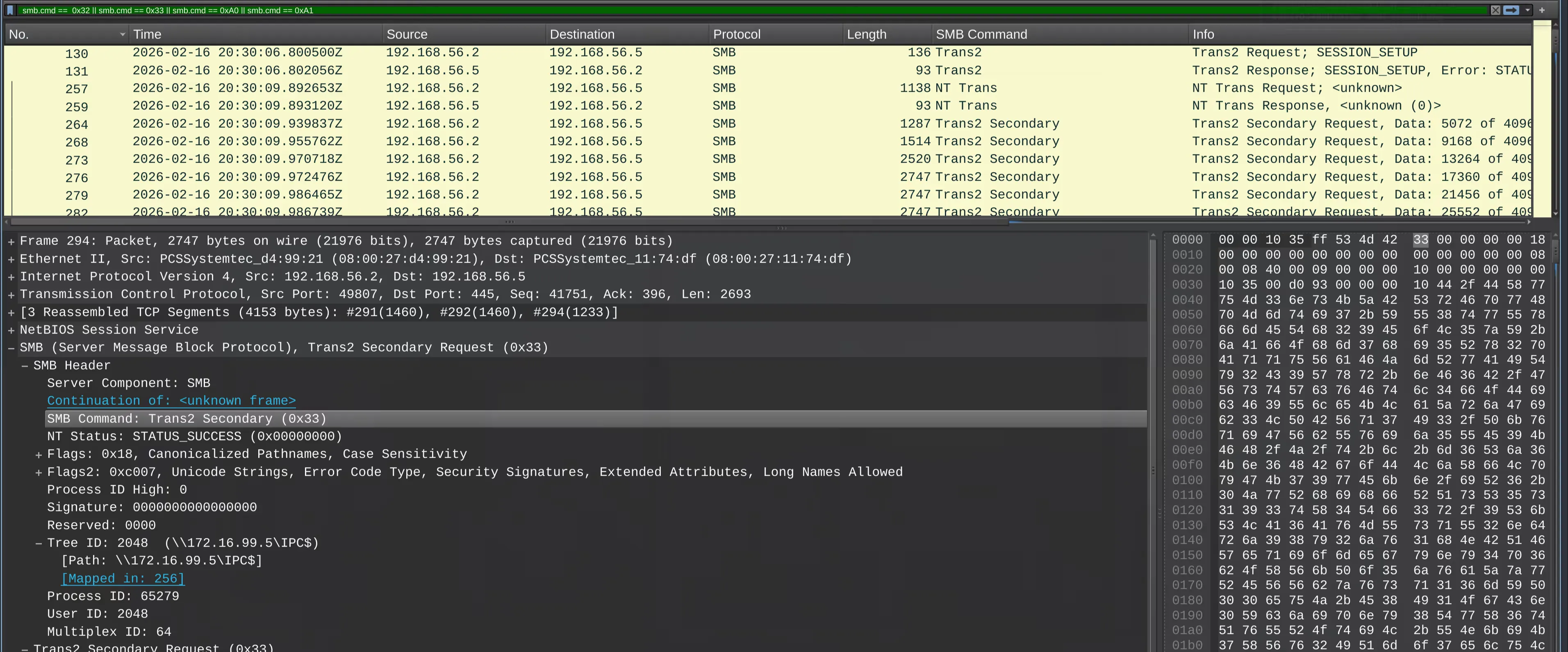
Note that as described in the article, the NT_TRANSACT is executed at 20:30:09.89 (packet 257) and the first TRANSACTION2_SECONDARY at 20:30:09.93 (packet 264), so it matches their statement. The next packets are showing data being transferred which is likely going to be the exe.