Ransomware · Ransomworm · Worm
WannaCry - invoice_greenanimals.pdf.exe
- Author
- Moise Medici
- Updated
- 15 Feb 2026 · Completed
- Difficulty
- Medium
- Platform
- Family
- Languages
- MITRE
Question 12
One idea at this stage is to run the sample in x32dbg until tasksche.exe is written to disk. Looking at resource_extraction_c_windows, the resource is loaded and then the file is written. The DAT_xxxxx variables have been renamed into PTR_<ApiCall> based on the syscall that created them. For example, the CreateProcessA string is pushed on the stack, GetProcAddress is called, and the resulting pointer, saved in EAX, is moved to a variable that is then renamed PTR_CreateProcess.
00407d07 PUSH s_CreateProcessA_004313a4 ; LPCSTR lpProcName for GetProcAddress00407d0c PUSH ESI ; HMODULE hModule for GetProcAddress00407d0d CALL EDI=>KERNEL32.DLL::GetProcAddress00407d0f PUSH s_CreateFileA_00431398 ; LPCSTR lpProcName for GetProcAddress00407d14 PUSH ESI ; HMODULE hModule for GetProcAddress00407d15 MOV [PTR_CreateProcess], EAX ; = 00000000The full list of CALLs in the function is:
00407cef CALL dword ptr [->KERNEL32.DLL::GetModuleHandleW] ; = 0000a5d800407d0d CALL EDI=>KERNEL32.DLL::GetProcAddress00407d1a CALL EDI=>KERNEL32.DLL::GetProcAddress00407d27 CALL EDI=>KERNEL32.DLL::GetProcAddress00407d34 CALL EDI=>KERNEL32.DLL::GetProcAddress00407d74 CALL dword ptr [->KERNEL32.DLL::FindResourceA] ; = 0000a5b600407d86 CALL dword ptr [->KERNEL32.DLL::LoadResource] ; = 0000a5a600407d95 CALL dword ptr [->KERNEL32.DLL::LockResource] ; = 0000a59600407da9 CALL dword ptr [->KERNEL32.DLL::SizeofResource] ; = 0000a58400407e01 CALL ESI=>MSVCRT.DLL::sprintf00407e18 CALL ESI=>MSVCRT.DLL::sprintf00407e2c CALL dword ptr [->KERNEL32.DLL::MoveFileExA] ; = 0000a57600407e43 CALL dword ptr [PTR_CreateFile] ; = 0000000000407e61 CALL dword ptr [PTR_WriteFile] ; = 0000000000407e68 CALL dword ptr [PTR_CloseHandle] ; = 0000000000407ee8 CALL dword ptr [PTR_CreateProcess] ; = 0000000000407ef7 CALL dword ptr [PTR_CloseHandle] ; = 0000000000407f02 CALL dword ptr [PTR_CloseHandle] ; = 00000000So the MoveFileExA is the same code that has been discussed in question 7. The interesting part now is what happens before and after. Before that, the code follows a common pattern to extract resources from within the sample (see the Learn section Load Resources).
After MoveFileExA, a file is created and a process executed. The assumption is that the process execution will be a simple run of the new file. The key questions here are: is the file really the resource, and if so, can it be seen how it gets decrypted? Previously, attempts to unzip the dump from pestudio prompted for a password.
The steps taken are:
- open the sample in x32dbg
- set a breakpoint at
WriteFile(bpx WriteFile) RunRun till return- run step by step until the end of the first
CloseHandle, at instruction00407E6E.
At that point, the file in C:\Windows has been written and still requires a password to be extracted. Stepping further down in the code, a potential command line being created can be seen:
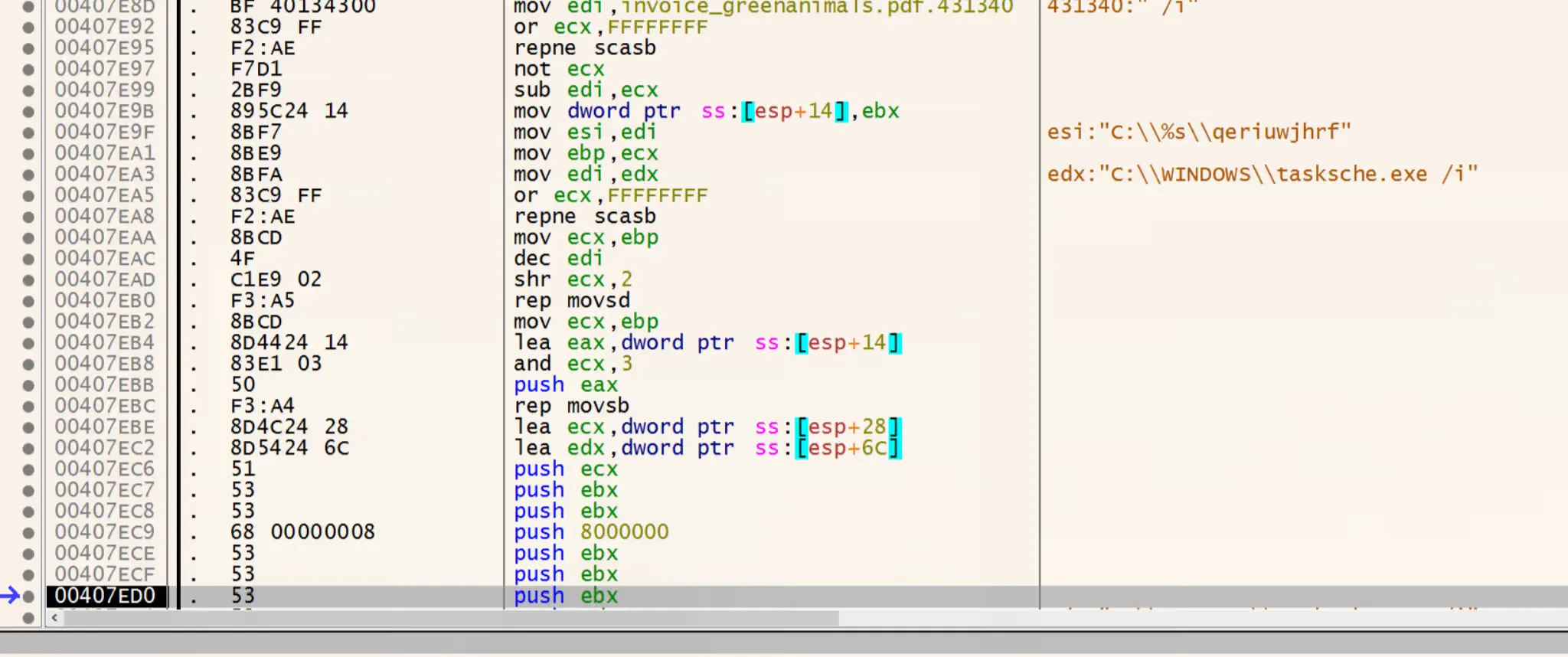
Note the /i after the name in EDX.
Once the call to CreateProcess 13 is reached, the lpCommandLine parameter is set to only C:\Windows\tasksche.exe /i. Given the following signature:
BOOL CreateProcessA( [in, optional] LPCSTR lpApplicationName, [in, out, optional] LPSTR lpCommandLine, [in, optional] LPSECURITY_ATTRIBUTES lpProcessAttributes, [in, optional] LPSECURITY_ATTRIBUTES lpThreadAttributes, [in] BOOL bInheritHandles, [in] DWORD dwCreationFlags, [in, optional] LPVOID lpEnvironment, [in, optional] LPCSTR lpCurrentDirectory, [in] LPSTARTUPINFOA lpStartupInfo, [out] LPPROCESS_INFORMATION lpProcessInformation);in x32dbg the second parameter closest to the call is the one assigned from EDX.
This reveals a mistake in the earlier assumption that the file was only a password-protected zip file. Dropping the file into pestudio shows that it is not just a zip; it also contains a new resource:

This time the resource is indeed a password-protected archive.
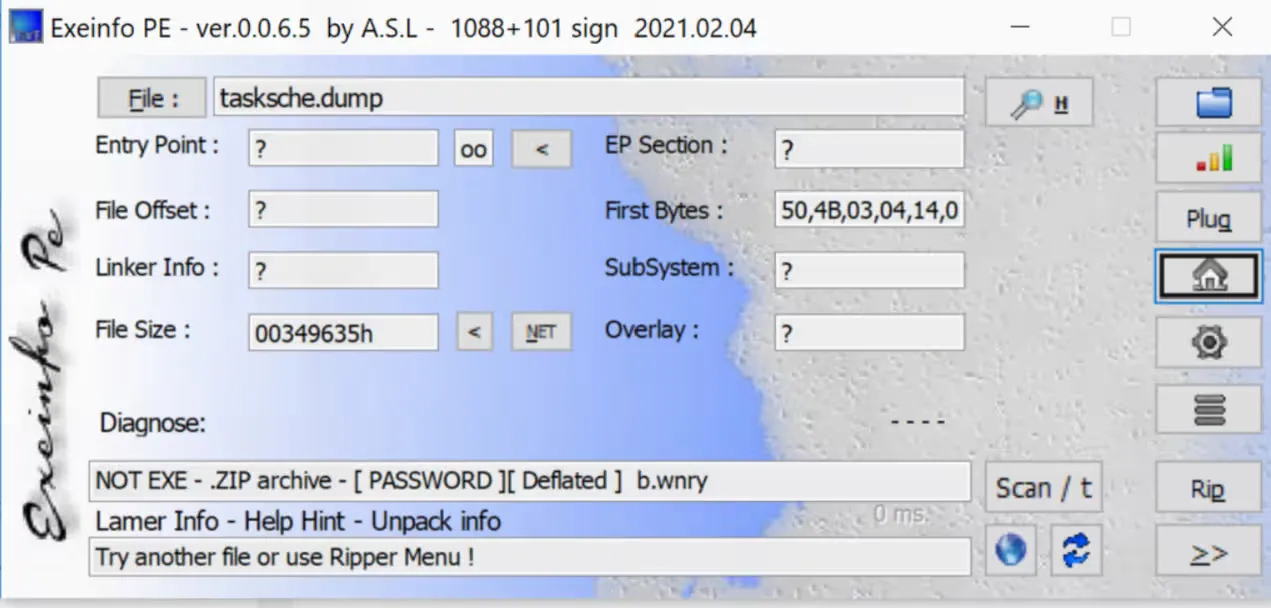
The next step is to open tasksche.exe in Ghidra and find the zip password. There is no operational value in finding this password, but it is a good learning exercise.
To find the password, the analysis starts by looking for the usual pattern of resource loading. From Window → Symbol References, search for the LoadResource function, and jump to where it is called (at 00401dde). There the usual code pattern appears:
00401dc3 CALL dword ptr [->KERNEL32.DLL::FindResourceA] ; = 0000da6c00401dc9 MOV ESI, EAX00401dcb TEST ESI, ESI00401dcd JZ LAB_00401e0700401dcf PUSH ESI ; HRSRC hResInfo for LoadResource00401dd0 PUSH dword ptr [EBP + param_1] ; HMODULE hModule for LoadResource00401dd3 CALL dword ptr [->KERNEL32.DLL::LoadResource] ; = 0000da5c00401dd9 TEST EAX, EAX00401ddb JZ LAB_00401e0700401ddd PUSH EAX ; HGLOBAL hResData for LockResource00401dde CALL dword ptr [->KERNEL32.DLL::LockResource] ; = 0000da4c00401de4 MOV EDI, EAX00401de6 TEST EDI, EDI00401de8 JZ LAB_00401e0700401dea PUSH dword ptr [EBP + param_2]00401ded PUSH ESI ; HRSRC hResInfo for SizeofResource00401dee PUSH dword ptr [EBP + param_1] ; HMODULE hModule for SizeofResource00401df1 CALL dword ptr [->KERNEL32.DLL::SizeofResource] ; = 0000da3aAfter that there are a few calls to other functions. There are two options:
- look for how this function has been called (by examining the caller function and what it is doing)
- look at each of the calls made inside this function
To decide, Window → Function Call Graph is used on the current function, which is renamed load_resources for easier tracking. All the functions it calls (and those they call) are expanded to see how deep the call stack goes. It is quite extensive, so it is more efficient to first see how load_resources itself is called.
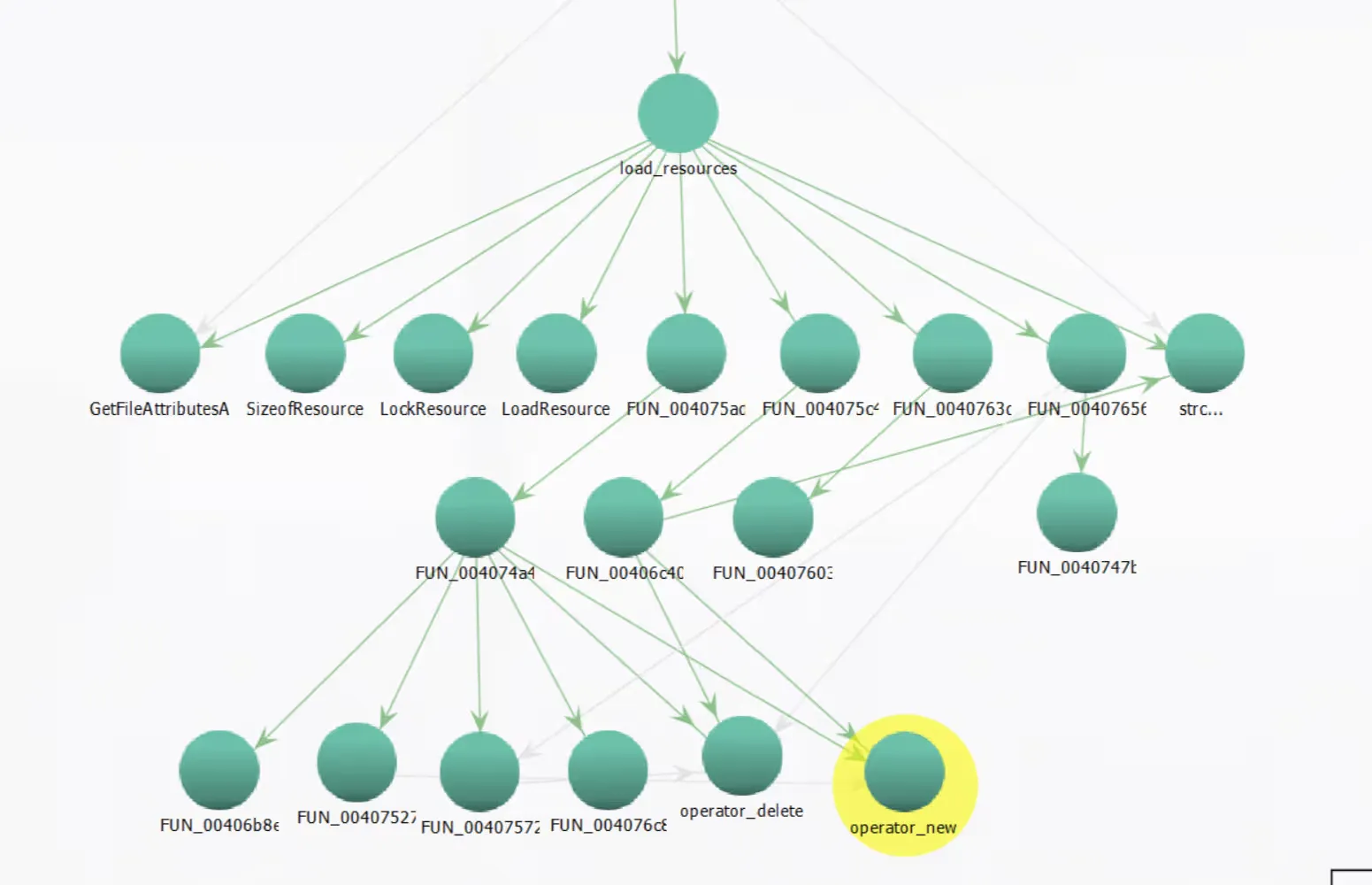
Using Window → Function Call Tree, the analysis moves back to the function that called load_resources. The code that precedes the call is:
004020c8 MOV dword ptr [ESP]=>local_6f8, s_WNcry@2ol7_0040f ; = "WNcry@2ol7"004020cf PUSH EBX004020d0 CALL load_resources ; undefined load_resources(undefined4 param_1, ; undefined4 param_2)The MOV moves the value WNcry@2ol7 to the top of the stack, and EBX is then pushed on the stack. The function is then called with these two arguments. The string WNcry@2ol7 strongly resembles a password; trying it on the protected archive confirms that it works.