Remote Access Trojan
VenomRAT - ClientAny.exe
- Author
- Moise Medici
- Updated
- 15 Nov 2025 · Completed
- Difficulty
- Easy
- Platform
- Family
- Languages
- MITRE
Code Analysis
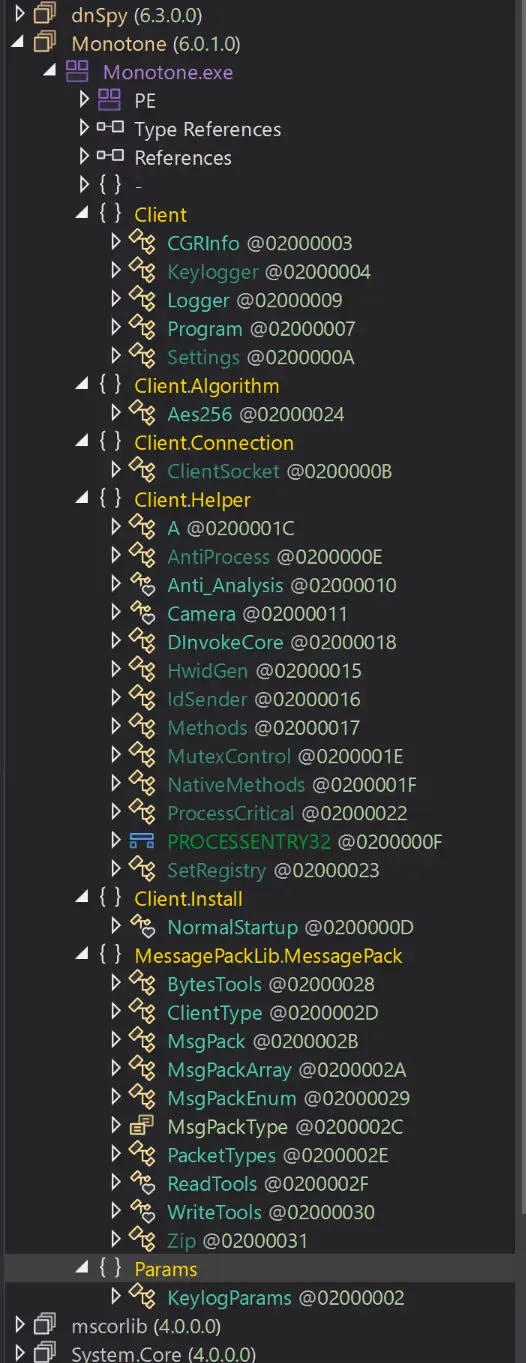
Opening the file with dnSpy shows something similar to the screenshot below:
The next step is to understand where to begin the analysis. This can be approached in 3 ways:
- Find the
Mainentrypoint, which is the first part of the code that is executed by the executable, and understand the execution paths; - Find some classes that seem like good starting points; for example, in this case
Client.Install,Client.SettingsorClient.Algorithmsare good starting points. The reasons they are good are different:Client.Installis a generic action that the malware is going to perform and gives good insight on the persistence mechanisms it will use, however it has dependencies with a lot of other parts of the code, so it might be difficult to understand at first.Client.SettingsandClient.Algorithmshave very small dependencies (number of imports of code from other parts of the exe); - If there is already an idea of what to look for, it is possible to go directly to the function that is likely performing that action, for example the keylogging in
Client.Keylogger.
To find the Main class, the search functionality in dnSpy can be used. Click the magnifier at the top, select “Monotone” on the left side and then, in the Search bar that opened at the bottom of the screen, change the scope of the search to “Files in same folder”. Since “Monotone” was selected, the search will only be performed on this folder.
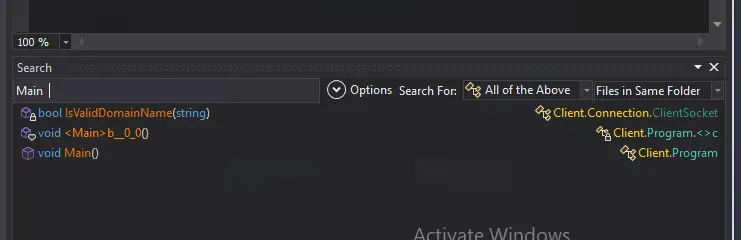
The Main entry appears in Client.Program. Double clicking on it brings the view directly to that part of the program.
The reason for starting from Client.Program and not something else is that, after a brief look, it does not seem to be heavily obfuscated, and a lot of details can already be understood from a first read. While going through the code, it becomes clearer what might be useful to investigate next.