Mutex
- Author
- Moise Medici
- Updated
- 23 Jan 2026 · Completed
Mutex creation
A mutex is usually created during infection, and the object is automatically deleted as soon as no processes have a handle to it. If a sample keeps running in the background indefinitely, the mutex will continue to exist until the process is terminated or the system is rebooted. Malware might also keep the mutex alive by creating a handle to it from another process or from a newly created service. For example, during infection, it creates a new mutex and a Windows service. Once the service starts, it retains a handle to the mutex.
The malware typically starts by checking for a mutex with a specific name and then creates it if it is not present.
Note that the presence of a mutex in a program does not by itself make the program malicious; legitimate software uses them routinely.
The following code is used to demonstrate the mutex creation:
#include <windows.h>#include <stdio.h>
#define RET_SUCCESS 0
int main() { HANDLE hMutex = NULL; for (int i = 1; i <= 2; i++) { hMutex = CreateMutexA(NULL, FALSE, "LearnMutex"); printf("Execution number %d\n", i); if (GetLastError() == ERROR_ALREADY_EXISTS) { printf("\tCannot create mutex\nerror: %lu \n", GetLastError()); } else { printf("\tCreated new mutex\n\n"); } } printf("Press enter to exit\n"); getchar(); return RET_SUCCESS;}Specifically, the code creates a new LearnMutex mutex. If the mutex is created, it prints: Created new mutex; otherwise, it prints an error message.
The mutex creation is done via the CreateMutex Windows API, which accepts the arguments below, as specified in the Microsoft documentation 1.
HANDLE CreateMutexA( [in, optional] LPSECURITY_ATTRIBUTES lpMutexAttributes, [in] BOOL bInitialOwner, [in, optional] LPCSTR lpName);The first two arguments are not of interest in this particular scenario, since lpMutexAttributes 2 is used to define which permissions are required on the mutex: for example, to delete a resource. The second argument determines if the process that creates the mutex is assigned as the owner of the mutex.
The lpName parameter is the relevant one here, and it is set to LearnMutex.
The last couple of lines of code are only there to allow the mutex to be located in Windows before it is deleted when the process is killed. When the code is run from a Windows terminal, it prints the following:
Execution number 1 Created new mutex
Execution number 2 Cannot create mutex error: 183
Press enter to exitAt this stage, System Informer can be used to inspect the mutex: in File handles and DLLs → filtering for “Mutant” and searching for “LearnMutex” shows two mutants, as in the screenshot below:
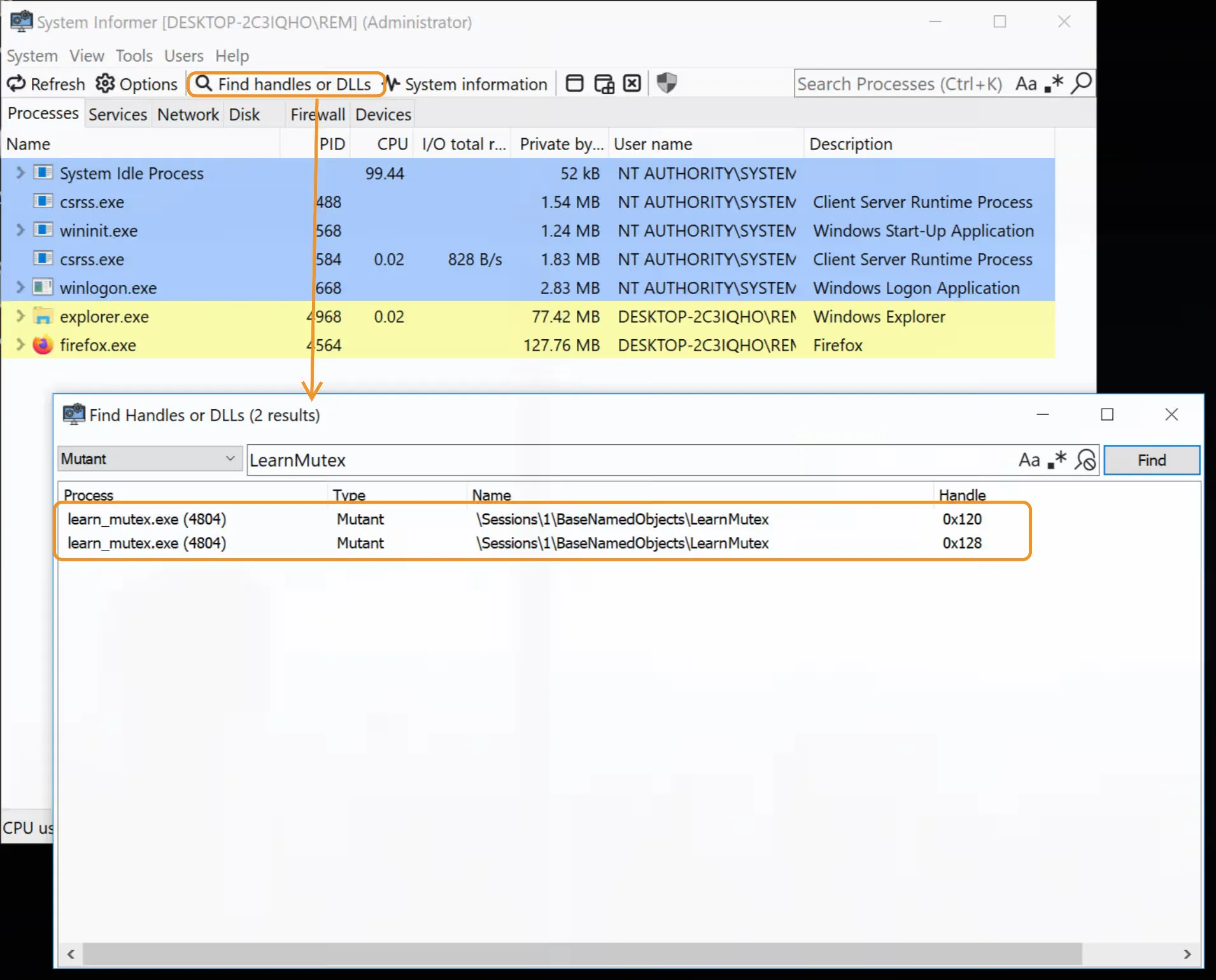
There are two handles, since CreateMutex has been executed twice; however, there is only one mutant, as seen from the “Name” column that points to the same file. This behavior makes sense, since the point of the mutex is to have multiple handles, one per thread, to a single object which can be acquired once at a time by each thread. This single underlying object with multiple handles matches the expected behavior of a synchronization primitive. If the for loop upper limit is changed from 2 to 10, 10 handles appear.