Load Resources
- Author
- Moise Medici
- Updated
- 22 Jan 2026 · Completed
Create and embed a resource
Embedding a resource in an executable is straightforward. The following components are needed:
- A
.exeto “take” the embedded file - A file to embed in the
.exe - A
.rcfile to “describe” the resource. An example will be presented shortly; for more details on.rcfiles, see 1
For this demo, a file called calc.ico is used, which is the output of:
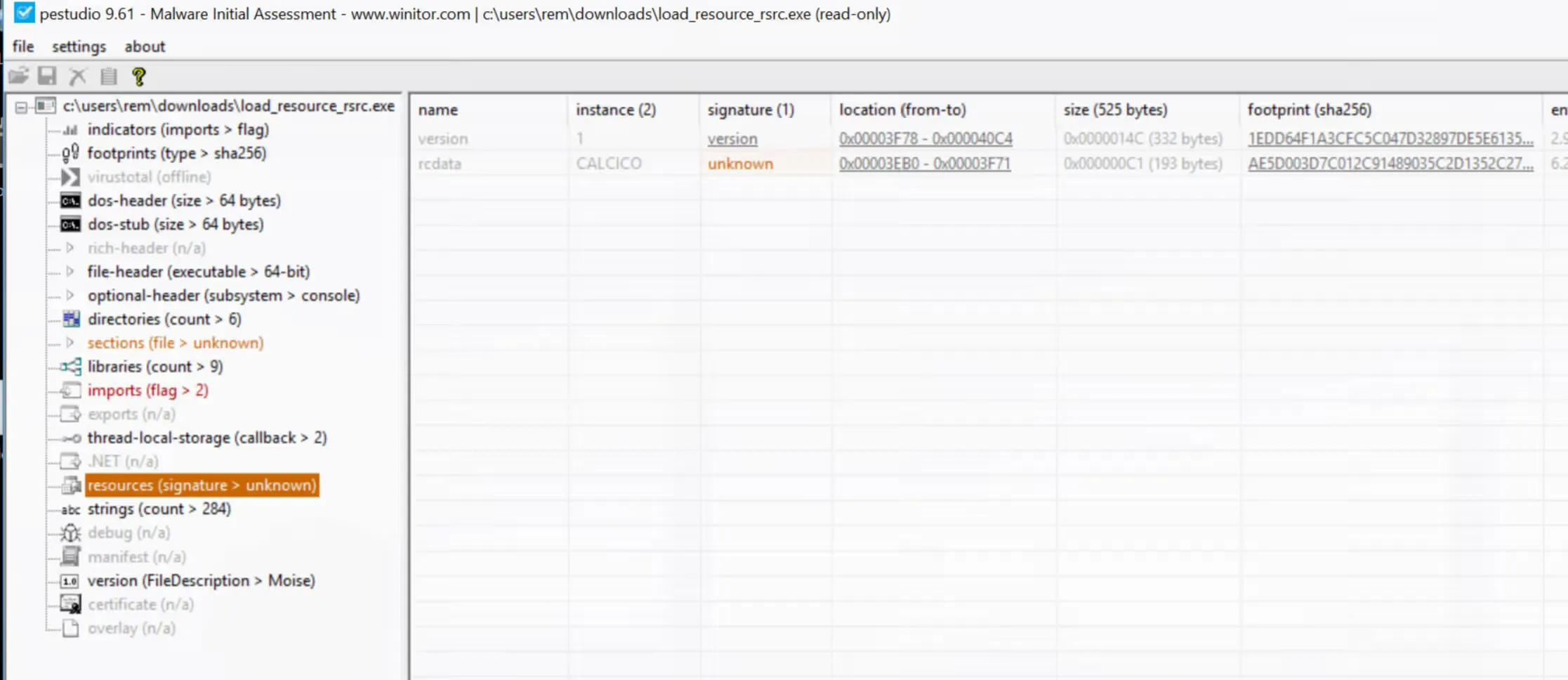
msfvenom --payload windows/exec CMD=calc.exe -f raw -o calc.ico`The .rc file is a simple description of the resource file, where the version, the name of the product, and the language are defined:
#include <windows.h>
CALCICO RCDATA "calc.ico"
VS_VERSION_INFO VERSIONINFOFILEVERSION 1,0,0,0PRODUCTVERSION 1,0,0,0BEGIN BLOCK "StringFileInfo" BEGIN BLOCK "040904B0" BEGIN VALUE "FileDescription", "Moise" VALUE "ProductName", "ProductMoise" END END BLOCK "VarFileInfo" BEGIN VALUE "Translation", 0x0409, 1200 ENDENDThese two files and the first payload are then bundled together during compilation. The result is a single .exe, which contains the resource and the logic to extract it.
Before examining the code of the resource extraction logic, it is useful to open the resulting .exe file in pestudio and observe the resource in the “resources” section. From there, the resource can be saved locally by right-clicking on it → instance → dump to file.