Load Library
- Author
- Moise Medici
- Updated
- 22 Nov 2025 · Completed
Standard Windows API Import
Code and executables download: From GitHub
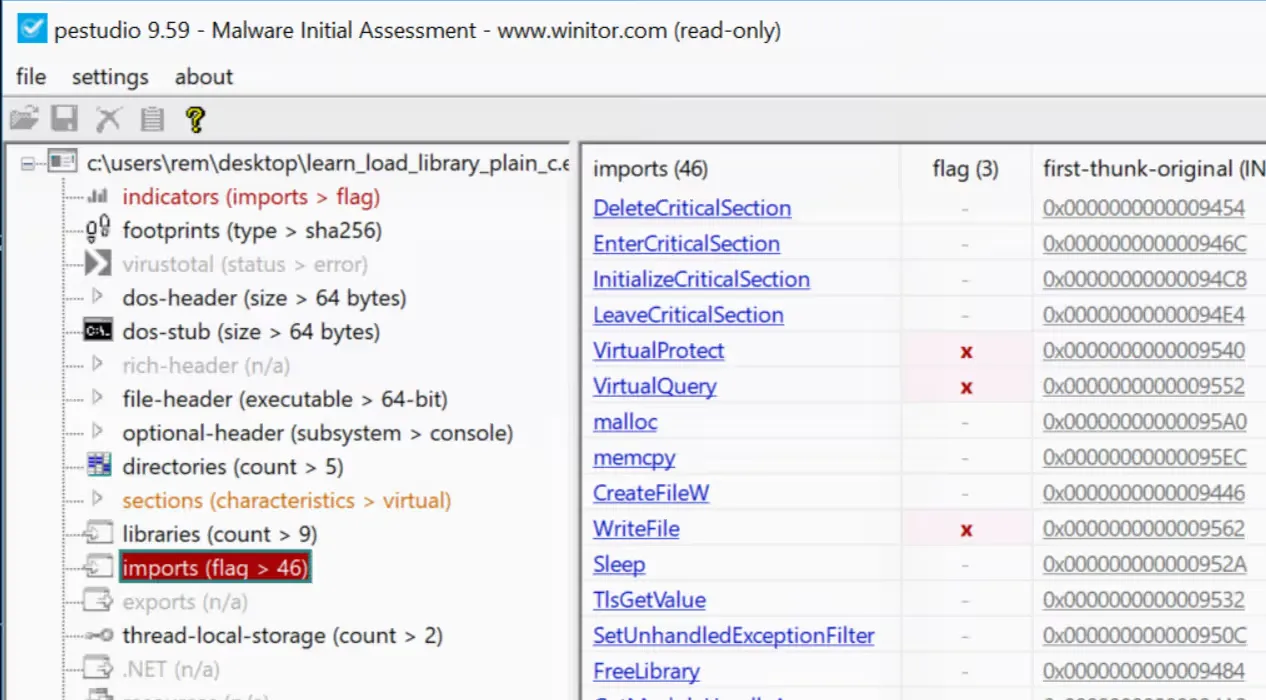
The standard approach to use a Windows functionality is to simply import the function and use it. However, this is easily recognized by tools like pestudio during analysis.
#include <stdio.h>#include <windows.h>
#define RET_SUCCESS 0#define RET_ERROR -1
int main( void) { LPCWSTR fileName = L"example.txt"; const char* text = "content of the file";
DWORD bytesWritten = 0; HANDLE handle = CreateFileW(fileName, GENERIC_WRITE, 0, NULL, CREATE_ALWAYS, FILE_ATTRIBUTE_NORMAL, NULL);
if (handle == INVALID_HANDLE_VALUE) { printf("Cannot create file, error %lu\n", GetLastError()); return RET_ERROR; }
BOOL ok = WriteFile(handle, text, (DWORD)strlen(text), &bytesWritten, NULL);
if (!ok) { printf("Cannot write file, error %lu\n", GetLastError()); CloseHandle(handle); return RET_ERROR; }
CloseHandle(handle); return RET_SUCCESS;}Opening either executable from the above code snippets shows the WriteFile function being imported.