Load Library
Code and executables download: From GitHub
Standard Windows API Import
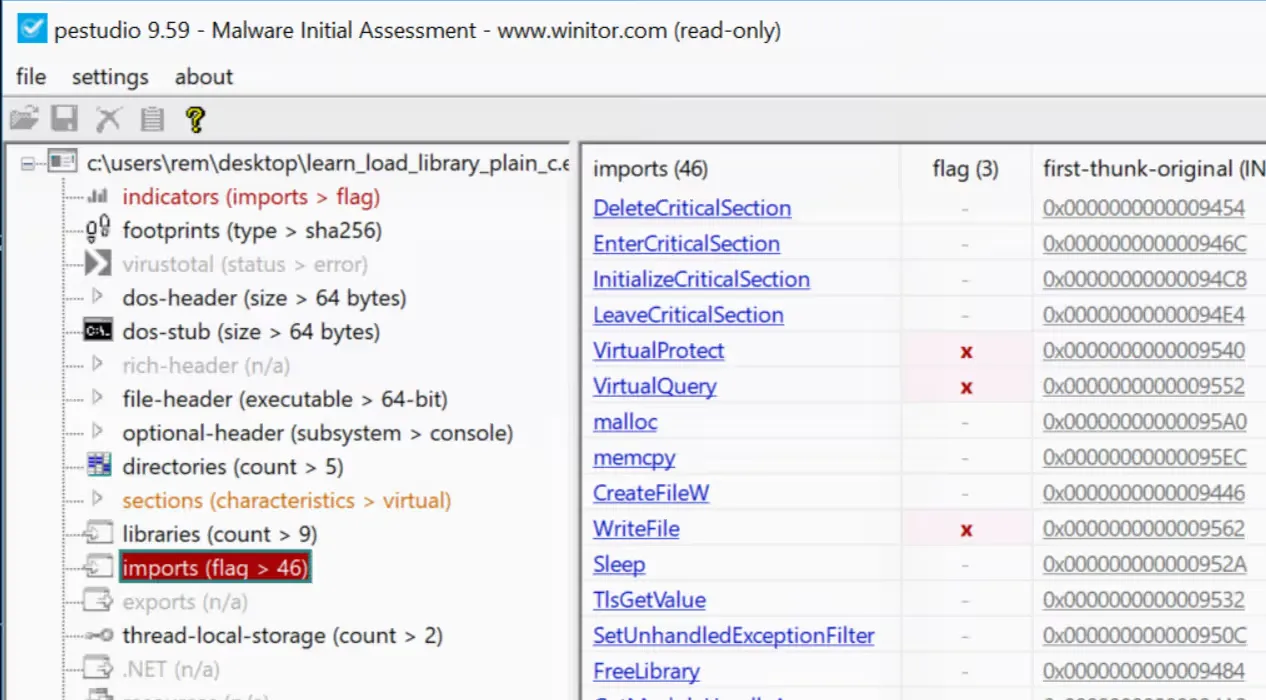
The standard approach to use a Windows functionality is to simply import the function and use it. However, this is easily recognized by tools like pestudio during analysis.
#include <stdio.h>#include <windows.h>
#define RET_SUCCESS 0#define RET_ERROR -1
int main( void) { LPCWSTR fileName = L"example.txt"; const char* text = "content of the file";
DWORD bytesWritten = 0; HANDLE handle = CreateFileW(fileName, GENERIC_WRITE, 0, NULL, CREATE_ALWAYS, FILE_ATTRIBUTE_NORMAL, NULL);
if (handle == INVALID_HANDLE_VALUE) { printf("Cannot create file, error %lu\n", GetLastError()); return RET_ERROR; }
BOOL ok = WriteFile(handle, text, (DWORD)strlen(text), &bytesWritten, NULL);
if (!ok) { printf("Cannot write file, error %lu\n", GetLastError()); CloseHandle(handle); return RET_ERROR; }
CloseHandle(handle); return RET_SUCCESS;}Opening either executable from the above code snippets shows the WriteFile function being imported.
Dynamic Import of Windows API
In cases where this capability needs to be less obvious during analysis, one option is to use LoadLibrary 3 to import KERNEL32.dll and, from there, import the CreateFile and WriteFile functions.
#include <stdio.h>#include <windows.h>
#define RET_SUCCESS 0#define RET_ERROR -1
typedef HANDLE(WINAPI* fnCreateFileA)( LPCSTR lpFileName, DWORD dwDesiredAccess, DWORD dwShareMode, LPSECURITY_ATTRIBUTES lpSecurityAttributes, DWORD dwCreationDisposition, DWORD dwFlagsAndAttributes, HANDLE hTemplateFile);
typedef int(WINAPI* fnWriteFile)( HANDLE hFile, LPCVOID lpBuffer, DWORD nNumberOfBytesToWrite, LPDWORD lpNumberOfBytesWritten, LPOVERLAPPED lpOverlapped);
int main() { const char* dllName = "KERNEL32.dll"; const char* fileName = "example.txt"; const char* text = "content of the file"; DWORD bytesWritten = 0;
HMODULE hModule = GetModuleHandleA(dllName);
if (hModule == NULL) { hModule = LoadLibraryA(dllName); }
PVOID pCreateFile = GetProcAddress(hModule, "CreateFileA");
fnCreateFileA CreateFileFunc = (fnCreateFileA)pCreateFile; HANDLE hFile = CreateFileFunc( fileName, GENERIC_WRITE, 0, NULL, CREATE_ALWAYS, FILE_ATTRIBUTE_NORMAL, NULL );
if (hFile == NULL) { printf("Cannot create file, error %lu\n", GetLastError()); return RET_ERROR; }
PVOID pWriteFile = GetProcAddress(hModule, "WriteFile"); fnWriteFile WriteFileFunc = (fnWriteFile)pWriteFile; BOOL ok = WriteFile(hFile, text, (DWORD)strlen(text), &bytesWritten, NULL); if (!ok) { printf("Cannot write file, error %lu\n", GetLastError()); CloseHandle(hFile); return RET_ERROR; }
CloseHandle(hFile); return RET_SUCCESS;}As highlighted in the code, there are three stages:
- Load the
KERNEL32.dlllibrary in the current process - Load the address of the procedure
CreateFileA - Execute the procedure from that address
Note that LoadLibrary is preceded by a call to GetModuleHandleA 4, which achieves the same effect as LoadLibrary. However, GetModuleHandleA will return the address of KERNEL32.dll if it has already been loaded in the current process, while LoadLibrary will load it if the previous call fails (i.e., the library was not used by the process and hence not loaded).
Once KERNEL32.dll is loaded, the address of the procedure CreateFileA is retrieved via GetProcAddress, and the function is executed via its address. Note that Proc in GetProcAddress refers to a “procedure”, not a “process”, and a “procedure” is a function like CreateFileA 5.
Examining the executable in pestudio shows that the create and write file functions do not appear in the imports, while LoadLibrary does.
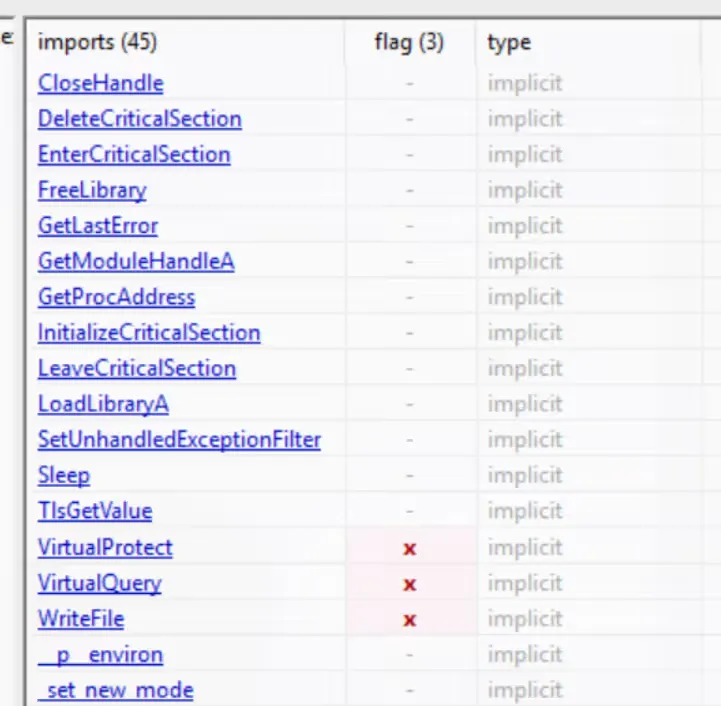
To analyze a sample that uses LoadLibrary, a common starting point is to open the sample with Ghidra, observe which library is loaded via LoadLibrary, and determine which functions are loaded via GetProcAddress. If the DLL name is obfuscated, executing the sample in a debugger with a breakpoint just before the execution of LoadLibrary can help reveal the deobfuscated string in memory.